
Real Estate Lead Conversion: A Step-by-Step Guide
Discover proven strategies for real estate lead conversion that turn prospects into loyal clients and boost your sales in 2026.

 Reviewed by Nikita Podelenko, Founder & Engineer of SkipCalls
Table of contents
- Why Most Real Estate Leads Never Become Clients
- Understanding Conversion Benchmarks by Lead Source
- Winning the First Five Minutes With Speed to Lead
- Qualifying Faster Without Losing Good Leads
- Follow Up Cadences Scripts and Staging That Keep Leads Warm
- Tools and Workflows That Improve Conversion Without Extra Staff
A new inquiry arrives while you're showing a property. You notice it later, call once, leave a voicemail, and move on to the next appointment. By the time you remember the lead, the buyer has already spoken with another agent, or the seller has stopped thinking about a move altogether.
That pattern gets blamed on poor lead quality, but the leak usually sits inside the workflow. Real estate lead conversion is primarily a speed, qualification, and persistence problem, not a contest to purchase the largest number of leads. The agents and teams that convert consistently build a system that responds immediately, identifies intent quickly, and keeps useful contact going after the first conversation.
Why Most Real Estate Leads Never Become Clients
A buyer submits an inquiry between meetings, then returns to work. A seller requests a valuation while comparing agents. If the first response comes hours later, the prospect may already be speaking with someone else. The missed opportunity is often created before the agent says a word. Real estate lead conversion is primarily a speed, qualification, and persistence problem, not a contest to buy the highest volume of leads.
The same leak appears after an unanswered call. One voicemail is left, the CRM stays unchanged, and the lead is labeled “not interested.” That is abandonment presented as prioritization. Industry summaries report internet leads converting at only 0.4% to 1.2% in many benchmarks, or roughly 1 to 2 closings per 200 raw leads. They also note that leads may take 6 to 24 months to convert and often need 8 to 12 touches before becoming ready for a transaction (real estate lead conversion benchmarks by source).
The first failure is usually operational
Before rewriting a script, answer three operating questions:
- Who receives the lead: Every inquiry needs a named owner. A shared inbox is not ownership if everyone assumes someone else is watching it.
- How fast the first touch happens: The system should trigger a text, call alert, or routing action as soon as the inquiry arrives.
- What happens after silence: No answer should place the lead into a planned sequence, with each attempt and outcome recorded.
Reviewing practical tips for real estate agents can help identify preventable gaps in daily operations. The goal is not to automate every human interaction. It is to keep a promising conversation from ending because the assigned agent is driving, showing a property, or handling another client.
Practical rule: A lead is not “worked” after one attempted call. It is worked when the team completes the defined first-touch and follow-up sequence, records the outcome, and assigns the next action.
Conversion is decided before the script matters
Scripts help agents stay prepared, but they cannot repair a delayed response or an absent next step. A warm referral may accept a slower reply because trust already exists. A cold portal inquiry usually requires faster action and clearer qualification. Applying one process to both sources leaves high-intent prospects underserved while too much time goes to low-intent traffic.
Start with the operational evidence. Measure the interval from submission to first attempted contact, separate results by lead source, and audit the number of touches each lead receives. Then fix the specific leak. Poor contact rates point to routing. Conversations without appointments point to qualification. Appointments without transactions require a review of expectations, financing, inventory fit, and handoff quality.
More lead volume can conceal a broken funnel, but it cannot repair one. Fix the response and follow-up system attached to existing inquiries before deciding whether additional leads are needed.
Understanding Conversion Benchmarks by Lead Source
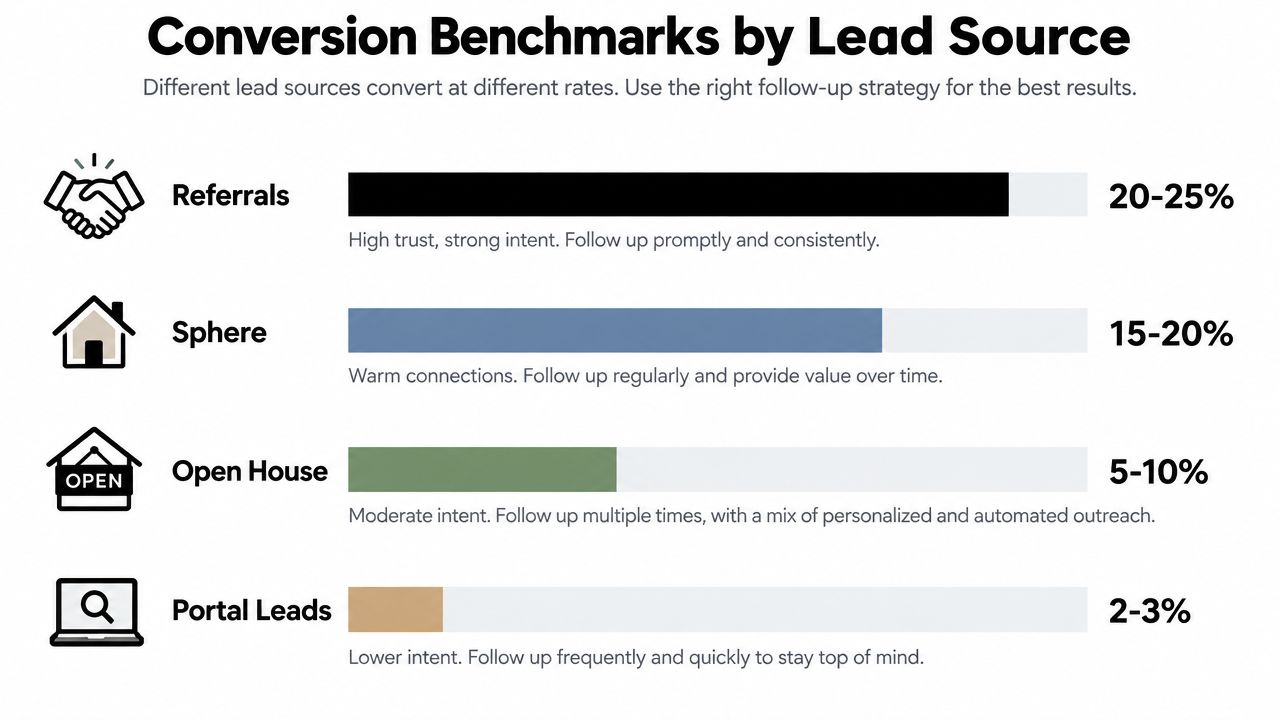
A blended conversion rate can hide an expensive problem. The broad benchmark for real estate lead-to-close conversion is 2% to 5%, or approximately 1 closing per 20 to 1 per 50 leads. Referral and sphere-of-influence leads commonly reach 15% to 25%, while portal and paid internet leads often convert at 1% to 4% (real estate conversion rate benchmark).
Those ranges guide decisions, not quotas for every channel. A referral usually arrives with context and borrowed trust. A paid internet lead may have submitted information while browsing, leaving the agent with little knowledge of timing or motivation. Source should determine response priority, qualification depth, and nurture length. Conversion is therefore a system decision as much as a script decision.
Use source-level numbers, not a vanity average
Calculate conversion separately for each source over a 12-month window. Divide closed transactions attributed to that source by the total leads generated by the same source. The longer window accounts for leads that remain in nurture for many months before closing.
A useful source review asks four operational questions:
- Which sources produce conversations: Compare contact rates and the quality of those conversations.
- Which sources produce appointments: A channel with many contacts but few appointments may need a different offer or qualification path.
- Which sources produce closings: Attribute transactions consistently across referrals, repeat business, portals, paid ads, open houses, and organic inquiries.
- Which sources justify fast routing: Give the quickest human response to channels where intent and expected value support it.
Raw lead volume can mislead staffing and acquisition decisions. At a 2% conversion rate, about 50 leads are needed per closing, while at 5%, about 20 leads are needed per closing (conversion benchmark methodology). That gap changes how many inquiries one agent can handle and how much follow-up a channel deserves. More leads will not fix weak qualification or poorly timed touchpoints.
Keep qualification data clean
Source reporting works only when contact records are reliable. Standardize source names, preserve the original campaign, remove duplicates, and record whether each lead is a buyer, seller, investor, renter, or unknown. Contact hygiene also affects alerts and nurture emails. A resource such as BillionVerify's Email Verification Benchmark can help teams assess contact-data quality before relying on it operationally.
Review source performance alongside response timing and stage progression. A channel with fewer leads and stronger intent may deserve more human attention than a high-volume channel producing mostly unqualified inquiries. That comparison shows where speed, qualification, or staged follow-up will improve closings, instead of treating volume as the solution.
Winning the First Five Minutes With Speed to Lead
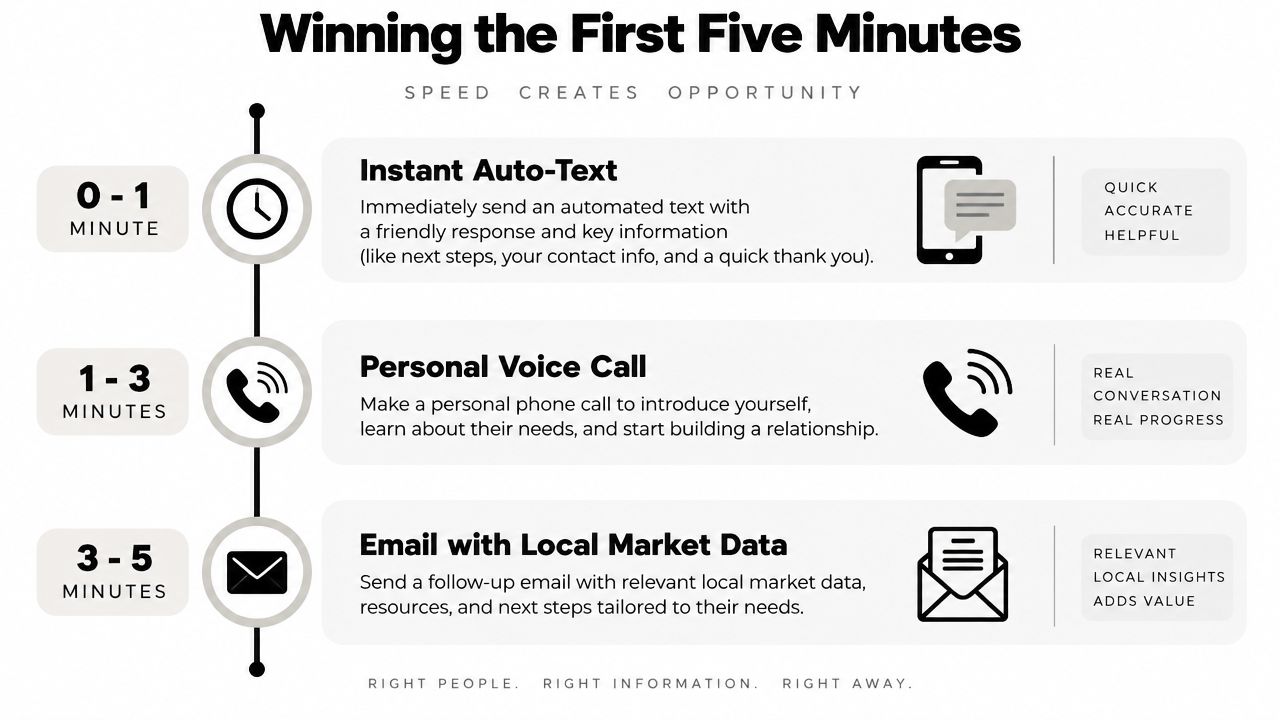
The first five minutes need a written workflow. “Respond quickly” isn't a process because it doesn't tell anyone what happens at minute one, minute three, or after an unanswered call.
One independent benchmark reports that leads contacted within 5 minutes are up to 21 times more likely to enter the sales process, while a next-day response can reduce conversion likelihood by over 90% (speed-to-lead study). The same source reports a response index of 1x under 5 minutes, 0.6x at 5 to 15 minutes, 0.4x at 15 to 30 minutes, 0.2x at 30 to 60 minutes, 0.05x at 1 to 24 hours, and 0.01x after 24 hours. The important operational lesson is that delay hurts most at the beginning, not only after a full day.
Build the first-hour sequence
At 0 to 1 minute, capture the inquiry in the CRM and send an immediate acknowledgment. The message should identify you, confirm the request, and make the next action easy:
“Hi [Name], this is [Agent] with [Brokerage]. I saw your inquiry about [property or area]. I'm reviewing the details now and will call shortly. Is this the best number for you?”
At 1 to 3 minutes, make a personal call. Reference the property, neighborhood, or request that triggered the inquiry. Ask one useful question instead of delivering a long pitch: “What caught your attention about this home?” If the prospect doesn't answer, leave a concise voicemail and send a text that repeats the reason for contacting them.
At 3 to 5 minutes, send a short email with relevant information, such as property details, comparable options, or a local market resource. Don't dump a generic newsletter into the inbox. Connect the message to the lead's stated action.
Create a handoff for busy periods
If you can't answer, the system should notify the next available person, preserve the lead's source and context, and create a callback task. Batching callbacks until the end of the day is convenient for the agent but expensive for the pipeline. A live handoff is preferable when the inquiry shows strong intent, while automation can acknowledge, collect basic details, and offer a calendar link when no human is available.
Track two timestamps: lead received and first attempted contact. Review the median and the slowest responses by source. You don't need a complicated dashboard. A CRM report and a weekly audit can reveal whether the team is responding in minutes or allowing inquiries to age.
For teams considering automated voice support, this overview of an AI voice agent for real estate provides a relevant workflow reference. The technology should handle the first operational step, not replace judgment when a buyer or seller needs a real conversation.
Qualifying Faster Without Losing Good Leads
Fast contact only creates an opportunity. Qualification determines whether you spend the next hour arranging an unsuitable showing or reserve that time for a prospect with a workable plan.

Start with a conversational framework, not an interrogation. You need to understand timeline, motivation, area, property needs, financing position, and next action. You don't need every answer before offering help, and you shouldn't force a qualified lead through a long form when the person is ready to speak.
Ask questions that change the next step
A practical opening sounds like this:
“Thanks for reaching out about the home in [area]. What interested you most, and are you hoping to move soon or still researching?”
The answer tells you how to proceed. A buyer with a clear timeline and financing plan may need a consultation and showing options. Someone browsing without a defined timeline may benefit from alerts and a lighter nurture track. A seller who wants a valuation but has no immediate plans can still be valuable, provided the CRM records the context accurately.
Use questions such as:
- “What would make a move worthwhile for you?” This exposes motivation instead of collecting surface preferences.
- “Which locations are workable?” A narrow area may require local inventory expertise, while flexibility could open more options.
- “Have you spoken with a lender or reviewed your financing?” Ask respectfully and avoid presenting financing guidance beyond your role.
- “What would you like to happen after this conversation?” The answer gives you permission for a showing, consultation, information email, or future check-in.
A simple tag structure is more useful than a complicated score. Label leads Ready, Nurture, Unclear, or Disqualified, then add a short reason such as “ready to tour,” “moving later,” “outside service area,” or “already represented.” A scoring model can help a team prioritize, but the written reason prevents an arbitrary number from replacing judgment.
Let the conversation sound human
A cold portal lead might say, “I'm just looking.” Don't argue. Respond with, “That makes sense. Which areas and price range should I use if I send you useful options?” A referral deserves a different opening: mention who referred the person, thank them for the connection, and ask what outcome they want.
Agents lose good leads when they disqualify too aggressively. “Not ready” doesn't mean “not valuable.” Move that person to nurture, record the expected timing, and offer something relevant. Disqualify only when there is a clear mismatch, such as an area you don't serve, a fraudulent inquiry, or a request outside your business.
For further practical ideas on how to qualify your leads more efficiently, focus on reducing unnecessary questions while preserving the details that determine routing and follow-up.
Once the conversation ends, update the record immediately. The lead prioritization workflow should tell the next team member what happened, what the prospect wants, and exactly when the next touch is due.
Follow Up Cadences Scripts and Staging That Keep Leads Warm
A lead who does not reply today is not necessarily lost. The follow-up system has to account for different response windows, lead sources, and levels of intent. A portal inquiry may need quick property-specific contact, while a referral may respond better to a personal introduction. Repeating the same message wastes time. Each touch should add context, answer a likely question, or make the next step easier.
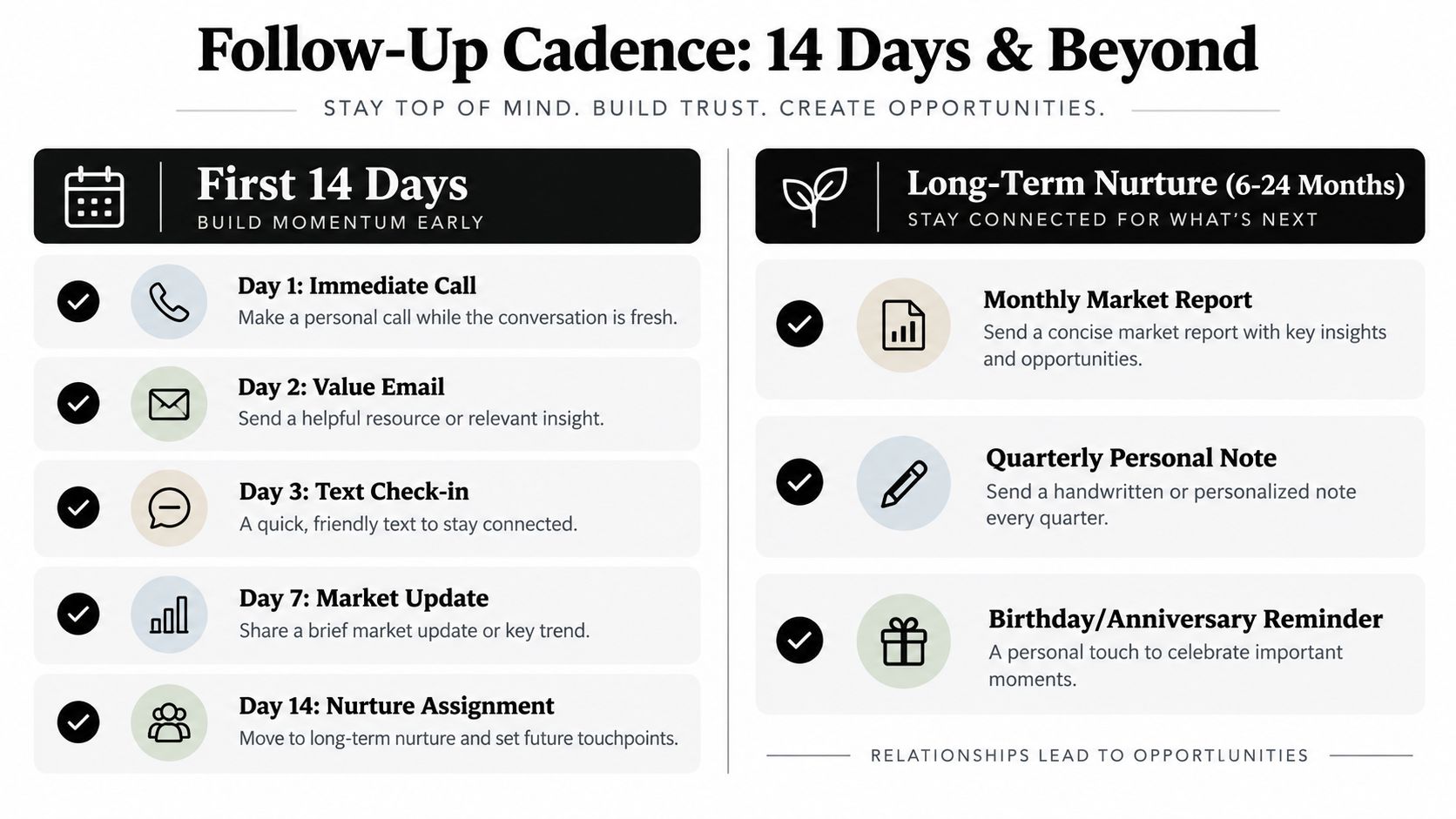
Industry guidance commonly places the buying cycle at 8 to 12 touches and 6 to 24 months, so silence in the first few days should trigger a planned stage change, not an immediate closeout. Build those touches around the lead's source and behavior rather than treating every contact as identical.
Give the first 14 days a job
The opening sequence should be active, varied, and simple enough to run during a busy day:
- Day 1: Call promptly, send a text acknowledgment, and email the requested property details or information.
- Day 2: Call at a different time. Leave a voicemail that explains the reason for the call.
- Day 3: Send a short text asking about priorities, such as area, timing, or property type, instead of asking whether the lead has decided.
- Day 4 to 5: Share one relevant listing, neighborhood detail, valuation point, or financing resource within your professional boundaries.
- Day 7: Call again and refer to the original inquiry.
- Day 10: Send a brief check-in with an easy reply option.
- Day 14: If there has been no meaningful engagement, assign the lead to a nurture stage with a defined next review date.
The exact days can change by source and intent. The sequence still needs to live in the CRM. A promised follow-up should never depend on an agent remembering it after a crowded afternoon.
Use scripts as openings, not performances
For a first contact, try: “I saw your request about [property or area]. What are you hoping to find that you have not found yet?” For a missed-call recovery, use: “I tried you about [request]. I can send the details by text, or we can talk when it suits you. Which is easier?”
Appointment language should make the next action clear: “Based on what you have told me, a short call would help narrow the options. Would [time option] or [time option] work better?” If the lead is not ready, ask permission to send relevant updates, then record the preferred channel and timing. That information should shape the nurture plan.
Every stage needs an exit condition. “New” becomes “Contacted” after a real exchange. “Qualified” follows confirmation of the basic facts. “Appointment Set” requires a calendar commitment. “Nurture” means the timing is deferred and a future action is scheduled. Close or archive only when the lead is unavailable, chooses another agent, or requests no further communication.
Audit the sequence before adding more touches
Check the workflow for these gaps:
- No owner: Assign accountability for every new record.
- No source: Preserve the source so the team can compare quality and response patterns.
- No next task: Give every active lead a dated action.
- No context: Make scripts reference the property, area, motivation, or timeline.
- No nurture stage: Give deferred decisions a defined place to remain active.
- Duplicate outreach: Align phone, CRM, and marketing tools so they do not send conflicting messages.
Persistence works when each contact is relevant, respectful, and easy to decline. It becomes counterproductive when the team repeats an empty request, ignores preferences, or keeps a lead in an active sequence after the buying window has clearly moved.
Tools and Workflows That Improve Conversion Without Extra Staff
A lean conversion system connects four functions: instant response, qualification, scheduling, and CRM follow-through. A lead form should create a record, preserve the source, trigger an acknowledgment, alert the responsible agent, and offer a clear appointment path. If those actions live in separate tools with no handoff, the team will eventually miss something.
Automate repetitive actions that protect speed. Keep human control over pricing discussions, sensitive seller situations, negotiation, agency questions, and any conversation where context matters more than a data field. Automation should create time for agents to sell, not create a maze for prospects.
Match the tool to the failure
If the problem is delayed email visibility, a Mail Tracker for Gmail solution can help agents monitor whether important messages are being engaged with and decide when a follow-up task is appropriate. If the problem is missed calls, look for a phone workflow that captures details and routes urgent conversations. If the issue is inconsistent CRM updates, prioritize an integration that writes the interaction back to the contact record.
SkipCalls is a simple-to-set-up solution that works for any case, from customer support, lead qualification, appointment booking, and many more. It handles voice and text and does not require you to change your phone number to integrate into your workflow. It has many integrations with CRM and calendars.
Use it as one component in a defined process. The receptionist can capture buyer or seller details, ask qualification questions, support appointment booking, and notify the agent when a lead needs rapid human attention. The agent still owns the relationship and the advice.
Implement the workflow this week
Start with a small operational checklist:
- Define ownership: Assign every new inquiry to a person or queue.
- Set the first-touch standard: Record received time and first attempted contact time.
- Write the acknowledgment: Prepare one text and one email for each major source.
- Create CRM stages: Use clear labels for new, contacted, qualified, appointment, nurture, and closed.
- Connect calendars: Make appointment availability visible without a long exchange.
- Review source performance: Calculate closed transactions divided by total leads for each source over a 12-month window.
- Audit exceptions: Examine missed calls, unassigned records, overdue tasks, and leads without a next action.
For CRM handoffs and data continuity, review the CRM integration guidance and confirm that captured details, transcripts, tags, and appointments reach the system your team uses. The best workflow isn't the one with the most automation. It's the one that keeps a real person informed at the moment that person's judgment matters.
SkipCalls handles voice and text, supports lead qualification and appointment booking, and can connect with CRM and calendar workflows without requiring a new phone number. Visit SkipCalls to see whether it can cover your missed-call and first-response gaps before you spend more on lead volume.


