

Answering Service for Contractors: The 2026 Guide
Discover how an answering service for contractors can improve customer communication, reduce missed calls, and boost your business in 2026.
You're halfway through a boiler-room replacement when the phone starts ringing. Your hands are wet, the customer is waiting, and the call goes to voicemail. By the time you can call back, the homeowner has already spoken with another plumber who answered immediately.
That's the operating problem behind an answering service for contractors. You're paid to diagnose faults, install equipment, climb roofs, and finish jobs. You can't consistently do that while acting as receptionist, dispatcher, estimator, and emergency coordinator. The right phone system doesn't replace your judgment. It protects your attention while making sure valuable calls reach the right next step.
Why Contractors Miss Calls and What It Costs
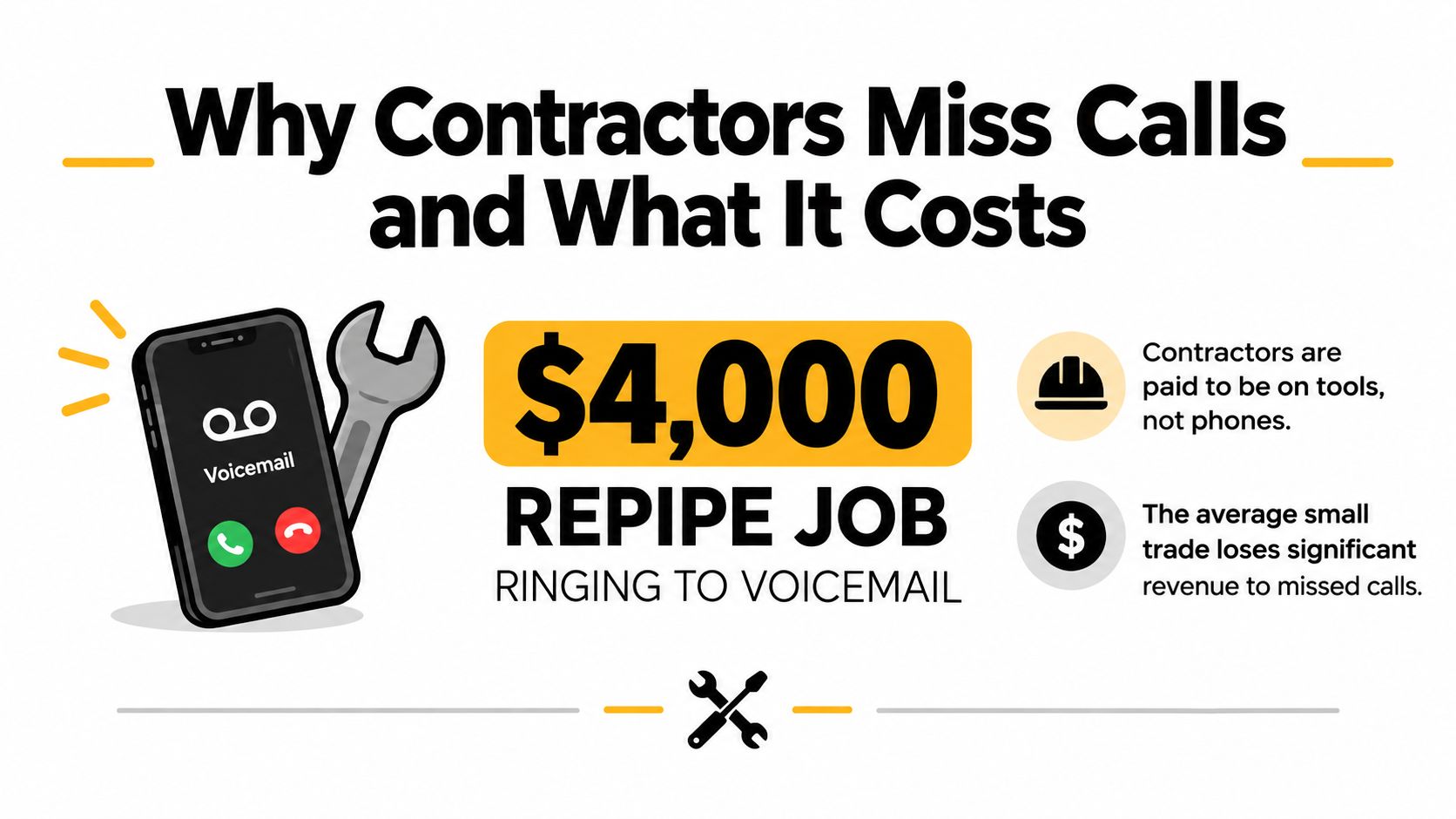
A plumbing contractor may be under a sink when a homeowner calls about a repipe estimate. The opportunity is worth $4,000 in this hypothetical job scenario, but answering could put the work or the technician at risk. The caller reaches voicemail, searches for another company, and hires whoever responds first.
That pattern is common in home services. A 2025 benchmark covering 1.1 million leads found that home services businesses missed 14% of inbound calls, compared with 32% in healthcare, 28% in legal, and 9% in real estate. The same home services missed-call analysis cites a 2016 study of 85 small businesses across 58 industries, which found that only 37.8% of calls were answered by a live person, 37.8% went to voicemail, and 24.3% received no response at all.
The expensive calls arrive at inconvenient times
HVAC and plumbing demand does not follow office hours. The contractor missed-call analysis from CallBird found that 35% to 45% of calls in HVAC and plumbing arrive outside standard business hours, with after-hours pickup rates below 18% in some datasets. Those calls often involve a failed furnace, blocked drain, or active leak, so response speed directly affects whether the lead stays available.
The cost continues after the missed ring. The same CallBird analysis reports that 67% of callers had booked with a competitor by the time a delayed callback happened, while 78% wouldn't leave a voicemail and moved on immediately. A contractor does not need to recover every call to justify better coverage. The priority is protecting urgent, high-intent calls from competitors that answer first.
Emergency triage matters more than treating every caller alike. A burst pipe, no-heat call, and routine estimate need different questions, escalation rules, and response times. Job qualification matters too. The intake process should capture enough trade-specific detail for the office or field team to decide whether to dispatch, schedule, quote, or decline.
Practical rule: If the phone is part of your sales process, voicemail is not a complete intake system.
An answering service provides the first response, identifies the job, separates emergencies from routine requests, and sends usable information to the right person. For a small contractor, an AI receptionist can often handle this structured intake more consistently and economically than a traditional call center, provided its rules reflect the company's service area, trade, and emergency policy. That keeps the crew working without turning every ring into a forgotten callback.
What an Answering Service for Contractors Actually Does
An answering service for contractors is a virtual front office attached to your business line. It answers calls, asks the questions your trade requires, records the service address and job details, then books, dispatches, transfers, or routes the request according to your rules.
Think of it as an office manager who never has to climb down from a roof to take a break. A good service gives that office manager access to your service area, emergency policy, calendar, pricing boundaries, and escalation contacts. A weak one just says hello, follows a generic script, and sends you a message that reads, "Customer needs a plumber."
The difference is job knowledge
A generic call center can take a name and number. A contractor-focused service should understand why a slab leak, a roof tarp request, and a standard maintenance visit require different handling.
For plumbing, intake may include the fixture involved, visible water damage, shutoff status, and whether the customer has a septic system. HVAC calls may need the equipment type, whether the system is producing heat or cooling, and whether the property is occupied. Roofing calls can require questions about active leaking, storm damage, roof access, and temporary protection.
The system should then follow a clear path:
- Answer and identify the caller's need.
- Confirm service-area eligibility and property details.
- Classify urgency and job type.
- Book a suitable appointment or alert the assigned person.
- Save the interaction where the office can act on it.
That last step separates useful intake from message taking. If the dispatcher has to call back to discover the address, job category, urgency, and preferred time, the service has only moved the interruption. Contractors comparing front-office support with external appointment-setting teams can also review this resource on the best place to hire appointment setters from LatHire.
A modern system can sit over the phone setup you already use. Businesses can generally keep their existing number by forwarding calls, and AI receptionists can connect through call forwarding or SIP-based integrations, as described by RingCentral's AI receptionist documentation. That matters because changing the number printed on trucks, vans, yard signs, and Google Business Profile listings creates needless friction.
Must-Have Features for a Contractor Answering Service
Don't buy phone coverage based on whether the receptionist sounds pleasant. Judge it by what happens after the call is answered. The system must protect emergency response, improve job qualification, and put a clean record into the workflow your dispatcher already uses.
A true 24/7 answering option is the foundation for emergency trades. The contractor call-handling analysis from PushLeads reports that one 2026 audit found contractors missed 38% of inbound calls overall, with missed-call rates rising to 84% after 5 p.m. and on weekends. Whether your own rate is lower or higher, the operational lesson is direct: coverage has to include the periods when technicians are unavailable.
Build the intake around the trade
A trade-aware script should ask questions that change the next action. For example:
- Is the water heater gas or electric?
- Is the roof leak active right now?
- Is water reaching electrical equipment?
- What city and ZIP code is the property in?
- Does the caller need emergency service, an estimate, maintenance, or a follow-up?
- Can the customer meet a technician during the available service window?
The service also needs real calendar access, not a promise to “request a callback.” An estimate booked into an empty slot is a saleable appointment. An email asking someone in the office to call later is an unworked lead.
| Feature | Why It Matters for Contractors |
|---|---|
| 24/7 live or AI coverage | Emergency calls can be answered when technicians are on-site, driving, or off duty. |
| Trade-aware qualification | The system captures details that affect safety, price, crew selection, and urgency. |
| Dispatch integration | A call can become a ticket in ServiceTitan, Housecall Pro, Jobber, or ServiceTrade instead of a loose message. |
| Calendar-based booking | The caller gets a real appointment rather than an uncertain callback. |
| Emergency escalation | Burst pipes, no-heat calls, active leaks, and unsafe conditions follow a defined alert path. |
| Bilingual support | Spanish-speaking homeowners can receive useful intake instead of being asked to wait for someone else. |
| Spam filtering | Solicitors and lead-generation scams don't consume dispatcher time or interrupt a crew on a roof. |
| Text, email, and push delivery | The right person receives the lead in the channel they actually monitor. |
| Call notes and recordings | The office can audit the intake and recover details without making the homeowner repeat the story. |
Your software connection deserves particular scrutiny. Review the CRM integration features for contractor phone workflows and confirm exactly what gets written back, where booked appointments appear, and whether emergency notes reach the on-call technician.
The service should also let you define escalation rules. A routine estimate can go to the calendar. A sewage backup may go to the dispatcher. A gas smell or active flooding may need an immediate human alert. If every caller follows the same path, your team will either overreact to routine work or underreact to a genuine emergency.
How an Answering Service Fits Into a Day on the Jobs
The best setup feels less like outsourcing the phone and more like adding a reliable handoff between the customer, dispatcher, and field crew.
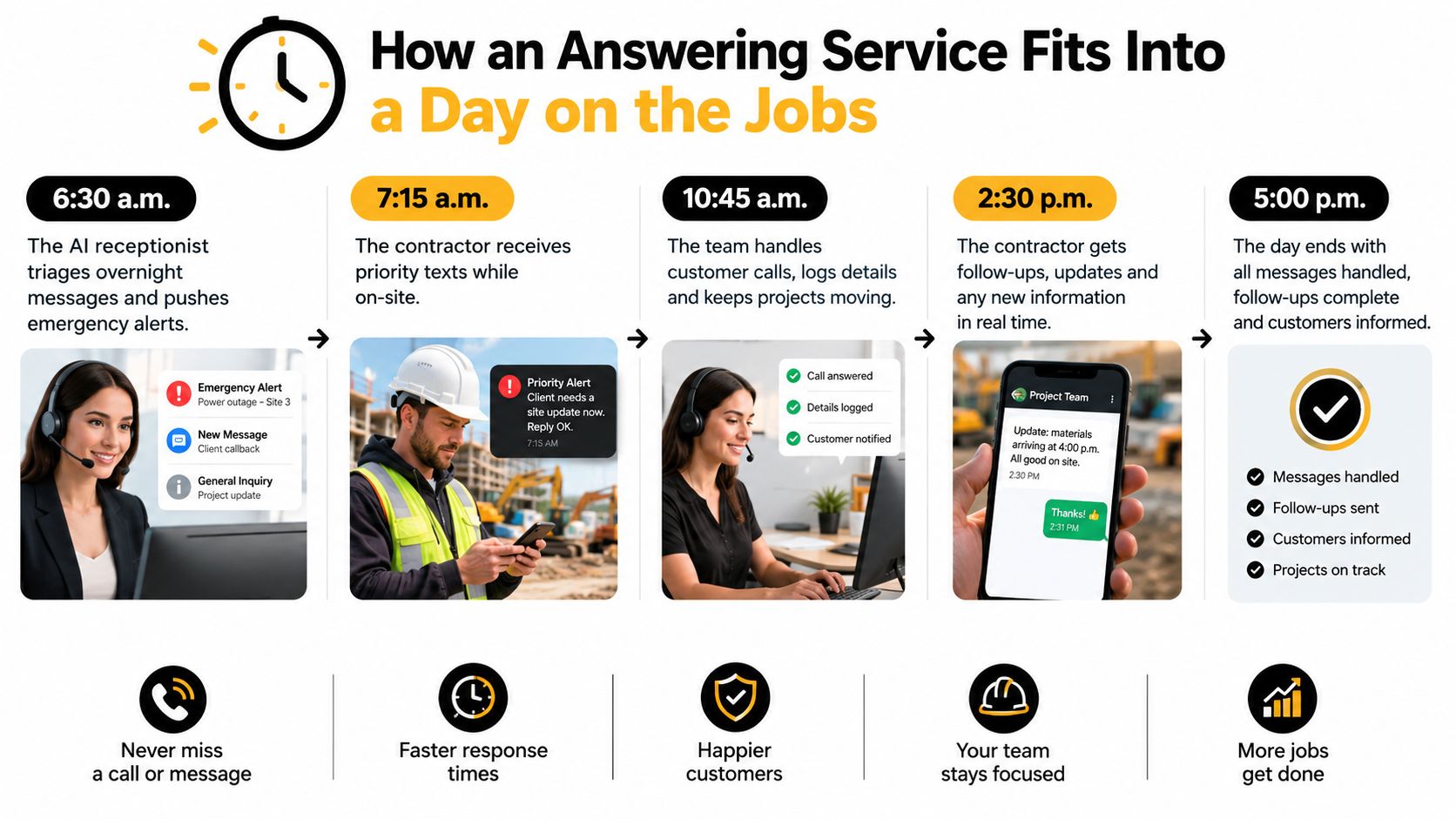
At 6:30 a.m., the AI receptionist reviews overnight interactions. An emergency water-heater call is marked for priority, and the on-call technician receives a text containing the caller's name, address, problem description, and urgency. The technician can start the day knowing which call needs attention instead of listening to a queue of incomplete voicemails.
The morning dispatch board
By the 8 a.m. dispatch huddle, booked estimates and service requests should already be visible in the system your office uses. If your team works in ServiceTitan or Housecall Pro, the service should create or update the appropriate record rather than leaving the dispatcher to copy details from an email.
The dispatcher then makes decisions that require operational judgment:
- Which crew is closest?
- Does the job fit the technician's skills?
- Is the customer inside the service area?
- Does the request need an emergency surcharge or special equipment?
- Can the estimate fit into today's route?
The answering service handles intake and routing. Your dispatcher still controls capacity, crew assignment, and exceptions.
The midday call
At midday, a homeowner calls about a water heater. The receptionist asks the equipment age, whether the unit is leaking, where the water is located, and whether the customer needs immediate service or a replacement estimate. If the caller fits the service area and an appropriate slot is open, the system books the visit. If the request needs review, it flags the lead with the information your office needs to make a decision.
That's the difference between capturing a lead and creating a usable job record.
At 5 p.m., call summaries, recordings, and lead notes should be available for review. The owner can see which requests were booked, which were escalated, and which need follow-up before the next morning. The workflow doesn't eliminate human decisions. It moves those decisions to the right person with the right information.
Here's a short visual explanation of the handoff:
Live Answering Service vs AI Receptionist for Contractors
Live receptionists and AI receptionists solve the same basic problem, but they behave differently under pressure. A live service gives you trained people who can handle emotion, ambiguity, and unusual requests. An AI receptionist answers instantly, follows consistent trade-specific rules, handles repetitive qualification, and can connect directly to scheduling tools.
The right choice depends on where your calls become difficult. A homeowner asking about a routine estimate is usually a strong automation candidate. A commercial property manager negotiating access requirements, a distressed caller dealing with major water damage, or a customer disputing an invoice may need a person.
Response speed is also a practical issue, not just a customer-service preference. Contractor-focused research cited by Vellum's analysis of missed-call lead capture reports that contacting an inbound lead within five minutes makes a business 100 times more likely to qualify the prospect than waiting 30 minutes, while responding within 60 seconds can increase conversions by 391%. Those figures support immediate answering, SMS fallback, or rapid transfer rather than a callback queue.
| Factor | Live Answering Service | AI Receptionist |
|---|---|---|
| Answer speed | Depends on available agents and call volume. | Immediate and consistent for routine calls. |
| Call handling | Stronger for emotional or unusual conversations. | Stronger for repeatable qualification and routing. |
| Trade specificity | Depends on training quality and script maintenance. | Depends on the knowledge base, rules, and integrations you configure. |
| Booking | May book, transfer, or take a message. | Can book directly when connected to the calendar. |
| After-hours coverage | Available through a staffed plan. | Designed to operate continuously without a shift change. |
| Cost control | Often varies with handling time and service terms. | Usually follows a subscription or usage structure set by the provider. |
| Best fit | Complex commercial work, sensitive calls, or human-first brands. | Small and mid-sized operators with repeatable residential intake. |
For most small contractor operations, I recommend starting with AI for routine calls and adding human escalation where the business needs judgment. A hybrid model is sensible when commercial jobs, complex dispatch rules, or bilingual human support carry meaningful weight. Contractors evaluating the trade-offs can review this comparison of AI receptionists and live answering services.
Pricing Models and the True Cost for Contractors
The cheapest headline price can become the most expensive phone system during a weather event. Contractors need to evaluate the whole operating cost, not just the advertised rate.
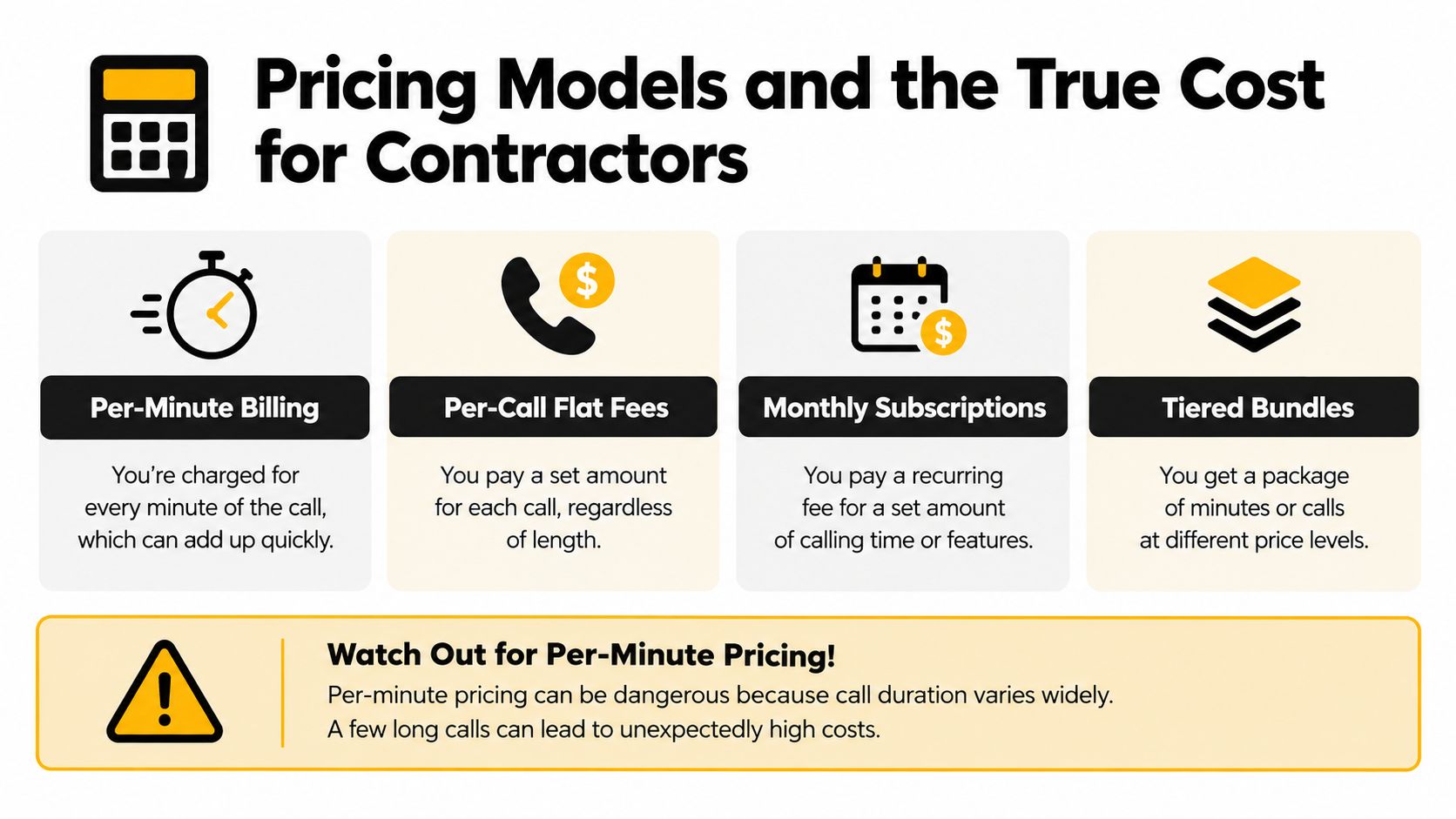
The four common structures are:
- Per-minute billing. You pay for connected time. Long emergency calls and detailed estimate discussions can push the bill higher than expected.
- Per-call pricing. Each answered interaction carries a set charge, which makes short and long calls easier to compare.
- Monthly subscriptions. You pay for a defined service level, often with usage rules or limits.
- Tiered bundles. You choose a volume or feature package, then pay more when usage exceeds the allowance.
Calculate the operating cost before signing
Per-minute pricing deserves special caution. A burst pipe, furnace failure, or upset customer can create a long conversation, and one unusually detailed call can consume the budget intended for many short calls. That doesn't make per-minute billing automatically wrong. It means you need to model call duration and seasonal surges before committing.
Ask the provider about every item that can appear outside the headline rate:
- After-hours or holiday surcharges
- Setup and onboarding fees
- CRM or calendar integration charges
- Bilingual coverage
- Transfer fees
- Recording and transcription charges
- Overage pricing during heat waves, cold snaps, or storms
- Charges for abandoned, spam, or transferred calls
For a five-truck HVAC operation, build a worksheet around your actual pattern rather than using a generic example. Record monthly call volume, average call length, emergency share, routine service share, estimate requests, bilingual requirements, and the number of calls that need live transfer. Then compare the result under each pricing model.
The phone answering service pricing guide can help frame that comparison, but your own call records should make the final decision. The winning plan is the one that captures qualified work at a predictable operating cost, not necessarily the one with the lowest starting fee.
Real-World Use Cases From the Field
A contractor's phone system earns its place through ordinary calls handled correctly. Three examples show the difference between answering a call and moving it toward revenue.
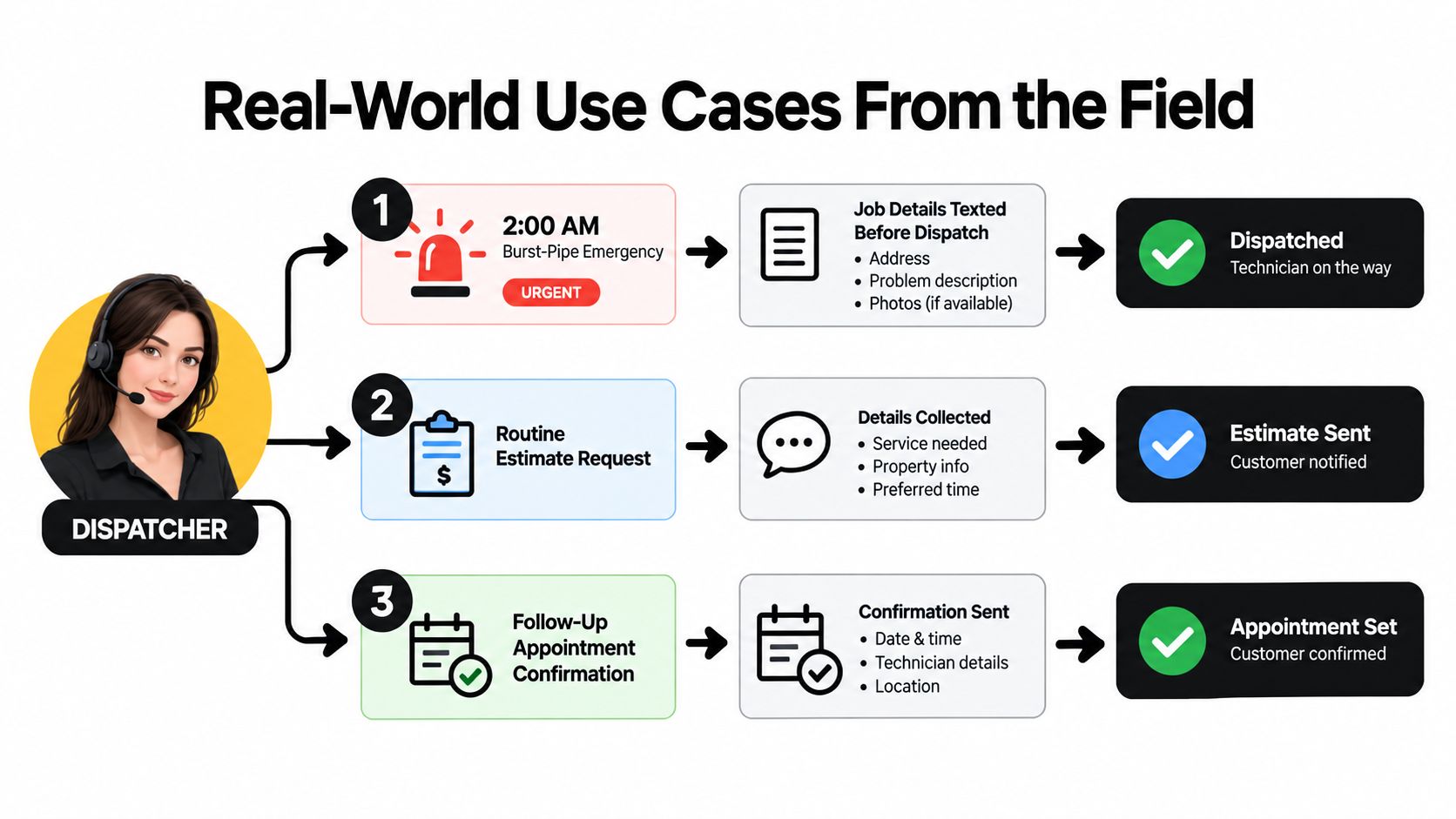
At 2 a.m., a homeowner reports a burst pipe. The receptionist confirms the service address, identifies the affected area, asks whether water is still flowing, and follows the emergency rule. The on-call plumber receives the job details by text before the call ends, while the customer gets a clear expectation about the next step.
A routine estimate becomes a scheduled visit
Later in the week, a homeowner calls about replacing an aging HVAC system. The AI receptionist confirms the property location, equipment type, reason for replacement, and preferred availability. It checks the connected calendar, offers a suitable estimate slot, and records the appointment so the dispatcher doesn't have to reconstruct the conversation.
The important detail is qualification. The office shouldn't receive a vague note saying “customer wants a quote.” It should receive a request with enough context to assign the right person and prepare for the visit.
Spam never reaches the roof
A roofing contractor receives a call while inspecting a roof. The system recognizes a solicitor or lead-generation pitch, follows the configured filter, and keeps the technician's mobile phone quiet. That protects attention without requiring the contractor to answer every call personally.
For legitimate calls, recordings and CRM notes create an operational trail. The office can review what the caller requested, confirm whether the appointment was accepted, and send a follow-up message without asking the customer to repeat the details.
You can also review this contractor remodeling lead workflow example when assessing how intake, qualification, and follow-up should connect. The principle is simple: emergency calls need escalation, estimate calls need qualification and booking, and unwanted calls need filtering. Treating all three identically wastes either time or revenue.
Choosing the Right Service and Getting Started
Use this checklist before you sign a contract:
- Trade-specific intake: Can the system ask questions that matter for plumbing, HVAC, electrical, or roofing?
- Continuous coverage: Are nights, weekends, holidays, and overflow included?
- Calendar and dispatch access: Can it work with ServiceTitan, Housecall Pro, Jobber, ServiceTrade, or your existing tools?
- Emergency escalation: Does a true emergency reach a named person through a defined route?
- Bilingual capability: Can the service support the languages your market requires?
- Transparent pricing: Are after-hours, transfers, integrations, and overages explained in writing?
- Review controls: Can you access recordings, summaries, and call notes while tuning the workflow?
Start with your existing number rather than rebuilding your branding. Forward calls during selected hours, test the emergency route after hours, place fake estimate calls, and ask someone outside the office to challenge the script with an unusual request.
During the first two weeks, review recordings and notes every day. Remove questions that don't affect dispatch, add the details technicians repeatedly need, and define what should be booked automatically versus escalated. A phone system improves only when the rules match how your crews work.
My recommendation is direct. Owner-operators and small teams should start with an AI receptionist when most calls involve repeatable qualification, scheduling, and message routing. Multi-truck operations with frequent emergencies, complex commercial work, or high-touch customer situations should use a live or hybrid service. This week, export your recent call history, mark which calls were missed or mishandled, and use that list as the acceptance test for every provider you consider.
SkipCalls answers business calls and texts, captures service details, qualifies contractor leads, books appointments, and routes urgent requests without requiring you to change your phone number. Visit SkipCalls to see whether its AI receptionist fits your dispatch and calendar workflow.

