
HVAC Scheduling and Dispatch That Books More Jobs
Learn HVAC scheduling and dispatch step by step — routing, staffing, scripts, KPIs and phone-first workflows to stop missed calls and fill your calendar.

 Reviewed by Nikita Podelenko, Founder & Engineer of SkipCalls
Table of contents
- Why HVAC Scheduling and Dispatch Decides Your Profit
- How HVAC Scheduling and Dispatch Works Today
- Choosing and Connecting Your Dispatch Tools Without Overhauling Phones
- Staffing and Routing Rules That Prevent Callbacks
- Scripts and Templates That Turn Every Call Into a Booked Job
- Tracking What Matters and Fixing Common Dispatch Problems
The phone starts ringing before the first technician reaches the shop. One homeowner needs emergency cooling service, another wants a maintenance appointment, and a commercial customer is calling about an arrival window. One call goes to voicemail while the dispatcher is assigning a job, then the voicemail becomes a callback, the callback interrupts routing, and the morning schedule starts slipping.
That's how an HVAC operation can have plenty of demand and still lose work. HVAC scheduling and dispatch isn't just calendar administration. It controls how quickly calls become booked jobs, whether the right technician arrives with the right information, and how much of the day disappears into driving, repeat visits, and phone interruptions.
This guide focuses on a phone-first system for small teams. The practical order matters: capture the call, qualify the work, assign the right resource, route the truck sensibly, and keep every status visible until the job is closed.
Why HVAC Scheduling and Dispatch Decides Your Profit
A dispatcher can make what looks like a small mistake at 8:00 a.m. and still be dealing with its consequences at 4:00 p.m. A technician sent to the wrong type of equipment may need a second visit. A replacement part that wasn't checked before dispatch creates another trip. An after-hours caller who reaches voicemail may book with a competitor before anyone returns the message.
The financial effect is direct. An Aberdeen Group field survey summarized for HVAC operations found that 25% of service truck rolls require at least one redundant callback, while 5% to 30% of technician time per dispatch can be lost to non-value activities. For HVAC businesses, where one truck roll is often estimated at $200 to $1,000, a weak dispatch decision can affect profit before the technician even starts work. The same operational analysis connects dispatch accuracy with first-time fix rate, labor utilization, and customer satisfaction.

The schedule is only as good as the intake
A calendar can show an open slot without telling you whether the customer has no cooling, a failed furnace, a maintenance question, or a commercial equipment issue requiring a particular certification. If the first call isn't qualified, the dispatcher is forced to make decisions with missing information.
That's why a small operation should fix the phone bottleneck before obsessing over route color-coding. Independent call-audit reporting cited by this analysis of the true cost of missed business calls says 37.8% of small-business calls were answered live, 37.8% went to voicemail, and 24.3% received no response, implying about 62% of calls were unattended. The same source set reports that 70% of small businesses answer fewer than half of incoming calls.
Practical rule: Don't optimize a dispatch board full of incomplete jobs. Make sure urgent calls, routine requests, and rescheduling needs enter the system with enough detail to act on.
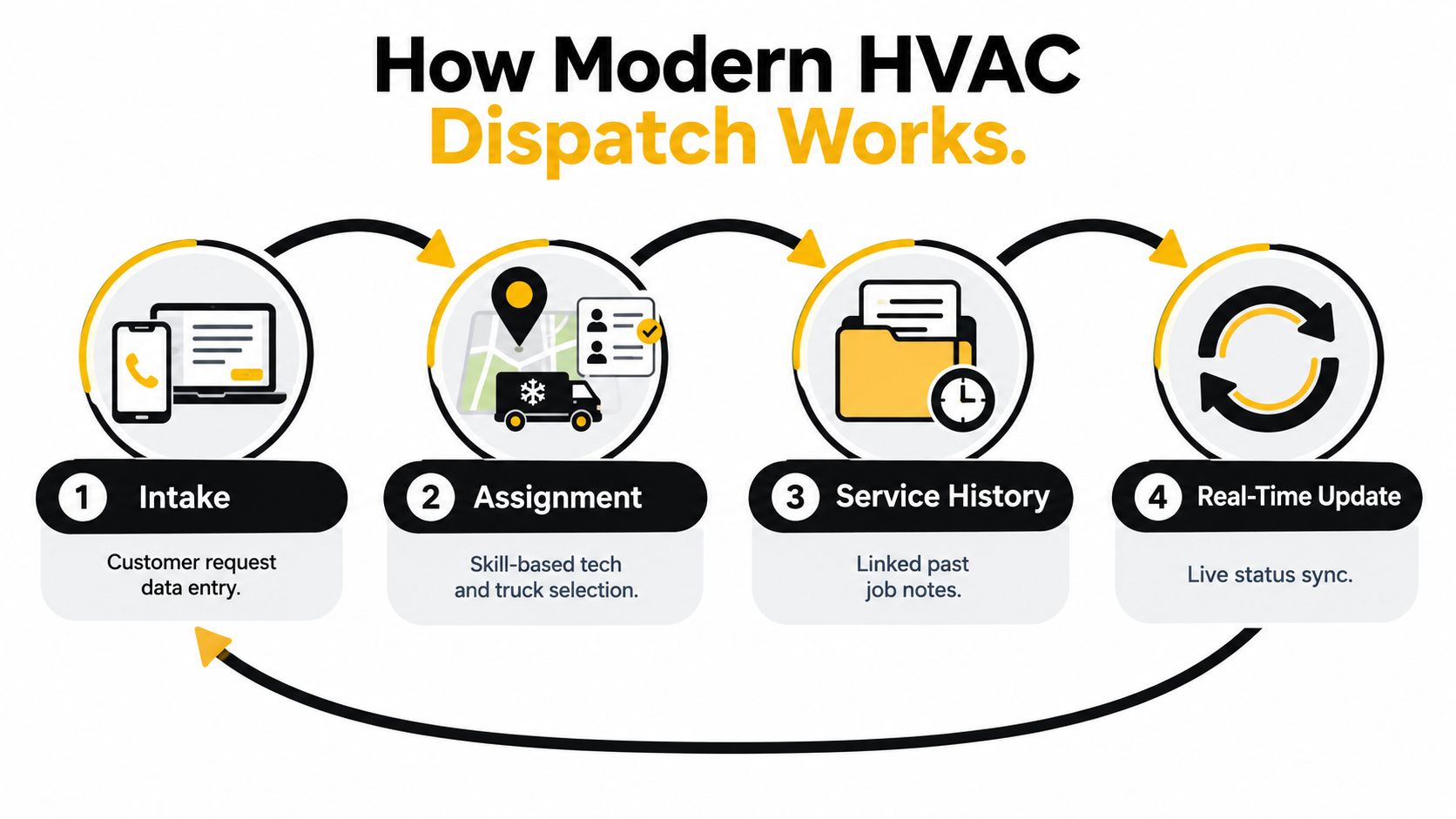
A modern dispatch software for HVAC teams workflow brings intake, job assignment, service history, and technician updates into the same operating picture. That matters for a small team because the schedule must support preventive maintenance and same-day breakdowns in the same week, sometimes on the same route.
How HVAC Scheduling and Dispatch Works Today
Modern dispatch starts before a job appears on the board. The person or system handling the incoming request needs to identify the customer, property, equipment, problem, urgency, access conditions, and preferred timing. A useful intake record gives the dispatcher enough context to decide what happens next without repeatedly calling the customer or technician.
Start with triage, then assign
Use a simple urgency screen:
- Identify the risk. Separate no-heat, no-cool, water leaks, unsafe equipment concerns, vulnerable occupants, and routine requests. The purpose isn't to diagnose remotely. It's to determine the right response window.
- Match job needs to technician capability. Check equipment type, job category, required certification, and likely parts before choosing an available technician.
- Use geography as a constraint. An available technician across town may be a worse choice than a slightly later technician already finishing nearby.
- Confirm the appointment window. Customers should receive a clear expectation, and the technician should see the same information in the field.
The modern HVAC service software workflow described by Arrivy treats technician availability, location, job needs, service history, and work-order status as connected parts of dispatch. That's the right mental model. A calendar slot by itself doesn't tell you whether the assignment is operationally sound.
Keep the handoff alive through job close
The work order should move through recognizable states, such as new, triaged, assigned, en route, on site, waiting for approval or parts, complete, and closed. Each status answers a different question for the office, field technician, and customer.
A technician who marks a job complete should leave usable notes, equipment details, parts used, recommendations, and any follow-up requirement. The next dispatcher should be able to see that record without relying on memory or a paper folder. Real-time updates also prevent the office from promising an arrival that the route can't support.
HVAC makes this harder than a simple appointment business. Planned maintenance creates predictable work, seasonal demand creates volume, and emergency calls disrupt both. A coordinated workflow lets the dispatcher protect urgent capacity without destroying the route built for recurring work.
Choosing and Connecting Your Dispatch Tools Without Overhauling Phones
Small HVAC teams usually face three tool choices. A lightweight scheduling app can be quick to deploy, a full field service platform can connect work orders and technician history, and an AI receptionist can absorb inbound calls when the office is busy or closed.
The right choice depends less on the length of the feature list and more on the handoffs your team can reliably manage. If a tool creates another screen for the dispatcher, requires duplicate data entry, or forces you to replace a number customers already use, adoption will suffer during the exact periods when you need it most.
| Tool Type | Setup and Phone Impact | Best For |
|---|---|---|
| Lightweight scheduling app | Fast setup, usually focused on calendars and basic assignment. Phone handling may remain separate. | Small teams with modest call volume and straightforward appointments |
| Full field service platform | More configuration, with work orders, customer records, service history, technician status, and routing in one environment. | Teams managing recurring maintenance, repairs, parts, and multiple technicians |
| AI receptionist intake | Adds automated voice and text handling, captures job details, and can connect booking to calendars. | Phone-reliant teams that need after-hours coverage or live intake without a full-time front desk |
Connect systems around one source of truth
Choose which system owns each record. Your CRM should hold customer and equipment history. Your field service platform should hold the work order and technician status. Your calendar should reflect actual availability, not a second version maintained manually.
Integration also needs a failure plan. Decide what happens if a booking can't be written to the calendar, a technician changes availability, or a customer replies by text instead of calling. A dispatcher should see the exception quickly rather than discover it after a truck has been promised.
For teams reviewing CRM integration practices, the key test is whether customer details flow once into the systems that need them. Avoid copying a caller's address, equipment type, and appointment window into several separate tools.
Keep the existing number when possible
Changing a phone number creates customer confusion and forces the team to update trucks, websites, invoices, directories, and saved contacts. A simpler approach is to add a voice and text layer that works with the current number and connects to the CRM and calendars already in use.
SkipCalls is a simple-to-set-up option for customer support, lead qualification, appointment booking, and similar intake tasks. It handles voice and text, doesn't require changing the business phone number, and offers integrations with CRM systems and calendars. For HVAC intake, that means a caller can provide job details and move toward an appointment while the dispatch team stays focused on active field work.
Staffing and Routing Rules That Prevent Callbacks
A packed schedule isn't automatically a productive schedule. If technicians spend too much time driving, wait for parts, or receive jobs outside their skill set, the board may look full while completed work falls behind.
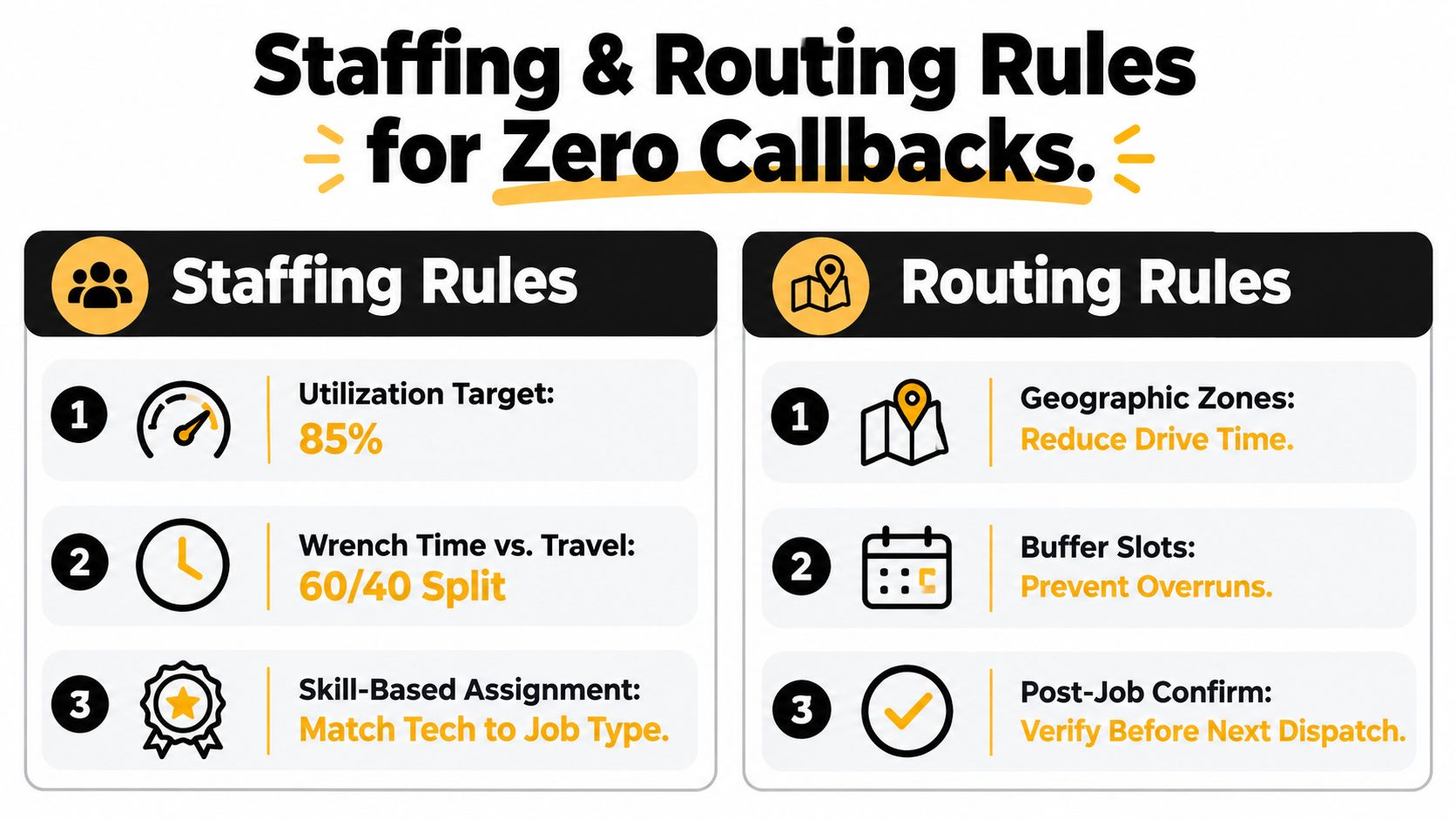
A practical benchmark is 75% to 85% technician utilization, while tracking first-time fix rate and customer satisfaction alongside it. Without structured dispatch, wrench time typically sits around 45% to 55%. Route-optimized scheduling with pre-staged parts can raise wrench time to 60% to 65%, while travel should remain below 25% of logged hours, according to HVAC service scheduling benchmarks and best practices.
Build assignment rules before the phones spike
Start with a skills matrix. Record which technicians handle installation, maintenance, refrigeration, heat pumps, commercial equipment, electrical troubleshooting, and difficult diagnostics. Add practical constraints, such as which vehicles carry recovery equipment or which technicians have access to specialized tools.
Then make parts availability part of assignment. A technician who has the right skill but not the likely part may be a poor first choice. Ask the intake process to capture model information and symptoms, then use service history to improve the estimate of what the truck should carry.
Geographic zones help reduce windshield time, but they shouldn't become rigid borders. Use zones as a default, then override them for emergencies, specialized skills, or a technician already near the customer.
Leave capacity for uncertainty
During a hot-weather surge, reserve space for no-cool calls and protect the technicians qualified to handle them. Don't fill every hour with maintenance visits just because the forecast looks manageable in the morning. Emergency demand can displace routine work, so give dispatchers a clear rescheduling policy before the pressure arrives.
During a shoulder-season tune-up week, the mix changes. Group maintenance by geography, confirm access in advance, and stage common parts and filters where practical. The objective is a clean route with fewer interruptions, not maximum bookings at any cost.
Routing rule: A schedule that leaves no room for travel, parts, customer questions, or overruns is already late.
The most common mistake is overfilling the board without checking those constraints. A job assigned by availability alone can create a repeat visit, a missed arrival window, and a dispatcher's next interruption. The call-routing guidance for small businesses is useful when you're deciding how much of the intake and escalation process should happen automatically before a dispatcher takes over.
Scripts and Templates That Turn Every Call Into a Booked Job
The best phone script doesn't sound like an interrogation. It gives the caller a clear path, gathers the details a technician needs, and sets an honest expectation about timing.
Use separate paths for emergencies and routine work
For an urgent call, the intake should quickly establish:
- Customer and location: Name, service address, best callback number, and access instructions.
- Immediate condition: No heat, no cooling, unusual noise, water, burning smell, visible damage, or another symptom.
- Occupant concerns: Whether anyone is especially vulnerable to the temperature or equipment condition.
- Equipment context: System type, known model information, recent service, and what changed.
- Availability: Whether the customer can accept the next emergency window or needs another option.
A practical emergency script can be direct: “I'll get the service address and understand what the system is doing now. Then I'll check the emergency availability that fits your location and equipment.”
Routine maintenance needs a different pace. Ask whether the request is a seasonal tune-up, an existing maintenance agreement, a performance concern, or a future appointment. Offer available windows only after checking technician capacity, route geography, and any contract requirements.
For ready-to-adapt language, the HVAC phone scripts resource can serve as a starting point. Keep the final script aligned with your actual service area, hours, pricing policy, and escalation rules.
Confirm by text and recover quickly
Send a confirmation immediately after booking:
“Your HVAC service appointment is scheduled for [day] during [window] at [address]. Reply C to confirm, R to reschedule, or call [number] if the equipment condition changes.”
A reminder should restate the window, access instructions, and what the customer should prepare, such as clearing access to the indoor unit or locating equipment information. Don't promise a precise arrival time if the route doesn't support it.
No-shows need a fast recovery path. Residential service calls commonly have 4% to 7% no-show rates, commercial service and maintenance contracts 1% to 3%, emergency and after-hours calls 8% to 12%, and shoulder-season tune-ups 7% to 10%, according to HVAC no-show rate benchmarks. Benchmark summaries report 35% to 50% reschedule recovery within seven days, but less than 10% recovery when the first contact is delayed beyond four hours.
Make the first follow-up automatic, then alert a person when the customer responds or the job is urgent. Speed matters before the appointment is lost, not after the dispatcher has finished the rest of the day's tasks.
The same principle applies to new leads. A summary citing Harvard Business Review reports that leads contacted within five minutes are 21 times more likely to convert than leads contacted after 30 minutes, while only 37% of businesses respond within one hour, as reported by this speed-to-lead benchmark summary. Live capture, immediate booking, and a hot-lead notification protect that first opportunity.
The video below provides another visual reference for organizing customer service and dispatch conversations.
Answering live is not only a customer-service preference. It's the first dispatch decision, because an unanswered call never reaches triage, assignment, or the calendar.
Tracking What Matters and Fixing Common Dispatch Problems
Review dispatch performance every week, not only after a disastrous weather event. The numbers should help you find the point where work leaks out of the process.
Track utilization, first-time fix rate, customer satisfaction, travel share, no-show rate, and reschedule recovery. Use the operating benchmarks above as reference points, but interpret them together. High utilization with poor first-time fix performance can mean the team is overbooked or misassigned. Low travel share with weak completion volume may indicate excessive gaps or poor job preparation.
A reporting dashboard should show the path from inbound request to closed work order. Guidance from Blowfish Technology's reporting and dashboards guide can help structure that view around decisions rather than decorative charts.
Diagnose the failure at its source
| Dispatch problem | Likely cause | Practical fix |
|---|---|---|
| Redundant callbacks | Missing job details, weak notes, or unclear technician status | Require structured intake and a closeout note before the next assignment |
| Wasted truck rolls | Poor skill matching or parts not checked | Use equipment history, a skills matrix, and parts readiness before dispatch |
| After-hours lead loss | Calls reach voicemail without a live response path | Add after-hours voice handling, urgent-call triage, and immediate text follow-up |
| Missed appointments | Confirmation arrives late or rescheduling depends on manual callbacks | Automate confirmation and trigger rapid outbound recovery |
| Route overruns | Every available slot is filled without travel or buffer capacity | Protect route space and schedule by geography |
| Dispatcher overload | One person handles phones, booking, status updates, and exceptions manually | Separate routine intake from human escalation with clear rules |
Market-facing service-business call data reports 40% to 60% missed calls for home services, and 68% of missed calls happen outside stated business hours, according to industry missed-call data for service businesses. Another cited industry summary says 85% of callers who don't reach a live person never call back, as reported by this missed-call analysis. Those figures make after-hours handling an operating requirement for phone-dependent HVAC businesses, not a minor convenience.
Run a short weekly audit
Ask the dispatcher and field team:
- Did every urgent call receive a clear disposition?
- Did any technician wait for information, approval, or parts?
- Which jobs required a repeat visit, and why?
- Did the route exceed the travel target?
- Were no-shows contacted and rescheduled quickly?
- Did every completed job include notes that help the next visit?
- Where did a customer, technician, or dispatcher have to repeat information?
Fix one recurring failure at a time. A small team doesn't need a complex transformation project. It needs reliable intake, disciplined assignment, honest capacity planning, and a feedback loop that exposes trouble before peak season exposes it for you.
SkipCalls handles HVAC call intake through voice and text, captures customer details, supports appointment booking, and connects with CRM systems and calendars without requiring a phone-number change. Visit SkipCalls to add a phone-first layer that protects after-hours leads and keeps dispatch focused on the trucks already in the field.


