
What Is Visual Voicemail? a Plain-English Guide for 2026
Learn what is visual voicemail, how it shows messages as a browsable list with transcripts, how it differs from traditional voicemail, and what you need.

 Reviewed by Nikita Podelenko, Founder & Engineer of SkipCalls

Table of contents
Four messages sit on your phone screen from this morning. One is a homeowner with a leaking water heater, one is a supplier confirming a delivery, one is a wrong number, and one is a caller who hung up without a word. On a screen, you can usually tell them apart at a glance and call the right person first.
That list is visual voicemail. It shows your messages by caller, time and length, so you pick what to hear instead of working through a phone menu in order. Apple introduced the feature to a mass audience with the first iPhone, and it has been standard on smartphones ever since.
The list is the easy part. A message that appears on a screen is visible, not answered. Somebody still has to listen, check the details and call back before the homeowner phones the next plumber on the list. For a small service business, visual voicemail changes how fast you spot a lead, not whether you keep it.
What Visual Voicemail Is and How It Differs
Visual voicemail turns voicemail from a phone menu you listen to in order into a list of individual messages you can scan. The model that makes the rest of this make sense is an inbox. Traditional voicemail is a tape: you start at the beginning and sit through messages until you reach the one you want. Visual voicemail is a sorted inbox: every message is its own row, and you tap the row you need.
Apple made the idea mainstream. Introducing the iPhone on January 9, 2007, the company described visual voicemail as an industry-first mobile phone feature and said it was co-developed with Cingular, then serving 58.7 million U.S. customers, as recorded in the USPTO petition record on the iPhone launch. The first iPhone was scheduled to reach the U.S. in June 2007 in 4GB and 8GB models priced at $499 and $599, which tells you the feature shipped as a headline selling point, not a buried setting.
Each row shows the caller, the timestamp, the length of the recording and whether it's been read. From there you can play a message, delete it, save it or call the person back, in whatever order you like. Nobody has to sit through the first three to reach the fourth.
Traditional voicemail compared with visual voicemail
| Feature | Traditional Voicemail | Visual Voicemail |
|---|---|---|
| How you access messages | Dial the mailbox and listen through a phone menu | Open a list in the Phone app or voicemail app |
| Message details shown | Caller known only by ear | Caller, timestamp, duration and read or unread status |
| Playback order | Sequential, oldest or newest first by menu | Any order, chosen by tapping one message |
| Deleting or returning a call | Keypad commands for each message | Tap the message and choose delete, save or call back |
| Transcript | Not part of the classic menu | Available only where the carrier supports it |
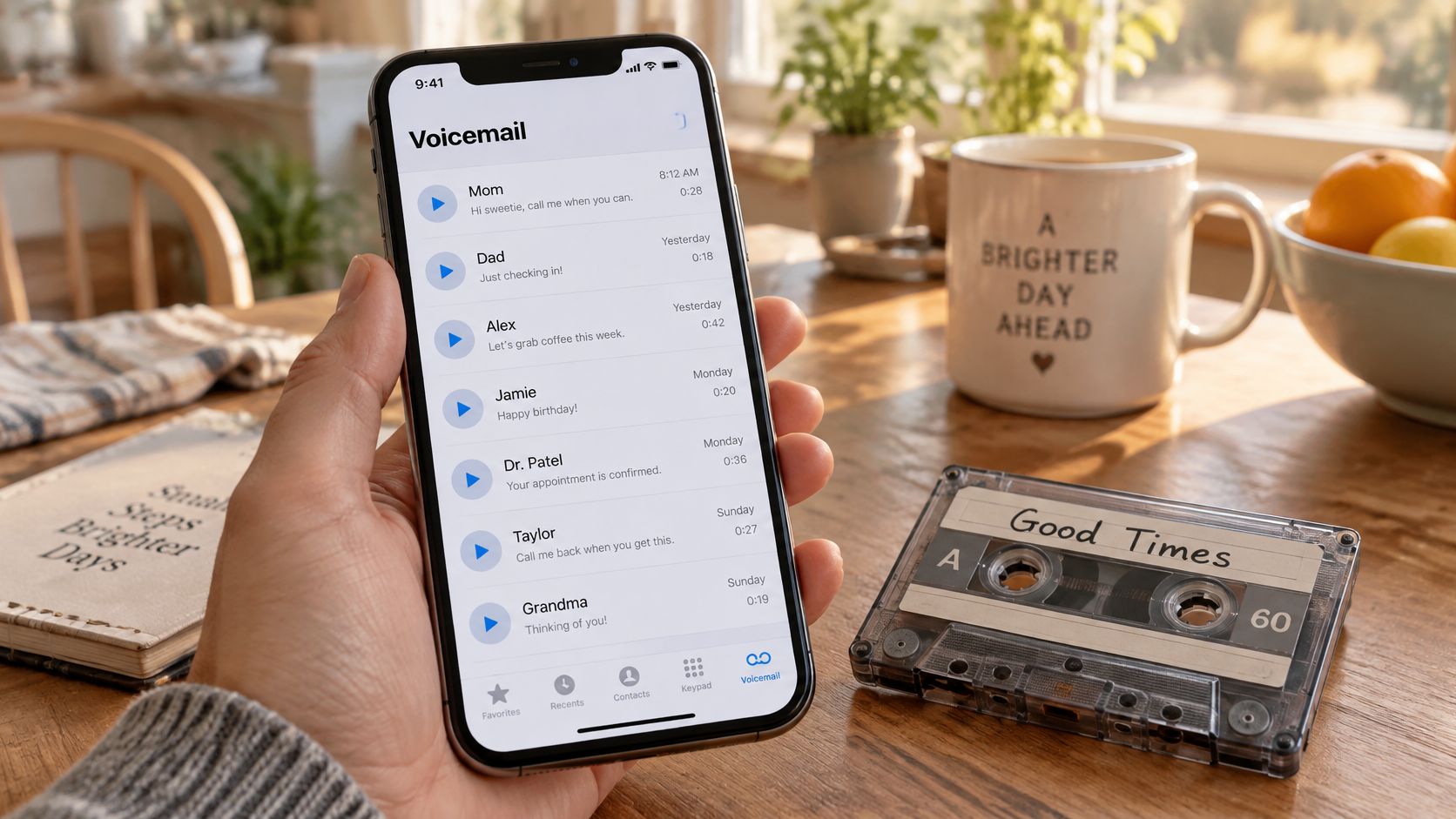
What surprises people is where the audio lives. The recording usually stays on the carrier or phone-system server, and the handset pulls the message data and the audio across mobile data or Wi-Fi, as the Webiano voice messaging reference explains. Deleting a row removes your copy of a message, not the recording sitting on somebody else's server.
Here's the sentence to hand a new office manager: the message list changes how you choose what to listen to, not where the recording lives. If what you want is a call that gets answered instead of recorded, AI answering instead of voicemail is the other direction to look.
How a Visual Voicemail Reaches Your Screen
A message doesn't appear the instant a caller hangs up. Six things happen in between, and each one is a place where a recording can exist while nobody at the business knows about it.
The short answer to what visual voicemail is covers the list. The longer answer covers the plumbing. Goodcall's six-stage walkthrough of the visual voicemail workflow sets out the sequence: an unanswered call routes to voicemail, the recording is stored on a carrier or phone-system server, the system sends a notification to the device, the phone downloads the message and its metadata, the message appears in a visual inbox with caller details and a timestamp, and speech recognition creates a transcript where the carrier supports it.
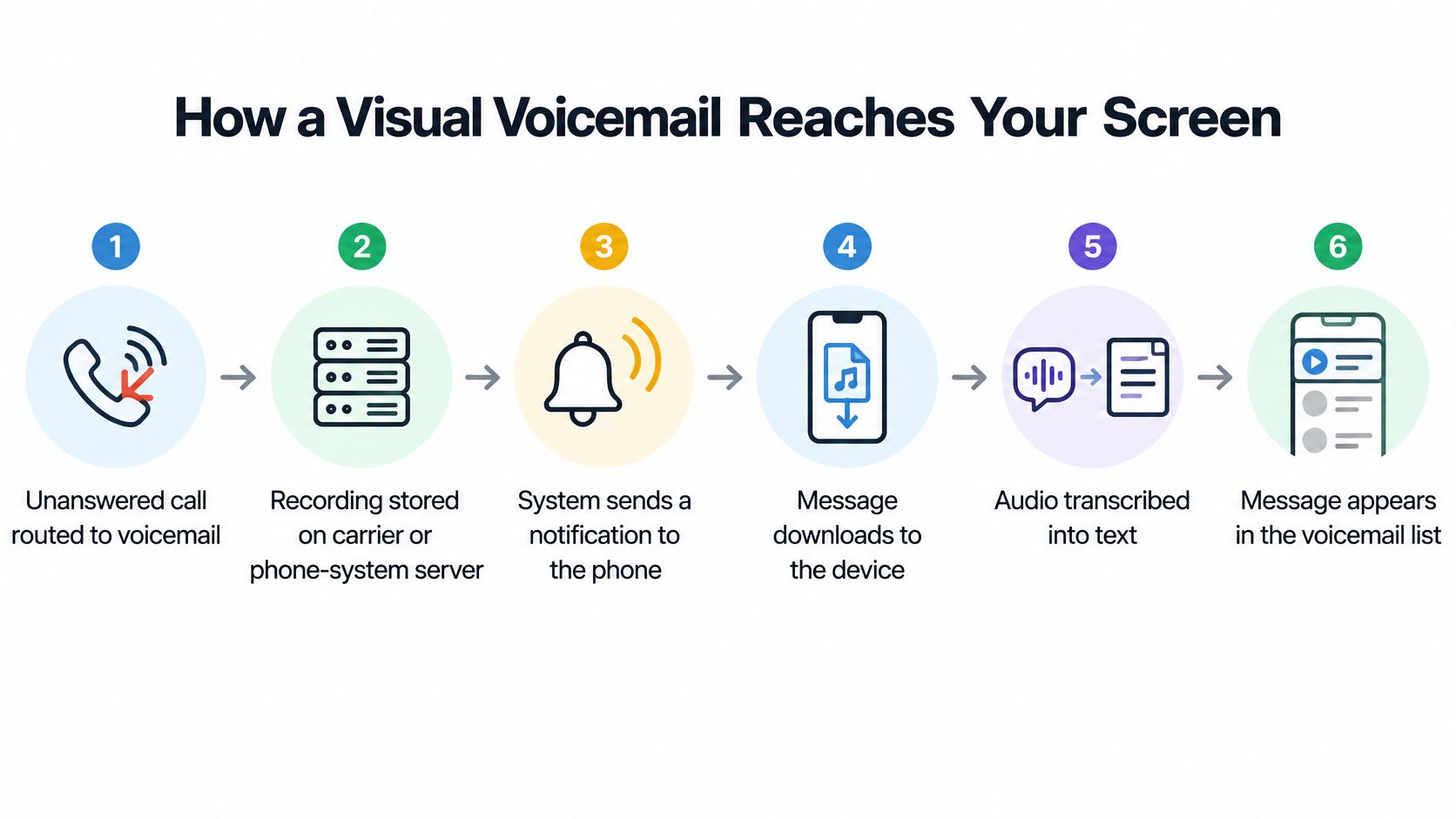
- The unanswered call routes to voicemail. Your greeting plays and the recording starts. Check that the greeting still names the business and the right seasonal hours.
- The recording is stored on a carrier or phone-system server. Nothing is on your phone yet. The useful side effect is that the message survives a dead battery, which is why dialing the mailbox directly still works as a rescue.
- The system sends a notification to the device. A missed-call alert or a badge on the Phone app confirms this stage fired. No alert at all points at notification settings or carrier provisioning, not at the caller.
- The phone downloads the audio and its details. This needs mobile data or Wi-Fi. A row that never fills in usually means the download stalled.
- The message appears in the inbox with caller details and a timestamp. Confirm the number and call time look right. If the name is wrong, the row is still usable, so fix the contact rather than the message.
- A transcript is generated where supported. Look for text under the playback controls.
Practical rule: a missing transcript is not a lost message. The audio is still there to play, and the caller never knew the difference.
Why a message can lag behind the call
Your phone and the carrier's voicemail platform have to agree on how metadata and audio get requested, and that agreement is standardized work. The GSMA's TS.46 Visual Voicemail Interface Specification, whose document history begins September 2, 2007, covers message retrieval, message upload, voicemail management, greeting management and service provisioning. The same record notes that internet voice-messaging standards addressed audio encoding and interoperability for unified messaging, with RFC 4239 published on November 4, 2005.
Run a baseline test. Call the business number from a personal phone, let it ring through, leave a fifteen-second message, and note how long the row takes to show up. If that delay suddenly stretches, something upstream changed, and the right move is to check the mailbox directly rather than assume callers stopped calling. The call forwarding guide explains how unanswered and busy calls get sent to voicemail in the first place.
Carrier, Phone and Plan Requirements to Check
Visual voicemail isn't a standalone app feature. It's a carrier service that your phone's voicemail client talks to, and the client only works when the carrier's platform backs it. Availability and transcription behavior depend on the carrier, the device and the service configuration, and some implementations process speech on the carrier side while others run recognition on the phone itself, as RingOWL's support explanation notes.
The practical consequence is that the same handset can show a full inbox on one carrier and a bare audio mailbox on another. A carrier without support may leave you audio-only voicemail with no transcript, and transcription itself can be bundled, sold separately or capped.
What to verify before relying on visual voicemail
| Requirement | Why It Matters | Where to Confirm |
|---|---|---|
| Carrier support | The feature depends on the carrier voicemail platform | Carrier support pages or customer service |
| Phone and voicemail app | The device needs a visual voicemail client that syncs with the carrier | Phone settings and the device maker's documentation |
| Transcription on your plan | Some offerings include it, others sell it separately or cap it | Your plan terms and the carrier's feature list |
| Country or region | Support varies by location | Carrier coverage or regional support pages |
| SIM changes and roaming | Sync can fail after a switch or while abroad | Leave a test message after the change |
| Data or Wi-Fi access | Message audio and details download over mobile data or Wi-Fi | Device data settings and a test message |
What to confirm before a busy week
- Get support confirmed for the specific line. It isn't enough that the carrier advertises visual voicemail. Ask whether it's provisioned on this number, and keep the reply.
- Ask what transcription does on your plan. Included, sold as an add-on and capped are three different answers, and only one of them means you can lean on reading messages during a rush.
- Retest after every change. A new SIM, a new handset, a ported number or a trip abroad can break sync without an error message anywhere.
- Write the answers next to the carrier and plan name. When the next person troubleshoots, they should start from facts instead of somebody's memory of a support call.
How Accurate Voicemail Transcripts Really Are
Transcripts are speech recognition output, and speech recognition makes mistakes. Multiple recognition passes were needed to reach 76% accuracy in one voicemail-interface study, and users reported that errors, poor punctuation and formatting made the text hard to read, according to the ScanMail voicemail-interface study. At that accuracy level, roughly one word in four comes back wrong. The same study notes that some Verizon offerings transcribe only the first 45 seconds of a message.
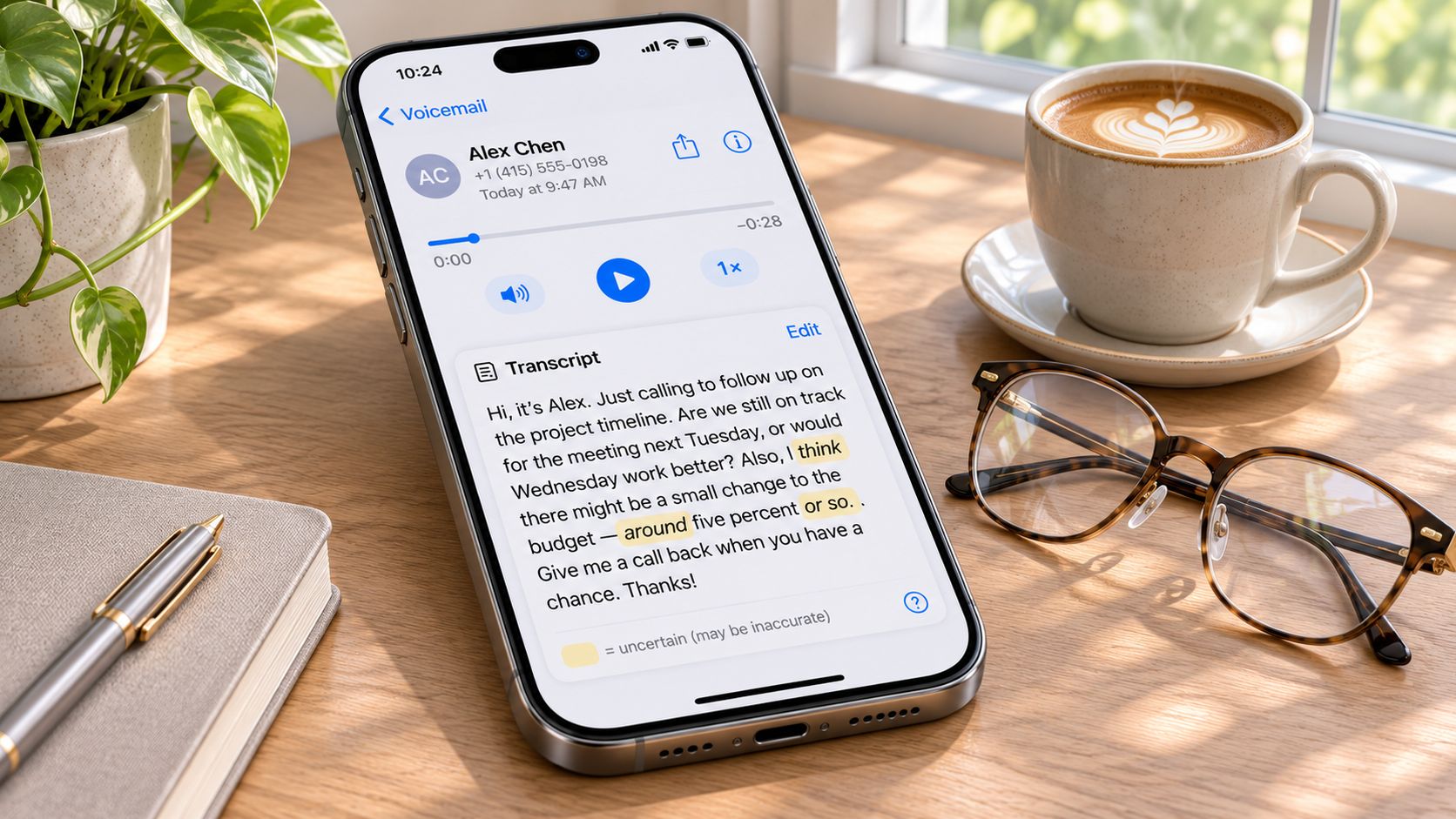
For a plumbing company, one wrong digit in a callback number costs a job. So does a garbled street address, a missing unit number, a price read back incorrectly or an appointment time that lands an hour off. Service businesses act on exactly the details transcripts break most often.
Accuracy falls further with background noise, fast speech, accents, weak audio and unclear pronunciation. A caller standing next to a running table saw can produce a transcript that is technically a transcript and practically useless.
A three-step routine for every transcript
- Play the original audio before acting. If the message contains a number, an address, a time or a price, listen to the recording. Treat the text as a pointer to the message, not as the message.
- Confirm by text. Send the details back in writing: Tuesday at 9 for the water heater at 412 Oak, unit B. A one-line reply catches the wrong digit while the caller is still standing there with a phone in their hand.
- Flag what you can't verify. Mark the unclear field and assign it to a named person. Anything still unresolved gets a phone call, not another listen.
Rule of thumb: treat a transcript as a note from a fast typist who wasn't in the room. Verify anything you'd repeat to a customer.
The privacy side nobody mentions
Anyone who can open the phone can read every visual voicemail message on it. That matters when the business phone gets handed to a driver, a helper or a family member in the truck. The voicemail PIN still matters for backup access, so confirm that dialing the mailbox directly still asks for it.
For a second written record to check against the audio, SkipCalls sends an instant call summary, full transcript and extracted action items after every call, and how SkipCalls transcribes business calls explains what lands in that record.
Missed Messages and How to Recover Them
A visual voicemail list works like an inbox, and like any inbox it can stop receiving. Three things have to stay in agreement: the carrier's voicemail server, the phone's visual voicemail client, and a mobile data or Wi-Fi connection. Carrier incompatibility, a SIM change, roaming, weak data service, app errors and delayed synchronization can each leave a message sitting on the server while the phone shows nothing, as a coverage guide on visual voicemail failures sets out.
Start with the cheap fixes. Verizon's own troubleshooting guidance includes restarting the phone or resetting the voicemail app, and those two steps clear a large share of "missing" message reports. Match the effort to how long the problem has lasted. A restart takes a minute. A provisioning issue can take days, and nobody should wait days before routing calls somewhere else.
Visual voicemail symptoms, causes and fixes
| Symptom | Likely Cause | First Fix |
|---|---|---|
| Caller left a message but nothing appears | Synchronization delay or weak data connection | Restart the phone, then reset the voicemail app |
| No notification for a new message | Notifications turned off or carrier setup incomplete | Check notification settings, then confirm carrier support |
| Message appears but has no transcript | Carrier doesn't offer transcription or a plan limit applies | Check plan terms and listen to the audio |
| Transcript has a wrong number or name | Background noise, fast speech or poor audio | Play the original audio and confirm by text before acting |
| Messages missing after a SIM change | Carrier configuration didn't transfer | Contact the carrier and retest with a test message |
| Messages stop after travel abroad | Roaming limits or no data connection | Confirm roaming settings and check the traditional mailbox |
Build an escalation path before you need it
- Keep the mailbox reachable. Dial the voicemail number directly and enter the PIN. If messages are waiting there and the list is empty, the problem is sync, not the caller.
- Name one owner and one schedule. One person checks the visual inbox and the callback list at set times, say 8 a.m., noon and 4:30 p.m. A shared inbox with no owner is where leads go to die.
- Follow up by text, fast. A caller who reaches voicemail is already one step from dialing the next name on the list, so reply in writing while the job is still fresh. Ready-made text-back templates for plumbing contractors show what a quick acknowledgment looks like, and SkipCalls sends an automatic follow-up text after each call so the caller can reply with photos, an address and details.
- Plan for calls nobody picks up. Route unanswered calls to a monitored shared inbox, an SMS alert or a receptionist that captures the caller's name, number and urgency. An answering service such as SkipCalls answers missed, busy and after-hours calls through call forwarding, so the call gets handled instead of recorded.
A message nobody is assigned to read is the same as no message at all.
Worth being direct about the limit here. Apple's iPhone Visual Voicemail support page describes the feature as carrier-dependent, with selective playback and deletion. It displays and organizes messages after callers reach voicemail. It doesn't answer questions, qualify a lead, book an appointment or escalate an urgent request. A readable voicemail is still a customer waiting on a human.
Check Your Visual Voicemail Setup This Week
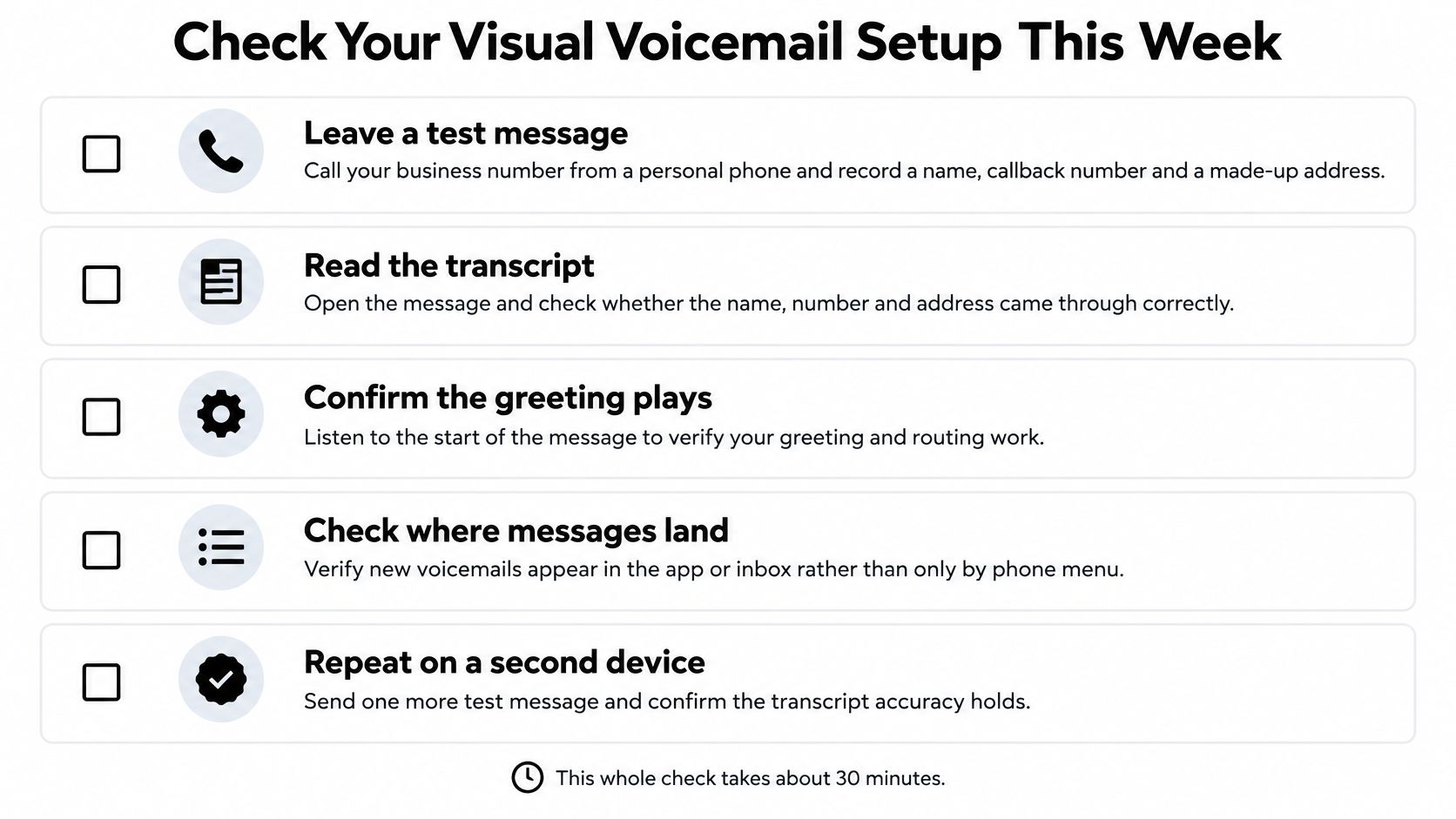
A visual inbox works like a mail slot: it can show a letter while the sender still waits. Run this check on a weekday morning, when you would normally be answering calls, so the result reflects real conditions rather than a quiet Sunday. The whole routine takes about half an hour.
- Leave a test message. Call the business number from a personal phone and leave a name, a callback number and a made-up address, spoken at normal speed.
- Time the delay. Note how many seconds pass before the row appears in the list. That is your baseline for a normal day.
- Read the transcript against the audio. Write down every error. A wrong digit on a test message is a wrong digit on a real one.
- Open the fallback once. Dial the voicemail number directly and enter the PIN so you know the mailbox behind the screen still answers.
- Assign the inbox before it fills. Put one name on the calendar for fixed checks and a second name for days off.
- Let one call go unanswered on purpose. Confirm the chosen fallback catches it: shared inbox, SMS alert or receptionist.
If the row arrives late, a message is missing, or the transcript changes the address, treat that as the answer. A readable voicemail can still be a missed lead when nobody is responsible for the next step. Add a monitored fallback before the next busy week, not after a job goes to the company that picked up.
To hear that fallback before you rely on it, call +1 (888) 884-9511 and talk to the SkipCalls AI receptionist with no signup, for as long as you want.
SkipCalls answers missed, busy and after-hours calls through call forwarding on your existing number, captures the caller's name, number and reason for calling, books appointments, then sends a summary, full transcript and action items. Visit SkipCalls to see how it fits between your phone and your voicemail, or call the demo line first and judge the voice for yourself.