
AI Appointment Booking System: How It Works in 2026
Learn how an AI appointment booking system answers calls, books jobs, and prevents no-shows for local service businesses. Features, ROI, and setup explained.
A homeowner calls your plumbing business while you're on a roof finishing an emergency repair. A second call arrives while you're carrying equipment down the ladder. A third lands when your hands are wet and your phone is out of reach. By the time you can call back, those homeowners may already be speaking with another company.
An AI appointment booking system gives those callers a live first point of contact. It can answer by voice or text, understand why the person is calling, check the calendar, ask the questions needed to qualify the job, and confirm a suitable appointment. The important distinction is operational, not cosmetic. A system that sounds natural in a demo still has to prevent double-bookings, respect time zones, recover from calendar-sync failures, and avoid filling your schedule with poor-fit jobs.
The Missed Call That Cost You a Job
The roofer doesn't need another notification saying, “You missed a call.” He needs the caller's problem captured while the need is urgent.
A capable booking assistant can answer the homeowner, identify a flooded basement or leaking water heater, check whether the address falls inside the service area, and offer an available visit window. Once the caller confirms, the system writes the appointment to the connected calendar and records the lead. The owner can finish the roof without forcing the customer into voicemail, a callback queue, or a generic scheduling page.

That's different from a missed-call text-back service. A text can tell someone that the business will respond later, but it doesn't necessarily complete the booking. A real AI appointment booking system handles the first conversation and turns the call into a confirmed calendar event when the request meets the business's rules.
The financial problem isn't limited to trades. In healthcare, industry coverage cites an estimated USD 150 billion in annual costs from missed appointments in the United States, while a clinical intervention reported a 42.8% reduction in missed appointments. Those figures concern healthcare, not plumbing or electrical work, but they illustrate why attendance and scheduling deserve more than a simple reminder workflow. The operational cost of missed business calls becomes clearer when a missed conversation also means a missed qualification step and an empty or poorly used slot.
Practical rule: The assistant should complete the booking during the interaction whenever it has enough information. “We'll call you back” is not the same outcome.
The rest of the system determines whether that promise holds. Calendar synchronization, local-time conversion, conflict checks, and qualification before slot assignment decide whether the AI books useful revenue or merely creates activity.
What an AI Appointment Booking System Actually Does
Think of the system as a receptionist standing between two rooms. One room contains the caller and the conversation. The other contains the calendar, customer records, staff availability, and business rules. The assistant has to carry accurate information between both rooms.
A booking link such as Calendly or Booksy gives a customer a way to select a time. An FAQ chatbot can answer questions. An AI appointment booking system combines conversation with action. It can interpret intent, ask follow-up questions, inspect live availability, and write a confirmed appointment instead of merely suggesting that the caller visit a calendar page.
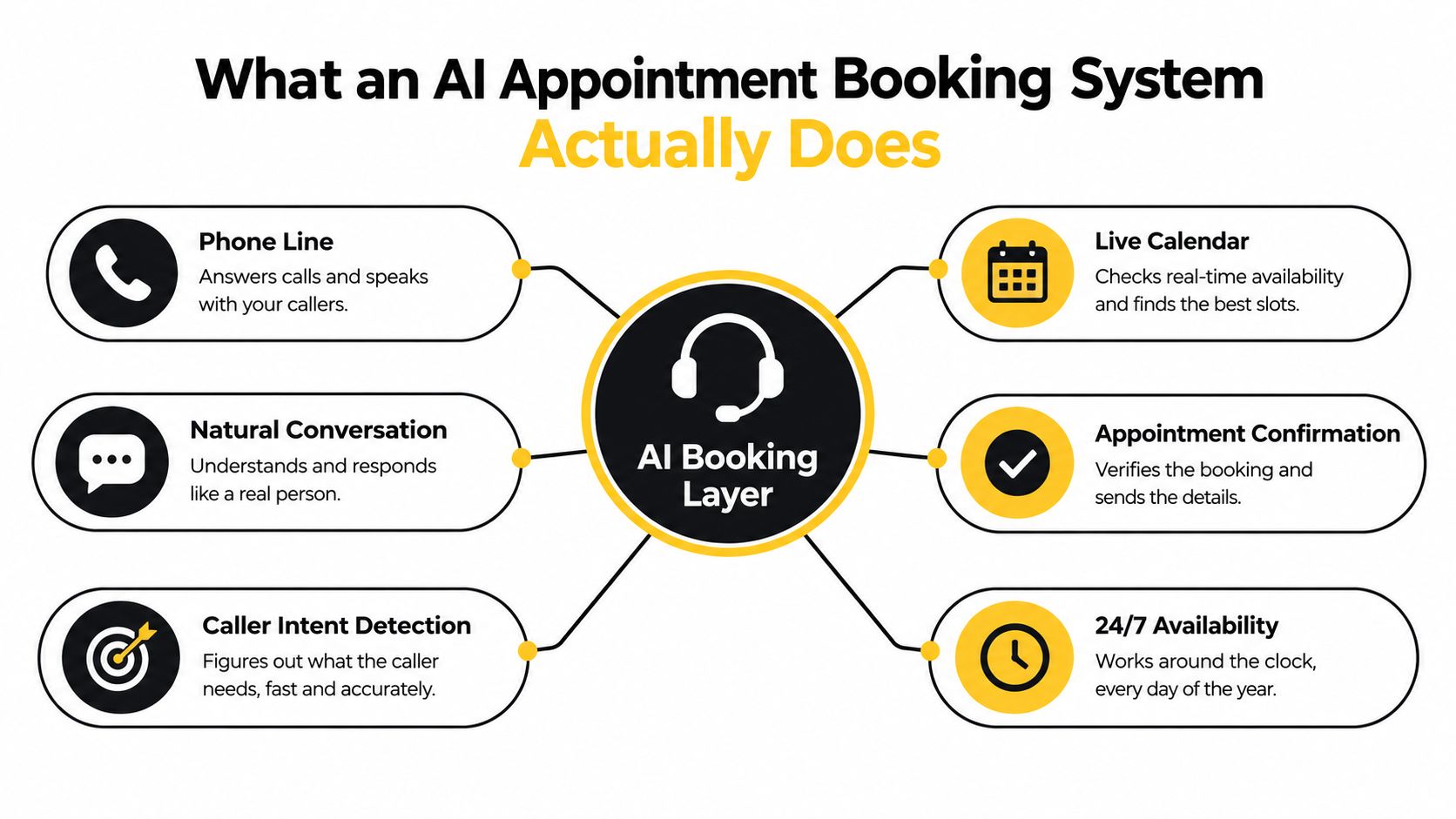
The four jobs the assistant must complete
Understand the request. “My boiler is leaking” requires a different path from “I'd like a routine inspection.” The assistant should identify the service type, urgency, location, and any other information that affects routing.
Read the current calendar. The system should query the connected calendar or scheduling platform instead of relying on a stale list of open times. It may need to account for the appointment duration, travel time, staff assignment, working hours, and buffers.
Offer an allowed slot. The assistant should propose only times returned by the availability check. It shouldn't guess that a technician is free because a general calendar appears open.
Commit the booking. After the caller confirms, the system writes the appointment, sends the confirmation, and logs the lead. Google's described setup uses calendar authorization, a booking script or template, a phone number, and forwarding or direct use of that number. Its scheduling flow also queries availability, writes the appointment, sends confirmation through connected notifications, and records the event in the selected calendar. A practical explanation of AI phone booking mechanics describes those actions as separate integration steps rather than one vague “AI scheduling” feature.
The voice layer has its own demands. Callers interrupt themselves, change the service request halfway through a sentence, speak with accents, or provide an address in an unexpected format. The assistant must preserve the booking state while handling those changes. For businesses that manage rooms, staff, or treatment durations, resources such as spa operations and appointment scheduling software show why booking is more than matching a person with an empty rectangle on a calendar.
For a deeper look at the receptionist layer, see this guide to an AI phone receptionist.
How the Booking Flow Works Step by Step
A successful call passes through several systems. The caller experiences one conversation, but the business depends on each handoff producing the right data.
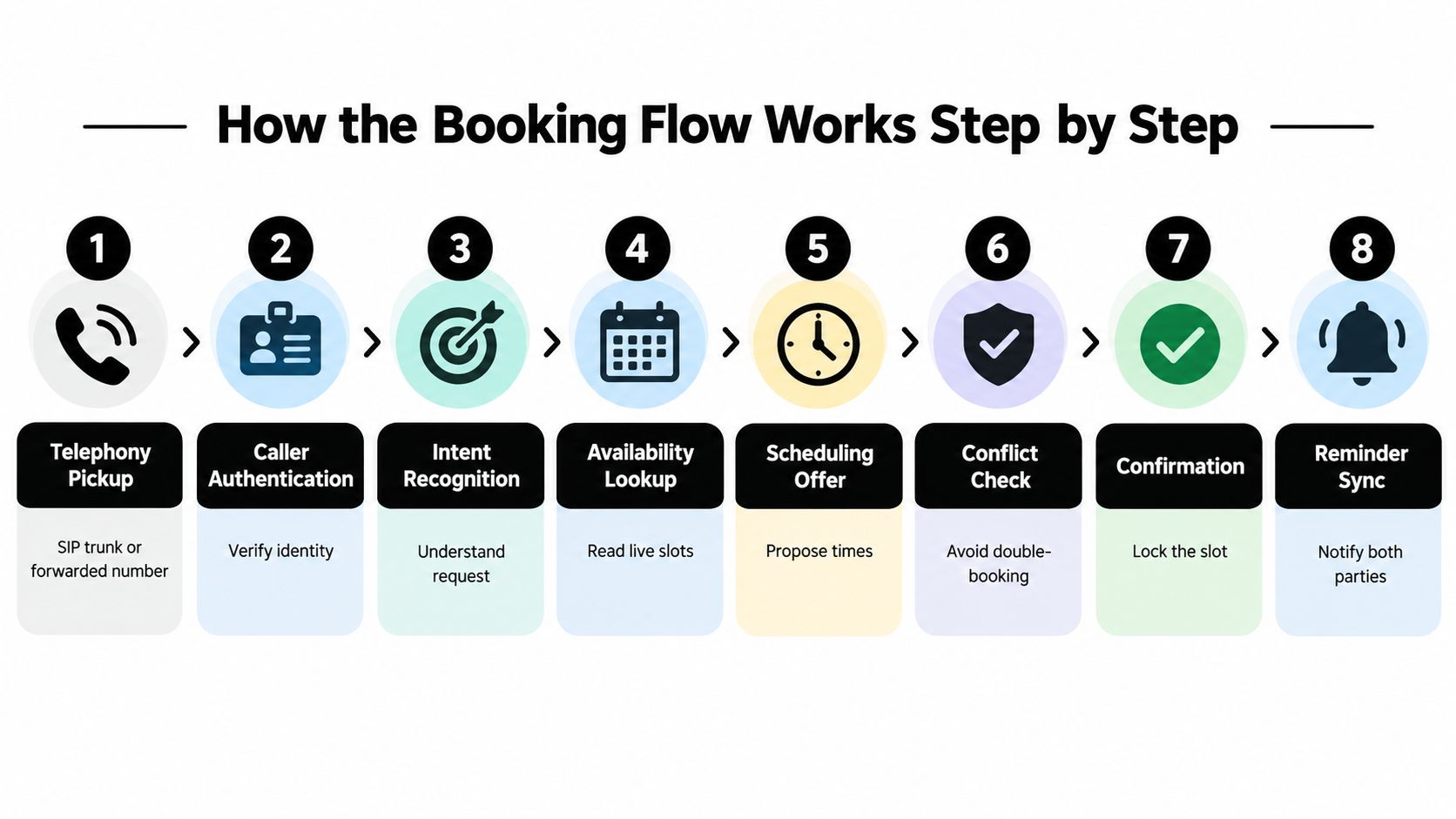
From ringing phone to calendar event
Telephony pickup. The call reaches the agent through call forwarding, SIP trunking, number porting, or another telephony connection. Twilio and Telnyx are examples of voice infrastructure that can carry the call.
Caller authentication. The system may confirm a name, phone number, existing customer record, or other details when the workflow requires it.
Intent recognition. The assistant determines whether the person wants emergency service, a quote, maintenance, a consultation, or something outside the booking workflow.
Job classification. It captures the service type and gathers information that affects duration, staff assignment, urgency, or routing.
Service-zone validation. The system checks whether the address is inside the business's operating area and whether the requested service is available there.
Time normalization. The assistant converts the caller's stated time into the business's relevant local time. Named IANA time zones are safer than storing only a raw UTC offset, especially when daylight-saving rules change.
Availability lookup and conflict check. The calendar or native connector returns possible slots. The system applies duration, travel, buffer, and duplicate-booking rules before presenting an option.
Confirmation and reminder sync. Once the caller agrees, the assistant locks the appointment, sends an SMS or email receipt, and logs the interaction in the CRM or job-management platform.
One implemented real-time voice booking system combined Twilio Voice, Google Calendar, Google Sheets, and n8n, and completed end-to-end booking in under two minutes during performance testing. The published implementation is useful because it shows the booking path as connected telephony, workflow, calendar, and record systems rather than a standalone chatbot.
Where silent failures appear
Voice latency affects turn-taking. Production benchmarks for a scheduling agent have reported approximately 600 milliseconds of end-to-end latency, while comparable systems have been measured in the 800 to 1,500 millisecond range, with difficult cases reaching about 2.5 seconds. The voice-agent scheduling benchmark discussion explains why pauses matter. A caller who repeatedly talks over a delayed assistant may abandon the call or assume nobody is listening.
A calendar event can also look correct while carrying the wrong local time. A daylight-saving transition, an expired connection, or a missed update can produce an appointment that appears confirmed to the caller but is absent or shifted in the operator's calendar. That's why a booking product should be evaluated like this booking system, by examining the full scheduling workflow rather than only the conversational surface.
For an implementation-oriented walkthrough, review this AI phone agent appointment-booking guide.
Core Features That Separate Real Systems From Demos
A polished voice demo proves that an assistant can respond. It doesn't prove that the business calendar will remain accurate after several people make changes, cancel visits, or call at the same time.
Live availability and deterministic slot logic
The assistant must query the current source of truth before offering a time. It should consider appointment length, travel buffers, business hours, staff assignment, and existing events. A response such as “Tuesday afternoon should work” is unsafe unless the system has checked the actual scheduling rules.
A practical small-business workflow requires explicit confirmation and validation of the time zone, service duration, staff, business hours, and duplicate bookings. The guidance to validate live appointment availability and booking inputs captures the central rule: the system should never invent availability.
Qualification before the calendar write
The assistant should collect the information that determines whether the appointment belongs on the calendar at all. For a home-service company, that can include the service type, urgency, address, and a description of the problem. For a law firm, salon, dental practice, or vet clinic, it may include the matter category, appointment type, practitioner, or required preparation.
A booking that lacks those details can create a poor dispatch decision. Qualification isn't an obstacle placed in front of the customer. It's calendar triage.
Bidirectional integration
A system should read changes made by staff and write confirmed appointments back to the scheduling system. If an office employee moves an event on a connected calendar, the assistant needs a reliable way to see that change. Vendors should explain how they renew calendar push channels, reconcile missed webhooks, and recover when an integration loses authorization.
Independent integration guidance distinguishes native connections, API-based connections, and middleware. It also identifies Google Calendar, Calendly, and Cal.com as common calendar integrations, while noting that the connection method affects setup and maintenance. This integration overview is a useful starting point for questions about telephony, CRM, calendar access, and number ownership.
Other safeguards matter too:
- Keep the existing number: Call forwarding can preserve the number customers already know, while number porting moves that number to another platform. The choice affects failover and control.
- Provide a human escape route: The assistant should transfer a caller when the request is uncertain, sensitive, or outside the configured workflow.
- Keep an audit trail: Store the call outcome, requested service, offered slot, confirmed time, and any transfer or correction.
- Recover from edge cases: Reschedules, cancellations, missed calendar updates, and no-shows should produce a visible workflow instead of a silent failure.
These are the mechanics covered in a reliable appointment scheduling setup, not decorative features added to a product page.
Why Local Service Businesses See the Fastest ROI
Local service companies feel booking friction immediately. A plumber, electrician, HVAC technician, mobile detailer, salon, or small clinic often depends on a phone conversation to understand the request before assigning time and staff. A customer who can't reach the business may not leave enough information for a later callback.
The value of automation comes from closing that gap while the customer is still engaged. The assistant can capture the address, understand the request, check the schedule, and create a usable record without asking the owner to stop work. For a company with mobile technicians, the quality of the booking matters as much as the fact that an event exists.
The broader market reflects growing interest in automated booking. Appointment scheduling software was valued at USD 546.1 million in 2025 and is projected to reach USD 1,518.4 million by 2032, with a projected 15.7% compound annual growth rate, according to the cited market overview. That projection describes the market, not the return any individual service business should expect.
Typical ROI Benchmarks for Local Service AI Booking
The available verified data doesn't establish universal before-and-after benchmarks for missed calls, booked-job rates, payback periods, or local-service revenue. A responsible operator should measure those figures from the business's own call records instead of accepting a generic vendor promise.
| Metric | Before AI | After 90 Days |
|---|---|---|
| Answered inbound calls | Establish a baseline from call records | Compare with the same call categories and hours |
| Qualified appointments | Count only bookings that meet service rules | Track qualification rate and routing accuracy |
| Calendar conflicts | Record every duplicate or invalid booking | Verify that conflicts are prevented and recovered |
| Show-up performance | Track confirmed appointments that attend | Compare by service type and reminder workflow |
| Revenue attributed to calls | Tie jobs to recorded call outcomes | Review completed work, not only booked slots |
The business case becomes clearer when the owner separates answered calls, qualified appointments, completed jobs, and revenue. A full calendar can still hide poor routing, excessive travel, low-value work, or no-shows. The right system improves the path from conversation to completed service, not just the number of events displayed on a calendar.
The Hidden Risk of Bookings Without Qualification
A calendar full of appointments can make a business look busy while leaving technicians exhausted and margins weak.
Suppose a plumbing assistant schedules every inquiry as a standard visit. It doesn't ask whether the property is in the service area, whether the issue is urgent, or whether the requested repair fits the company's normal work. A technician may then spend valuable travel time on a minor job while a serious water-heater problem waits for the next opening.
The same pattern affects professional services. A legal practice may need to route matters by case type and attorney. A salon may need to distinguish a short service from a longer treatment. A clinic may need to reserve appropriate staff and room resources instead of placing every caller into the same generic appointment type.
More bookings don't automatically produce more revenue. Qualified bookings are the useful unit.
Questions the assistant should ask
- What does the caller need? Capture the service or matter in language the team can use.
- How urgent is it? Route emergencies or time-sensitive cases differently from routine requests.
- Where is the job? Confirm the address and service-zone rules before offering a visit.
- Who should handle it? Match the request to the technician, practitioner, attorney, or team member with the right capacity.
- Does the request meet the business's criteria? Apply minimum job rules without making the customer repeat the conversation.
Qualification should feel like a helpful intake, not an interrogation. The assistant can explain why it needs an address or service detail, then offer the next appropriate step. If the request falls outside the rules, it can route the caller to a person instead of forcing an unsuitable booking.
The important question isn't whether the AI can maximize occupied slots. It's whether it can maximize qualified appointments that have a realistic chance of becoming completed work.
Setup Options Without Changing Your Phone Number
You don't necessarily need to replace the phone number printed on your vans, website, invoices, or local listings. Common deployment paths include call forwarding, simultaneous ringing, and number porting. Call forwarding preserves the public number and routes calls to the AI service. Simultaneous ringing lets multiple destinations receive the call. Porting transfers the number to the new telephony provider.
Each approach changes the failure behavior. Ask what happens if the AI doesn't answer, if a caller requests a person, or if the service becomes unavailable. Independent integration guidance describes SIP trunking, call forwarding, and number porting as distinct options with different effects on downtime, number ownership, and caller-ID control.
Calendar and CRM connection choices
Native integrations are usually simpler to maintain because the vendor manages more of the connection. API-driven integrations can provide more control, but they require careful handling of permissions, expired credentials, and missed updates. Middleware such as an automation platform can connect systems that lack a direct integration, but it adds another handoff to test.
Start with the calendar that governs field work. That might be Google Calendar, Outlook, a scheduling platform, or a job-management system such as Jobber or ServiceTitan. Then confirm where the lead record belongs. A booking that reaches the calendar but not the CRM can leave the dispatcher without the address, call context, or qualification notes.
Tests to run before launch
- Time-zone test: Call from a different location and verify the displayed and stored local time.
- Daylight-saving test: Test appointments around a daylight-saving transition rather than assuming ordinary dates behave the same way.
- Buffer test: Create adjacent appointments and confirm that travel and preparation rules remain intact.
- After-hours test: Verify the emergency route, voicemail fallback, and next-business-day behavior.
- Concurrent-booking test: Have multiple callers request the same slot and confirm that only one receives it.
- Human-transfer test: Ask for a person and confirm that the transfer preserves the caller and conversation context.
Ask vendors who owns calendar write conflicts, how long call recordings are retained, how failed synchronization is surfaced, and whether a live caller can reach a human without being disconnected. Those answers reveal more about deployment maturity than a smooth demonstration.
A Short Checklist for Evaluating Any AI Booking System
Use a live call, not a slide deck. Ask the assistant to handle a normal request, an unclear request, a reschedule, and a request for a human.
Call handling
- Answer behavior: Does it respond promptly and identify the business clearly?
- Conversation quality: Can it handle interruptions, accents, background noise, and mid-call changes?
- Human handoff: Can it transfer the caller without losing the phone connection or collected details?
Calendar integrity
- Live availability: Does it query the current calendar before offering a slot?
- Scheduling rules: Does it respect service duration, travel buffers, working hours, and staff assignment?
- Conflict protection: Can it prevent duplicate bookings when requests arrive close together?
- Time accuracy: Does it handle named time zones and daylight-saving changes?
Qualification logic
- Useful intake: Does it ask the questions your dispatcher or technician needs?
- Routing: Can it distinguish emergencies, service areas, job types, and team assignments?
- Calendar quality: Can it reject or route poor-fit requests instead of filling every opening?
Reporting
- Call records: Can you review transcripts, outcomes, transfers, and missed opportunities?
- Source attribution: Can the business connect a booking to the call or message that created it?
- Recovery visibility: Does the system show failed syncs, corrections, cancellations, and reschedules?
Ask the vendor to prove two business outcomes with evidence relevant to your industry: the missed-call recovery rate and the share of booked calls that show up. If those figures aren't available, establish your own baseline before launch and review qualified bookings, completed jobs, conflicts, and attendance together.
SkipCalls answers business calls and texts, captures customer details, qualifies leads, checks real-time calendar availability, and books appointments without requiring you to change your existing phone number. It connects with CRM and calendar workflows, and it can notify you about hot leads by calling you, so SkipCalls can help you test the reliability layer behind AI appointment booking.




