The 15-Minute AI Receptionist Setup: A Solo Contractor’s Playbook
Stop missing jobs while you work. Set up a 24/7 AI receptionist in 15 minutes. A complete guide for plumbers, electricians, and solo trades.
It’s the scenario every solo contractor dreads: You’re on a roof, under a sink, or wiring a breaker box. Your phone buzzes in your pocket. It’s a local number.
Do you stop what you’re doing, wipe your hands, and risk your safety to answer? Or do you let it go to voicemail, knowing there’s an 85% chance that customer will never call back?
For solo operators, this is the daily paradox: You need to answer the phone to get work, but you need to ignore the phone to do the work.
Most contractors think the solution is hiring an office manager (too expensive) or sending calls to a call center (too impersonal). But in 2025, there’s a third option that costs less than a tank of gas: The AI Receptionist.
This isn’t about building complex robots or learning to code. This is a practical, 15-minute guide to setting up a 24/7 front desk that lives on your phone, filters spam, and books jobs while you work.
The Cost of the "Missed Call" Lifestyle
Before we dive into the setup, let’s look at the math. Why does this matter?
According to industry data, 62% of calls to contractors go unanswered during the workday. If your average job is worth $500, missing just two calls a week is a $52,000 annual loss.
But it’s not just about money; it’s about professionalism. Homeowners today have the "Amazon mindset." They want instant answers. If they hit your voicemail, they don't leave a message—they hit "Back" and call the next guy on Google.
Setting up an AI receptionist stops this leak instantly. And the best part? You can do it from your van in the time it takes to eat lunch.
Step 1: The "Van Setup" (Call Forwarding)
The biggest myth about AI phone answering is that you need a new phone number. You don’t. You want to keep the number your customers already know—the one on your truck and business cards.
The first step is enabling Call Forwarding. This is the bridge that connects your cell phone to the AI.
How it works:
- Download the App: Start by getting the SkipCalls app (or your chosen provider).
- Get Your Forwarding Number: The app will generate a unique number for your AI agent.
- Activate Forwarding: This is usually a simple code you dial on your phone (like
*72or*21followed by the forwarding number).
Pro Tip: You have two choices here:
- Conditional Forwarding (Recommended): The AI only answers when you don't pick up, are on another line, or decline the call. This lets you answer personally when you're free, but covers you when you're busy.
- Unconditional Forwarding: The AI answers everything immediately. Great for vacations or focused work days.
Time required: 3 minutes.
Step 2: The "Gatekeeper" (Spam & Screening)
If you're like most contractors, half your calls are "Scam Likely" or robots trying to sell you health insurance. You don't want your AI wasting time (and minutes) on these.
A good AI receptionist setup includes spam filtering. When configuring your AI, ensure the "Robocall Block" feature is on.
The "Human Filter" Setting: Configure your AI to ask for the caller's name and reason for calling immediately. This simple psychological hurdle stops 99% of robocalls because they can't answer a contextual question. Your AI will politely ask, "Who do I have the pleasure of speaking with?" Real customers answer; bots hang up.
Time required: 2 minutes.
Step 3: The "Dispatcher" (Scripting & Tone)
This is where the magic happens. You don't want a robotic voice saying, "Please leave a message." You want a helpful assistant that sounds like part of your team.
Best Practice Script for Trades:
Don't overcomplicate it. Give your AI a persona (e.g., "Sarah, the Office Assistant").
Recommended Greeting:
"Thanks for calling [Your Company Name]. I'm the automated assistant. [Name] is currently on a job site, but I can help you schedule an estimate, book a repair, or take a message. How can I help you today?"
Why this works:
- Honesty: It admits it's an assistant (people appreciate transparency).
- Context: It explains why you aren't answering ("on a job site" = "in demand" = "good contractor").
- Action: It offers immediate solutions (schedule, book, message).
Time required: 5 minutes.
Step 4: The "Calendar Command" (Booking Jobs)
The ultimate goal isn't just taking messages; it's booking work.
Most AI receptionists can sync with Google Calendar or Outlook.
Setup Rules for Solo Contractors:
- Buffer Times: Don't let the AI book back-to-back estimates across town. Set a 30-minute travel buffer in your calendar settings.
- Job Types: Teach the AI the difference between an "Estimate" (30 mins) and a "Service Call" (60+ mins).
- The "Safe Zone": Only allow the AI to book appointments between 8:00 AM and 10:00 AM, or 3:00 PM and 5:00 PM, leaving the middle of the day open for big jobs.
When a customer asks, "Can you come Tuesday?", the AI checks your real-time availability and says, "I have an opening at 9:00 AM or 2:00 PM. Which works for you?"
Time required: 5 minutes.
Handling the "After-Hours" Emergency
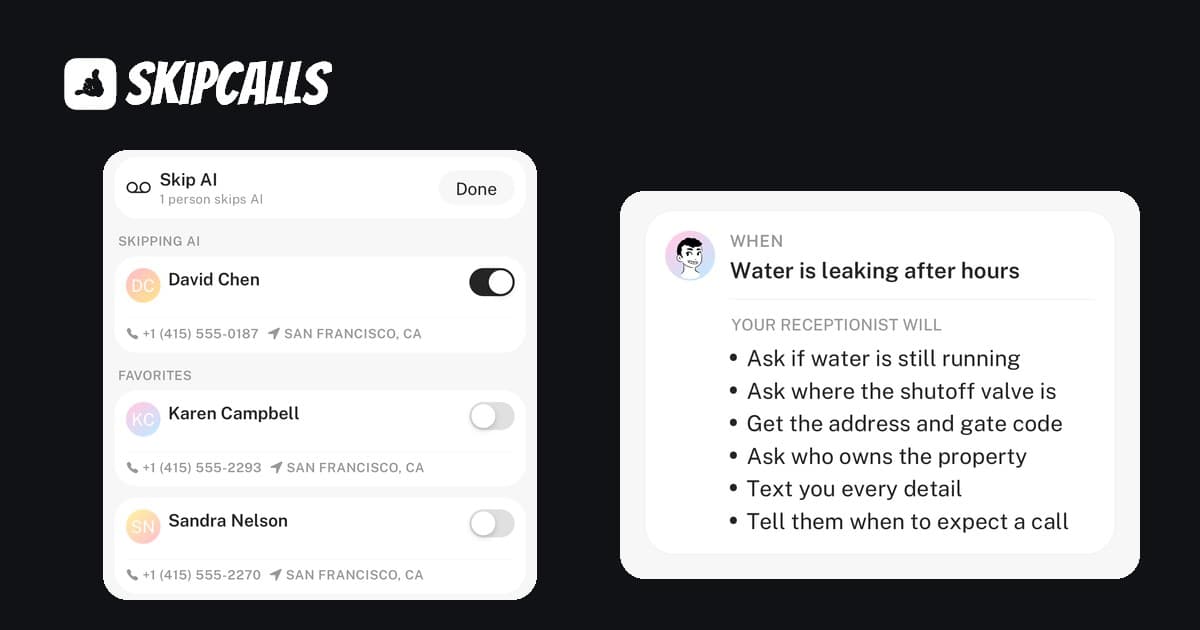
One of the biggest reasons contractors burn out is the 9 PM emergency call. You don't want to miss a true emergency (water flooding a basement), but you don't want to wake up for a tire-kicker.
The Solution: Keyword Escalation.
Configure your SkipCalls AI to listen for "Trigger Words" like:
- Flooding
- No heat
- Sparking
- Emergency
If the AI hears these during after-hours mode, it can be set to send you a Priority Push Notification or even ring your phone through a special override. For everything else (pricing questions, scheduling), it takes a message and lets you sleep.
Is It Worth It? (The ROI Check)
Let's look at the numbers again.
- Cost of AI: ~$199/year (SkipCalls Annual Plan).
- Cost of Missed Job: ~$350 - $9,000 (depending on trade).
If the AI captures just one job in an entire year that you would have otherwise missed, it has paid for itself. But in reality, users report booking 30% more jobs because they are simply the first to answer.
Calculate Your Missed Call Revenue
Step 1 of 3 • Takes 30 seconds
On a typical busy day, how often does your phone ring when you can't pick up?
When you're with a customer, under a house, on a ladder...
Don't stress about the exact number – a rough guess is perfect
Calculate Your Missed Call Revenue
Calculate how much revenue your business loses from missed phone calls. Most contractors lose $800-$1,500 per month from unanswered calls. SkipCalls AI phone answering costs only $199/year and captures every lead.
- Calculate how much money you lose from missed calls
- Average contractor loses $800-$1,500/month to unanswered calls
- SkipCalls AI answering costs only $199/year
- One captured job pays for 5+ years of service
Summary Checklist: Your 15-Minute Setup
Ready to reclaim your time? Here is your quick setup checklist:
- Download SkipCalls and create an account.
- Record/Select a Voice: Choose a friendly, professional tone.
- Sync Calendar: Connect Google Calendar so it knows when you're free.
- Set Business Hours: Decide when you want to be disturbed vs. when the AI handles it.
- Enable Call Forwarding: Dial the code and test it by calling your own number.
That’s it. You now have a 24/7 front desk. You can go back to being a craftsman, and let the AI handle the noise.