Small Business Phone Answering Service: A 2026 Guide
Learn what a small business phone answering service does, how AI and live receptionists compare, what to expect on price, and how to choose the right one.

 Reviewed by Nikita Podelenko, Founder & Engineer of SkipCalls
Table of contents
- What a Small Business Phone Answering Service Actually Does
- How AI and Virtual Receptionists Handle a Call
- Live, Virtual, AI, and Shared Receptionists Compared
- Pricing Models and the Real ROI of Answering More Calls
- Setting Up an Answering Service Without Changing Your Number
- Industry Use Cases from Trades to Law Firms
- Buyer Checklist for Choosing the Right Answering Service
- Picking the Right Setup for Your Business
Only 37.8% of small-business inbound calls get answered by a live person, while 37.8% go to voicemail and 24.3% get no response at all. If you're a solo owner or small team, that means roughly 62% of calls aren't handled live, and that's exactly why a small business phone answering service matters.
If you're a roofer, plumber, attorney, or salon owner, you already know the situation. You're on a job, with a client, driving, or dealing with the mess right in front of you. The phone rings, it goes to voicemail, and the caller doesn't wait around for your callback. They call the next business.
That's the problem a small business phone answering service solves. Not prestige. Not "customer experience strategy." It closes the coverage gap between when a prospect calls and when you can respond. In 2026, I think most owners are asking the wrong question. The issue isn't live versus AI. It's coverage versus capture. Can somebody or something pick up, capture intent, and move that lead forward fast enough to matter?
What a Small Business Phone Answering Service Actually Does
You're halfway through a roof repair. Gloves on, ladder up, client asking questions. Your phone buzzes three times in your pocket and rolls to voicemail. That caller needed an estimate and was ready to hire somebody this week. They don't leave a message. They call the next contractor.
That's how most small businesses lose work. Not because the owner is bad at sales. Because the phone rang at the wrong time.
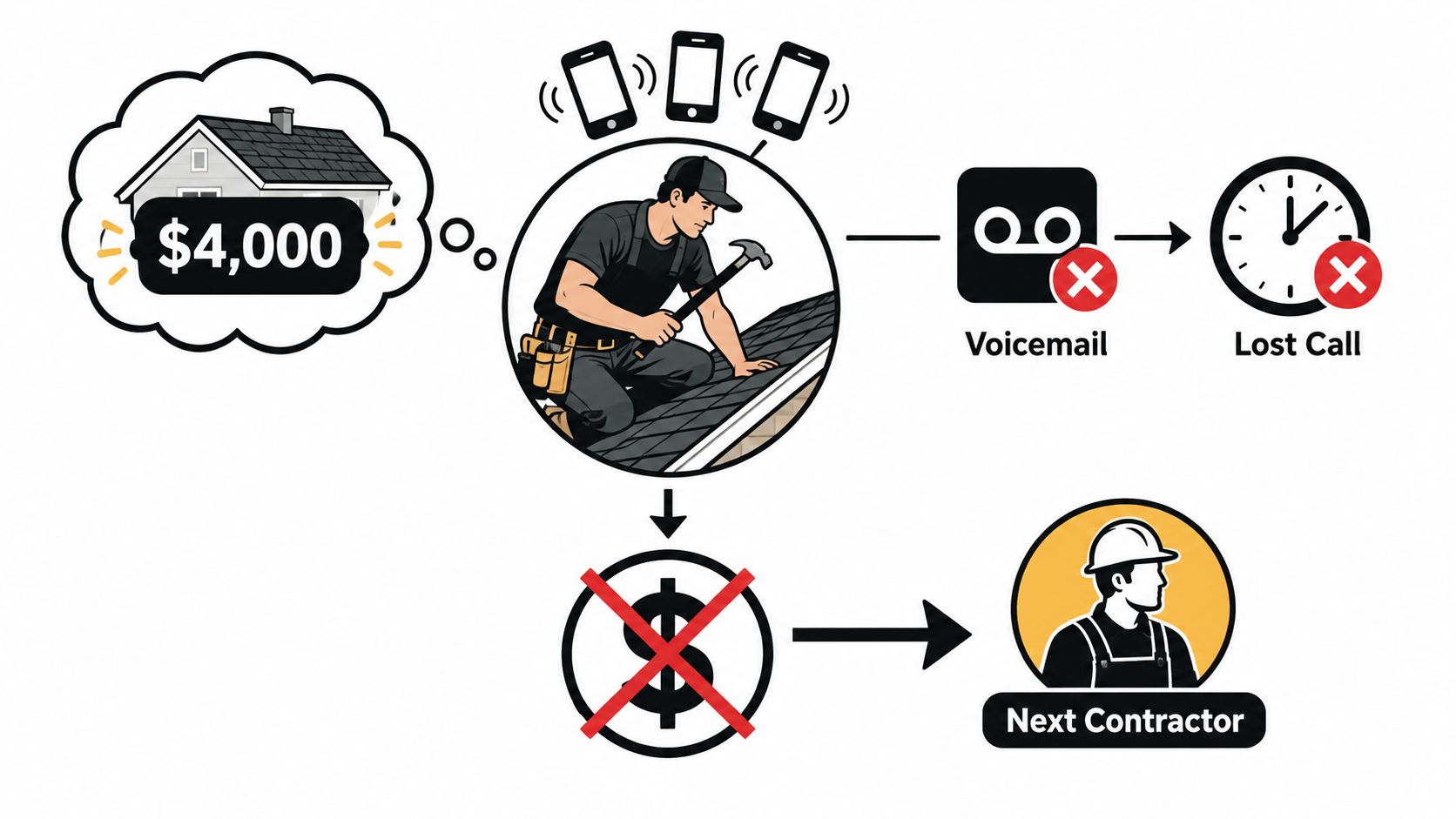
A small business phone answering service is any outside system that answers calls for you, figures out why the person is calling, and sends that call or lead to the right place. Sometimes that's a live receptionist. Sometimes it's AI. Sometimes it's a hybrid. The point isn't who answers first. The point is that the call doesn't die in voicemail.
A large observational study of 85 small businesses across 58 industries found that only 37.8% of inbound calls were answered live, while 37.8% went to voicemail and 24.3% got no response at all. Operationally, that means about 62% of calls were not handled by a live person, which is why one-person or front-desk-dependent setups leak leads so badly during busy periods (missed call study data).
The four jobs that matter
An answering service earns its keep when it does these four things well:
- Business-hours coverage: When you or your front desk are tied up, it still answers.
- After-hours pickup: Nights, weekends, and lunch breaks are where a lot of local-service calls disappear.
- Overflow handling: If multiple calls hit at once, the second and third callers still get handled.
- Structured intake: The system turns "Hey, I need help" into a usable record with name, issue, timing, and next step.
Practical rule: If your current setup depends on one person hearing every ring, you don't have a phone system. You have a hope-based workflow.
Why this category exists
Owners don't buy answering services because they love outsourcing conversations. They buy them because missing a ring is expensive. A voicemail box isn't a process. It's a dead end for a lot of callers.
The other reason this matters now is response speed. Research commonly cited in SMB call analytics says contacting a lead within 5 minutes can make it 21× more likely to convert than waiting 30 minutes, which is why fast routing, instant alerts, and immediate lead capture matter more than a polished greeting (speed-to-lead benchmark).
That's the frame I'd use for every buying decision here. Don't shop for "answering." Shop for capture within five minutes.
How AI and Virtual Receptionists Handle a Call
Most owners think these systems are complicated. They're not. The mechanics are pretty straightforward once you see the call path.
Start with your existing business number. The caller dials the number already on your truck, website, Google profile, or yard sign. You don't need to rip that out. One documented setup pattern is simple call forwarding from your current published number, with the main number staying the same across Google, your site, vehicle wraps, and business records (existing-number forwarding pattern).
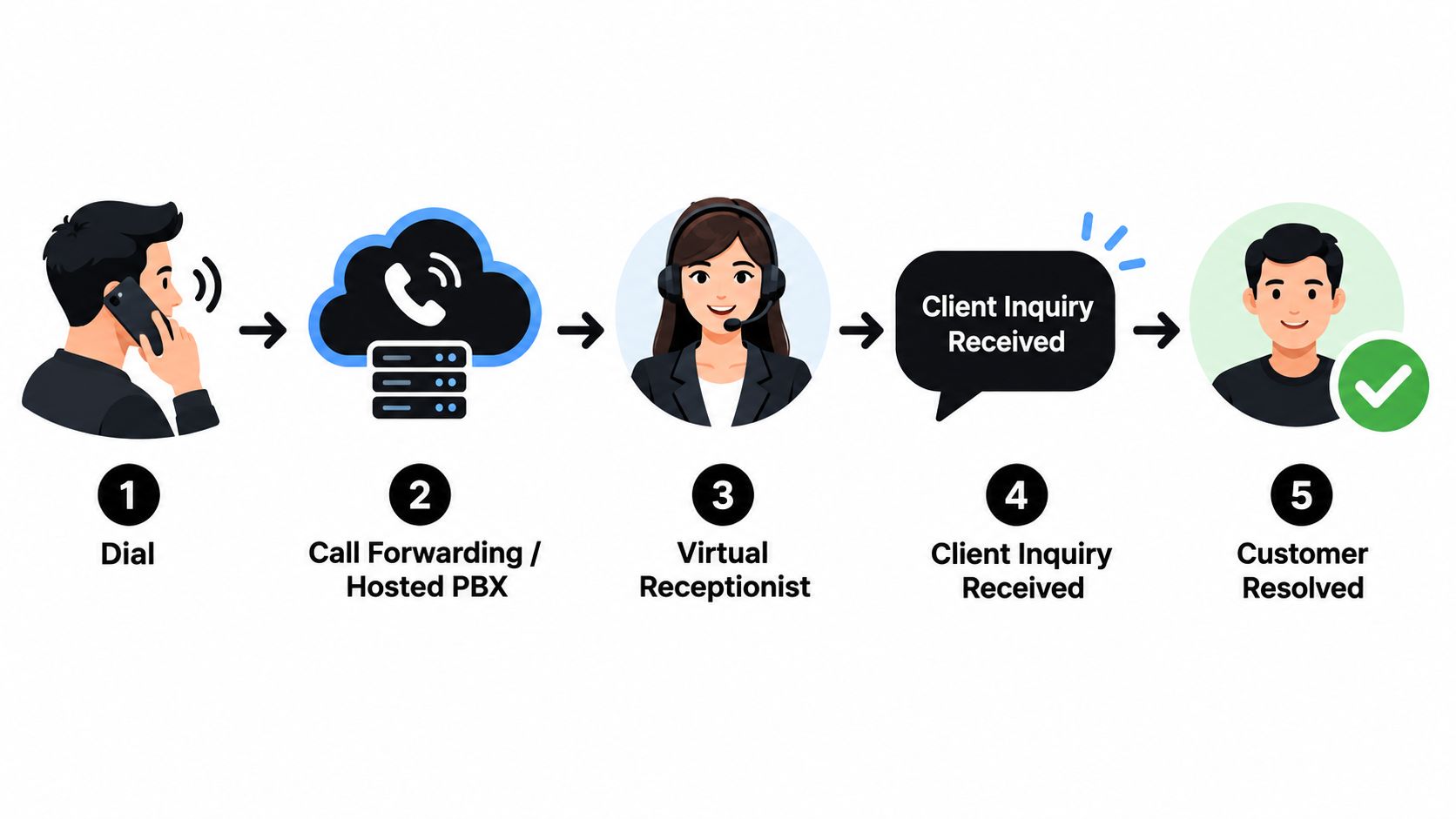
What the call flow looks like
Here's the typical journey:
- The customer calls your normal number.
- Forwarding or your phone system routes the call to an AI receptionist or virtual receptionist layer.
- The system answers with your greeting and asks a few intake questions.
- It identifies intent like new estimate, support request, billing issue, schedule change, or emergency.
- It triggers the right outcome such as booking, message delivery, or live escalation.
That final step matters most. Good setups branch cleanly into three outcomes:
- Book now: Appointment goes straight onto the calendar.
- Route details: Owner or staff gets the intake by SMS or email.
- Escalate urgency: An urgent caller gets transferred to the on-call person.
A lot of owners should watch a practical walkthrough before buying anything. This explainer on Orbit AI agent capabilities is useful because it shows what modern AI agents can do beyond greeting and message-taking.
Where the integrations do the heavy lifting
The software part matters more than the voice part. If the call ends and nothing lands in your calendar or CRM, the system isn't finished.
Some setups can book directly into tools like Google Calendar, ServiceTitan, Housecall Pro, Jobber, or the business CRM, then send SMS confirmations right after the call ends (real-time booking integrations). Others use tools like Calendly, HubSpot, Zapier, or webhooks to push intake into your workflow.
If you want a deeper look at how this works in practice, SkipCalls has a useful breakdown of the AI phone receptionist model.
What AI handles well and where it still falls short
I've used both live and AI setups, and here's the blunt version.
AI is very good at:
- Routine intake: collecting name, address, service type, timing
- After-hours coverage: no staffing issue, no missed lunch breaks
- FAQ handling: hours, service area, availability, basic pricing policy
- Bilingual intake: useful when you need broader coverage
- Concurrency: multiple calls at once without a queue problem
Live humans are still better when the call needs judgment. Distressed callers, delicate legal intake, complex objections, or emotionally charged situations still benefit from a real person who can read nuance.
The smartest setup isn't always all-human or all-AI. It's the one that handles routine calls instantly and reserves human attention for the calls that actually need it.
Live, Virtual, AI, and Shared Receptionists Compared
Most buying guides treat every answering service like it's the same thing with a different logo. That's lazy. These are different operating models, and they fail in different ways.
The better comparison isn't "which one sounds nicest." It's "which one gives me dependable coverage and actual lead capture for the kind of calls I get?"
The four models
| Answering Service Types Compared for Small Businesses | |||
|---|---|---|---|
| Service Type | Best For | Typical Pricing (2026) | Key Trade-off |
| Live answering service | Legal, medical, sensitive intake, high-emotion callers | Higher-cost, usually minute-based or quote-based | Strong empathy, weaker economics at scale |
| Virtual receptionist | Professional services wanting continuity and scheduling help | Monthly retainer or bundled plans | Better relationship feel, but limited by staffing time |
| AI receptionist | Home services, salons, straightforward intake, after-hours coverage | Lower-cost subscription or usage-based | Excellent coverage, but less nuanced in edge cases |
| Shared receptionist | Solo operators who want a human voice without dedicated staff | Flat monthly plan or shared bundle | Affordable human coverage, less consistency per caller |
My verdict on each
Live answering services make sense when the caller is upset, vulnerable, or making a high-trust decision. Estate law, hospice-adjacent services, medical practices, and some high-ticket consultative businesses fit here. The strongest pro is empathy. The most common complaint is cost creep once call minutes pile up.
Virtual receptionists work when you want more continuity and a semi-embedded front desk feel. They fit accounting firms, agencies, brokers, and offices where the same kinds of scheduling and routing happen every week. The upside is consistency. The downside is you're still buying a human bottleneck.
For a sharper look at how modern on-site lead capture tools compare to older chat-style approaches, the Captiwate vs legacy Servicebell comparison is worth reviewing because it highlights where instant response matters more than traditional handoff models.
AI receptionists are the best fit for a lot of small operators whether people want to admit it or not. If your calls are predictable, your volume is uneven, and you need nights and weekends covered, AI usually wins the math. It handles routine intake without getting tired, and it doesn't break when three people call at once. The complaint is obvious. It can sound flat or stumble when the conversation gets messy.
Shared receptionist models appeal to solo businesses that want a human voice but can't justify dedicated coverage. This can work well if your call volume is modest and you mostly need screening plus message-taking. The recurring pain point is inconsistency. The caller may not get the same person twice, and the receptionist may never know your business as you want.
Coverage beats charm. Capture beats coverage.
Here's where owners get tripped up. The cheaper model often wins on coverage because it answers more often, especially after hours. But it can lose on capture if it doesn't qualify the caller, log the details well, or route the lead fast.
Buy for the failure mode you can least afford. If your problem is missed calls, fix coverage first. If your problem is sloppy follow-up after pickup, fix capture first.
That's the lens I'd use. Not live versus AI. Not old-school versus new-school. Coverage versus capture.
Pricing Models and the Real ROI of Answering More Calls
Most owners ask the wrong pricing question. They ask, "How much does an answering service cost?" The better question is, "What am I buying, and how many missed opportunities does it take to pay for this?"
The pricing models you'll run into
| Answering Service Pricing Models at a Glance | |||
|---|---|---|---|
| Pricing Model | Typical Range | What It Covers | Watch For |
| Per-minute | Varies by provider and call time | Human talk time, basic message-taking, some routing | Overage charges, transfer time, after-hours billing |
| Per-call | Varies by provider and workflow complexity | A completed interaction or handled inbound conversation | What counts as a billable call |
| Monthly subscription | Flat recurring fee | Set volume, baseline features, sometimes texting and booking | Feature caps, call caps, usage thresholds |
| Tiered bundles | Several plan levels | Included usage bucket plus overages | Price jumps between tiers, unused capacity |
The line items matter. After-hours coverage, bilingual support, CRM syncing, overflow handling, warm transfer rules, and calendar access sometimes sit outside the base plan. If a quote looks cheap, read the parts that aren't on the first line.
How I'd model ROI
Use a simple owner-operator formula:
- Missed-call rate
- multiplied by the value of a booked call in your business
- compared against the monthly cost of the service
You don't need fantasy math. You need honest math.
Industry summaries say small and mid-sized businesses miss roughly 25% to 60% of inbound calls, with some home-service datasets putting missed-call risk near 62% to 70% in trades. The same summary also notes a benchmark claiming businesses can lose up to $126,000 annually from missed calls, which is directionally useful as a warning even if your own business is smaller (missed-call cost research summary).
For a solo HVAC contractor, the model is simple. If one captured call in a week covers the monthly bill, the decision is easy. For a two-partner law firm, the intake value per call is often higher, but so is the need for nuance, so paying more for live handling can make sense if the workflow converts consultations cleanly.
One thing I like about this category is that setup no longer has to be heavy. A missed-call text-back workflow can automatically text callers who don't connect, continue by two-way SMS, answer questions, qualify the lead, and book an appointment. One published implementation says it can be launched in about 5 minutes and handle unlimited concurrent calls and texts (missed-call text-back workflow).
If you want to sanity-check what different AI receptionist plans usually include, this guide to AI receptionist pricing is a practical place to compare the billing logic.
My rule of thumb
If your business lives on inbound calls and one additional captured call per week covers the service, stop overthinking it. The danger isn't paying for an answering service. It's paying for one that answers but doesn't move the lead anywhere useful.
Setting Up an Answering Service Without Changing Your Number
Most small businesses overcomplicate setup. You usually don't need to port your number. You need to forward it correctly and decide when calls should roll over.
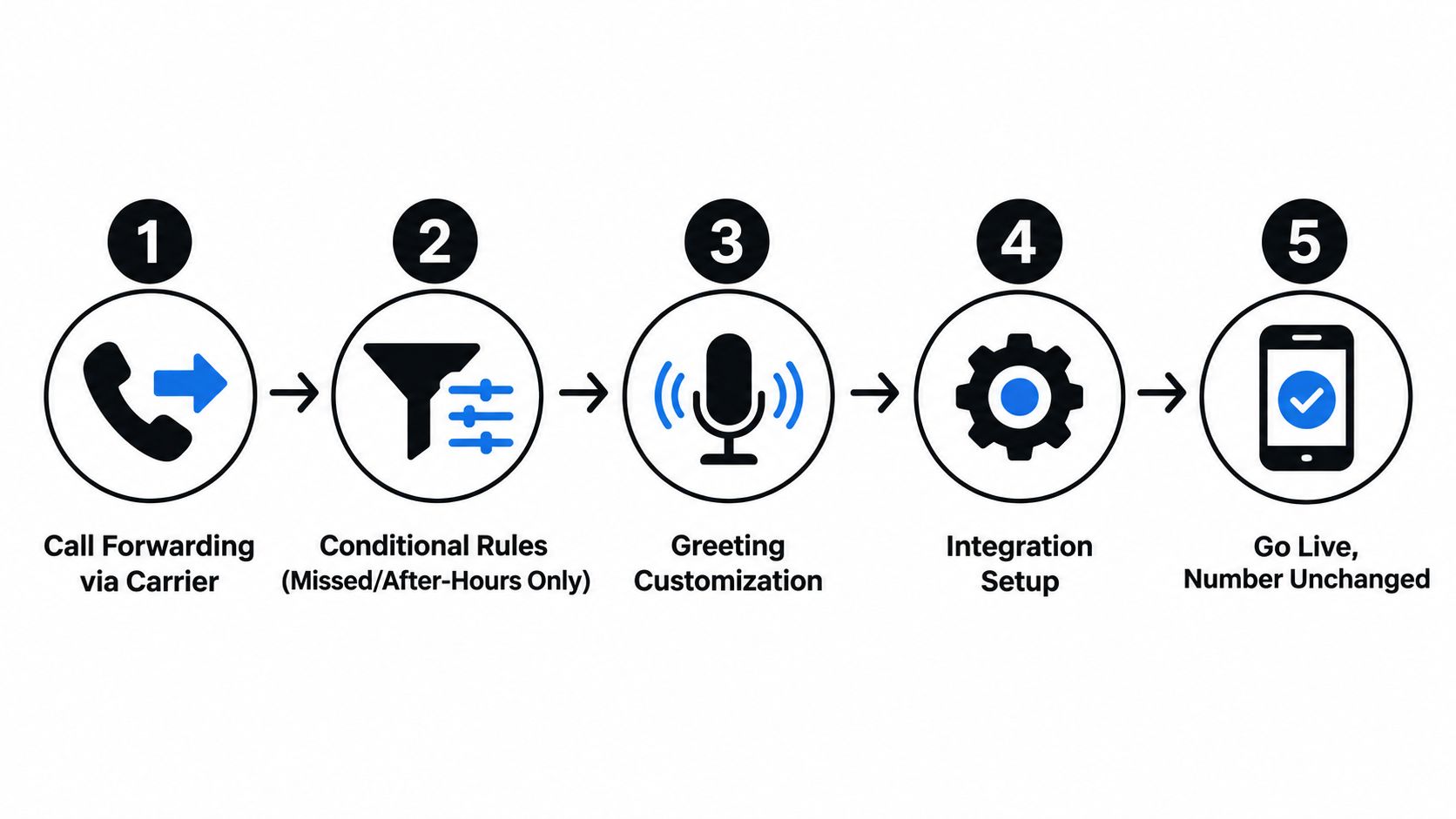
The clean five-step setup
Turn on carrier forwarding
Start with your existing business number. Forward calls to the answering layer instead of replacing the public number.Use conditional routing
Send only missed calls, after-hours calls, weekend calls, or overflow traffic if that's what you need. A lot of owners make the mistake of forwarding everything before testing the workflow.Write the greeting like a real business owner
Keep it short. Name the business, say what happens next, and set expectations for urgent requests.Build escalation rules
Decide what triggers a transfer, a text alert, an email summary, or an on-call dispatch message.Connect your CRM or calendar
If calls don't end up in your system of record, people will still drop the ball manually.
What owners mess up on day one
The biggest mistake is porting a number when conditional forwarding would have done the job with far less friction. The next mistake is failing to define urgency rules. "Emergency" means something different for a plumber, a criminal defense attorney, and a medspa.
You also need to think through:
- Recording consent: Some states require very clear disclosure.
- Time zones: Especially if you serve more than one metro.
- Compliance: HIPAA and similar obligations need to be verified in writing where relevant.
Keep the number. Change the routing. That's almost always the cleaner move for a small business.
If you're sorting out the mechanics, this breakdown of call forwarding options is useful because it maps the different routing patterns to real business scenarios.
Industry Use Cases from Trades to Law Firms
The same service model doesn't fit every business. A plumber's after-hours emergency call is not the same as an estate-planning consultation or a weekend showing request.
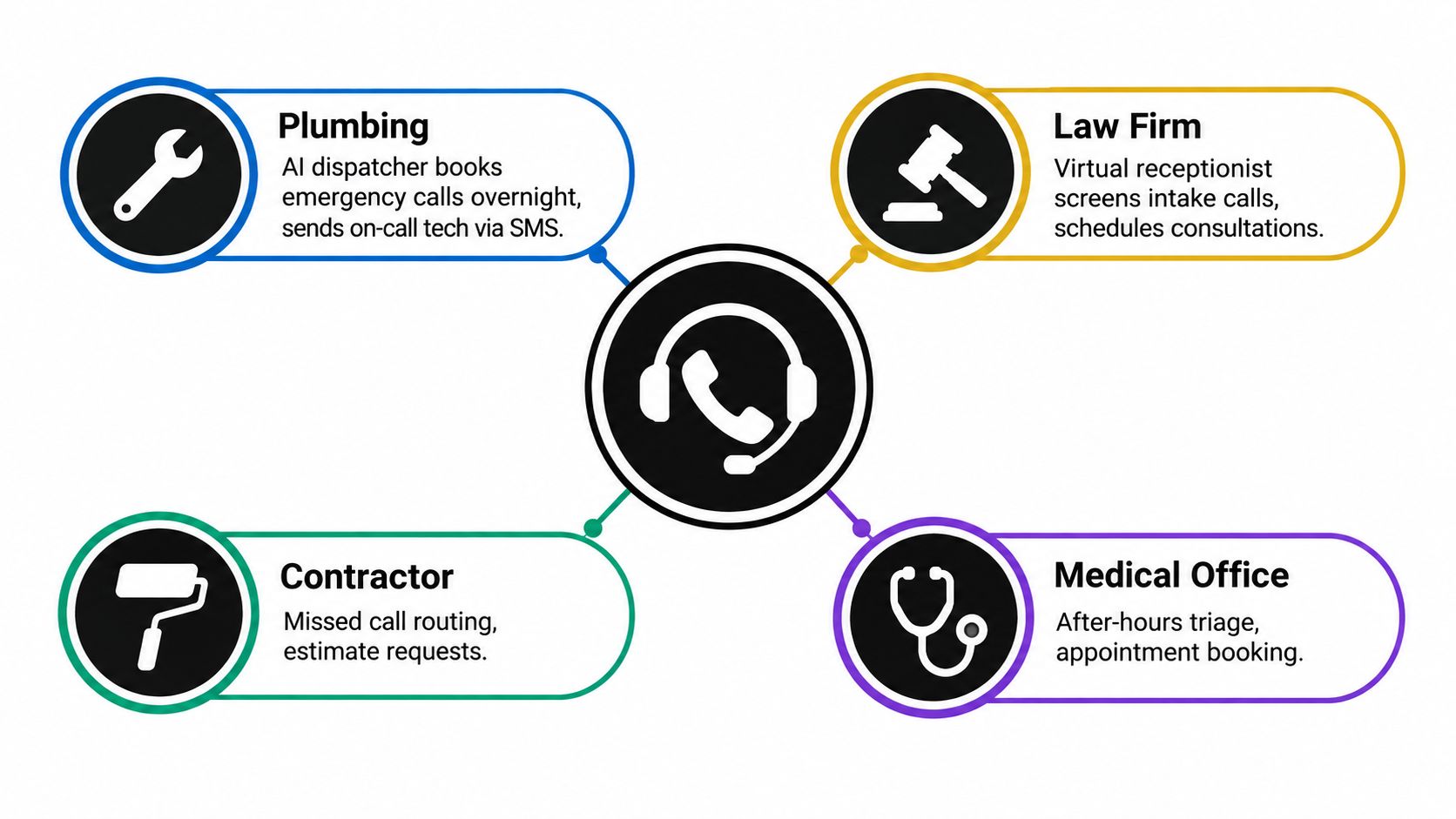
Home services
A plumbing company usually needs one thing after hours. Don't let emergency calls vanish. An AI receptionist can answer overnight, collect the issue, grab the address, and text the on-call tech with the details. That's a strong fit because the intake is predictable and speed matters more than warmth.
SkipCalls fits well in the mix. SkipCalls is a simple-to-set-up solution that works for any case, from customer support, lead qualification, appointment booking, and many more. It handles voice and text and does not require you to change your phone number to integrate into your workflow. It has many integrations with CRM and calendars.
Law firms
A solo estate-planning attorney has a different problem. Many calls aren't emergencies, but they do require sensitivity, matter-type screening, and often bilingual intake. A live receptionist usually fits better here, especially after hours, because the caller may need reassurance as much as routing.
One widely cited benchmark says only 37.8% of small-business calls are answered live, with 37.8% going to voicemail and 24.3% getting no response, and the same research reports that 85% of callers who don't get through never call back. That's why legal intake can't rely on voicemail and vague callback promises (SMB missed-call benchmark).
Real estate and beauty
A boutique brokerage can use AI well for weekend showing requests. The system greets the caller, captures the property they're asking about, logs budget or timing, and texts the lead to the agent quickly. That isn't about replacing the agent. It's about making sure a live opportunity doesn't cool off before Monday.
A multi-location medspa has another issue entirely. Lunch breaks, front-desk rushes, and overlapping calls. A shared receptionist pool can smooth that out without hiring separate coverage at every desk.
If you want to explore how these patterns change by business type, SkipCalls has a useful set of industry-specific use cases.
What the owner should actually measure
Don't obsess over whether the voice sounded "impressive." Measure things like:
- Did every caller reach a response path?
- Did intake details arrive cleanly?
- Did urgent calls hit the right person fast?
- Did appointments land on the calendar without manual re-entry?
That's the difference between a tool that sounds good in a demo and one that helps a small team run tighter.
Buyer Checklist for Choosing the Right Answering Service
Most owners get sold on features and regret the workflow later. Don't buy the demo. Buy the operating reality.
Coverage
Ask these first:
- Are calls answered around the clock: nights, weekends, holidays, and lunch breaks?
- What happens during spikes: If several calls hit at once, does the system queue, overflow, or fail?
- What happens when agents are busy: Do callers land in voicemail, or does another path take over?
If the vendor gets fuzzy here, walk away. Coverage is the floor.
Capture
This is where many services quietly fall apart.
- How fast is caller intent logged: right away, or after the call through manual notes?
- Can they show a real transcript or intake summary: not a polished mockup?
- Does the CRM or calendar sync fire automatically: or is someone copying notes by hand?
Industry data on missed-call behavior shows why this matters. One synthesis reports that 69% of missed business calls do not get a callback within 48 hours, and other research cited in the same market places the no-callback share near 80% for callers who hit voicemail. That's why the value isn't just "someone answered." It's whether the lead was captured before it disappeared (missed-call callback behavior).
Ask the vendor to describe the path from first ring to booked job. If they can't explain it clearly, they probably can't deliver it clearly.
Escalation
A service that answers but can't escalate is just a nicer voicemail box.
- Who gets urgent calls and by what trigger
- Whether warm transfers are available
- Whether alerts go by text, phone call, email, or app
- How after-hours emergencies are separated from routine inquiries
Lock-in
This is the part owners forget until they're unhappy.
- Contract length
- Cancellation terms
- Number ownership and porting rights
- Who owns transcripts, recordings, and intake data
- How hard it is to export and switch
Two red flags should stop the conversation fast. First, vague per-minute pricing. Second, any vendor that can't explain how a lead gets from ring to qualified next step in under five minutes.
Picking the Right Setup for Your Business
Here's my blunt recommendation. Start by deciding whether your bigger problem is coverage or capture.
If you're a solo tradesperson or a small home-service shop, coverage is usually the pain. You're on jobs, in trucks, or off the clock when the phone rings. In that case, an AI receptionist that can answer instantly, collect details, and book directly into your scheduling system usually gives the best return.
If you run a small law firm, real estate team, accounting office, or insurance shop, capture may matter more. You still need coverage, but your calls often involve nuance, screening, and warm transfer judgment. That's where a virtual receptionist or shared live receptionist with AI overflow makes more sense.
E-commerce and SaaS businesses with predictable support traffic usually don't need much here unless phone remains a primary sales channel.
The practical match
| Which Answering Setup Fits Your Business | ||
|---|---|---|
| Business Profile | Recommended Setup | Optimize For |
| Solo contractor or home-service owner | AI receptionist with booking and text follow-up | Coverage |
| One-to-three-person local service team | AI-first setup with escalation rules | Coverage and fast intake |
| Small law, real estate, or insurance office | Virtual or shared live receptionist with AI overflow | Capture |
| Multi-location appointment business | Shared receptionist plus calendar integration | Coverage across front-desk gaps |
| Low-phone-volume online business | Minimal answering layer or voicemail-plus-text-back | Simplicity |
The first decision matters more than every feature comparison after that. If you need someone to always pick up, buy for coverage. If you need clean lead routing and quality intake, buy for capture. Then choose the setup that does that one job well, every time.
SkipCalls is built for the exact gap most small businesses have. It answers calls and texts, captures customer details, books appointments, and helps you keep your existing number while plugging into your workflow. If you want to see whether it fits your business, visit SkipCalls.