Multiple Phone Line Setup: A Small Business Guide
Learn how to set up a multiple phone line system for your business, including costs, features, and tips for choosing the right provider in 2026.

 Reviewed by Nikita Podelenko, Founder & Engineer of SkipCalls
Table of contents
You're under a sink, in a showing, or halfway through a color service when your business phone starts buzzing in your pocket. You can't answer without looking unprofessional to the person paying you right now, so you let it ring. That single missed call is where most multiple phone line setups fail, not because you bought the wrong number, but because nobody designed what happens when you're busy.
The Call You Missed Last Week
Last Tuesday, a two-person plumbing shop owner I know was elbow-deep in a water heater swap when his main line rang three times in twenty minutes. One caller was a repeat customer with a question. One was a robocall. The third was a homeowner with a burst pipe who booked the next plumber who picked up. He found all three in voicemail at lunch, too late for the job that mattered.
That pattern is the daily reality for solo operators, home service businesses, real estate agents, insurance agencies, law firms, salons, and debt collection teams. You depend on the phone to win work. You also can't afford a full-time receptionist sitting idle between calls. So you add a second number for ads, a cell for clients, maybe a separate line for a second location, and hope the extra numbers create coverage.
A multiple phone line setup isn't a hardware purchase. It's a coordination system for picking up, qualifying, and booking when you're not free.
What a Working Setup Has to Do
It has to answer every published number quickly, figure out whether the caller needs a quote, a booking, or a human right now, and capture enough detail that you can act without playing phone tag. For shops that schedule work online, that intake should connect cleanly to booking rather than ending in a sticky note. If you're evaluating that piece, online booking for repair shops shows how a booking flow can sit alongside phone intake instead of competing with it.
You'll get a concrete plan here. First, why buying numbers alone doesn't raise your answer rate. Then the four building blocks every setup needs, how an AI receptionist fits at the front, the capacity math vendors rarely explain, the compliance line between answering and automated follow-up, and a troubleshooting checklist you can run in an afternoon.
Why More Lines Do Not Mean More Answers
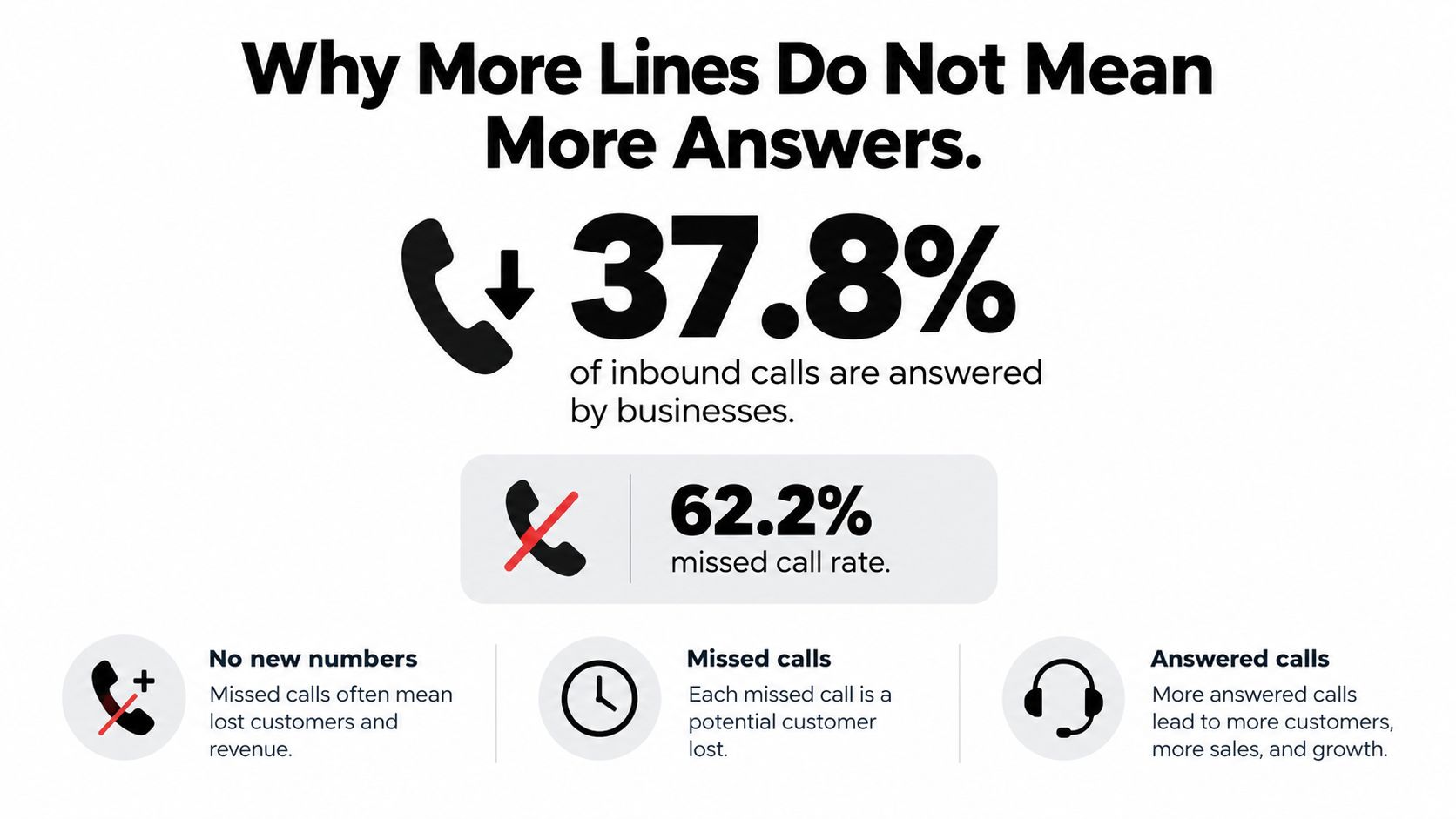
Adding numbers feels like progress. You've got a main line, a Google ad number, a texting number, and your personal cell on the truck wrap. On paper, customers have four ways to reach you. In practice, you've built four places where a call can go unanswered.
The numbers back that up. Reporting cited in 2025 business phone statistics from Ambs Call Center says 77% of customers expect to reach someone immediately, while a separate cited dataset in that same reporting found businesses answered only 37.8% of inbound calls, sent 37.8% to voicemail, and produced no response for 24.3%.
The Contractor With Four Numbers and No Coverage
I watched a remodeler add separate numbers for kitchens, baths, handyman work, and his office. Callers picked whichever number Google showed them. He checked two voicemail boxes regularly and forgot the other two existed. A kitchen lead left a detailed message on the bath line on a Friday. He found it Wednesday. She'd already signed with someone else.
He didn't have a capacity problem. He had an ownership problem. Every new line created another queue nobody staffed, another inbox nobody checked, and another callback task with no name attached to it.
Measure this instead: answered-and-booked calls per week. If that number doesn't move, your new phone line is decoration.
The fix isn't fewer numbers. Plenty of businesses legitimately need separate lines for locations, campaigns, or departments. The fix is one coordinated intake layer sitting in front of all of them, so every number leads to the same answering, qualifying, and booking behavior. A caller shouldn't get a great experience on your main line and dead air on your ad line. Design for the moment every line is busy, it's after hours, or you're face-to-face with a client. That's the moment that decides whether you win the job.
The Four Building Blocks of a Multi-Line Setup
Multiple lines aren't new. In the FCC's 1996 Statistics of Communications Common Carriers, regulators counted 41,181,509 analog multiline business access lines against 4,759,218 analog single-line business access lines, roughly 8.7 to 1. Businesses have always needed one public number to serve several people and several simultaneous conversations. The tools changed. The structure didn't.
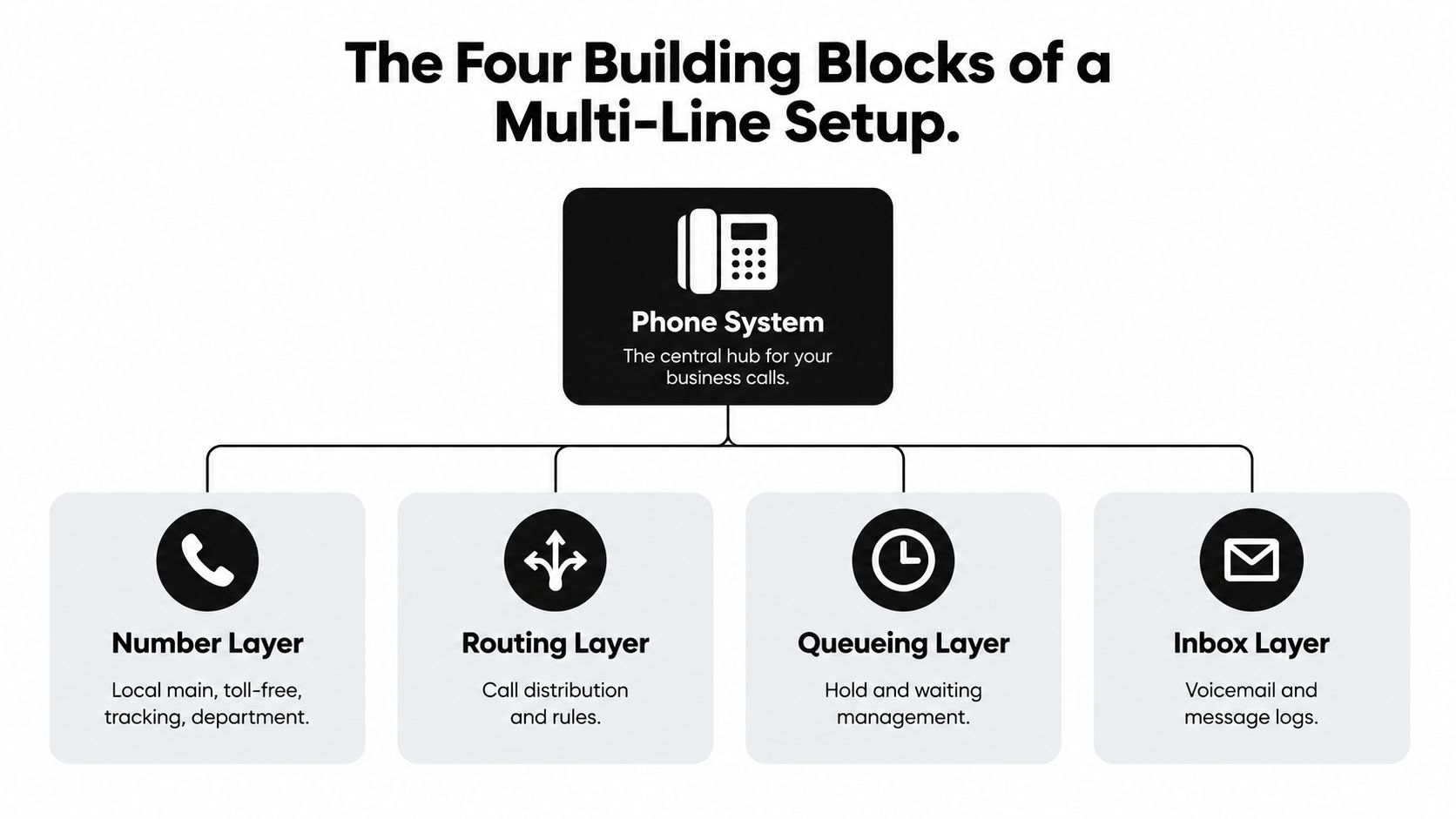
The Number Layer
This is what customers dial. A real estate agent might publish one local main number everywhere, plus tracking numbers on yard signs and listing pages so she knows which property generated the call. Keep your main number sacred and consistent. Use tracking and department numbers for measurement, not as separate identities customers have to remember.
The Routing Layer
Routing decides where a call goes based on time, location, or intent. A two-truck HVAC company can ring the on-call tech after hours, send maintenance-plan callers to scheduling during the day, and keep a simple menu for emergencies. If you're still on copper lines, switching to VoIP for your business is worth reviewing because internet-based systems make these rules far easier to change. For the routing rules themselves, call routing software for local teams covers the practical patterns small teams use.
The Queueing Layer and the Unified Inbox
Queueing is what happens when everyone's busy. Callers can hold, get a callback offer, or reach an answering layer that captures the job details. What they shouldn't get is endless ringing.
- Queueing takeaway: decide the busy behavior for every line before you publish it, not after complaints start.
- Inbox takeaway: calls, texts, voicemails, and contact details from every number land in one unified inbox you check.
That last piece matters because a caller who texts your ad number after a missed call expects you to see it in context. Four building blocks, one mental model. Numbers bring calls in, routing sends them somewhere sensible, queueing handles the busy moments, and the inbox makes sure nothing disappears.
Putting an AI Receptionist at the Front of the Stack
The setup below shows where the answering layer sits relative to your numbers.
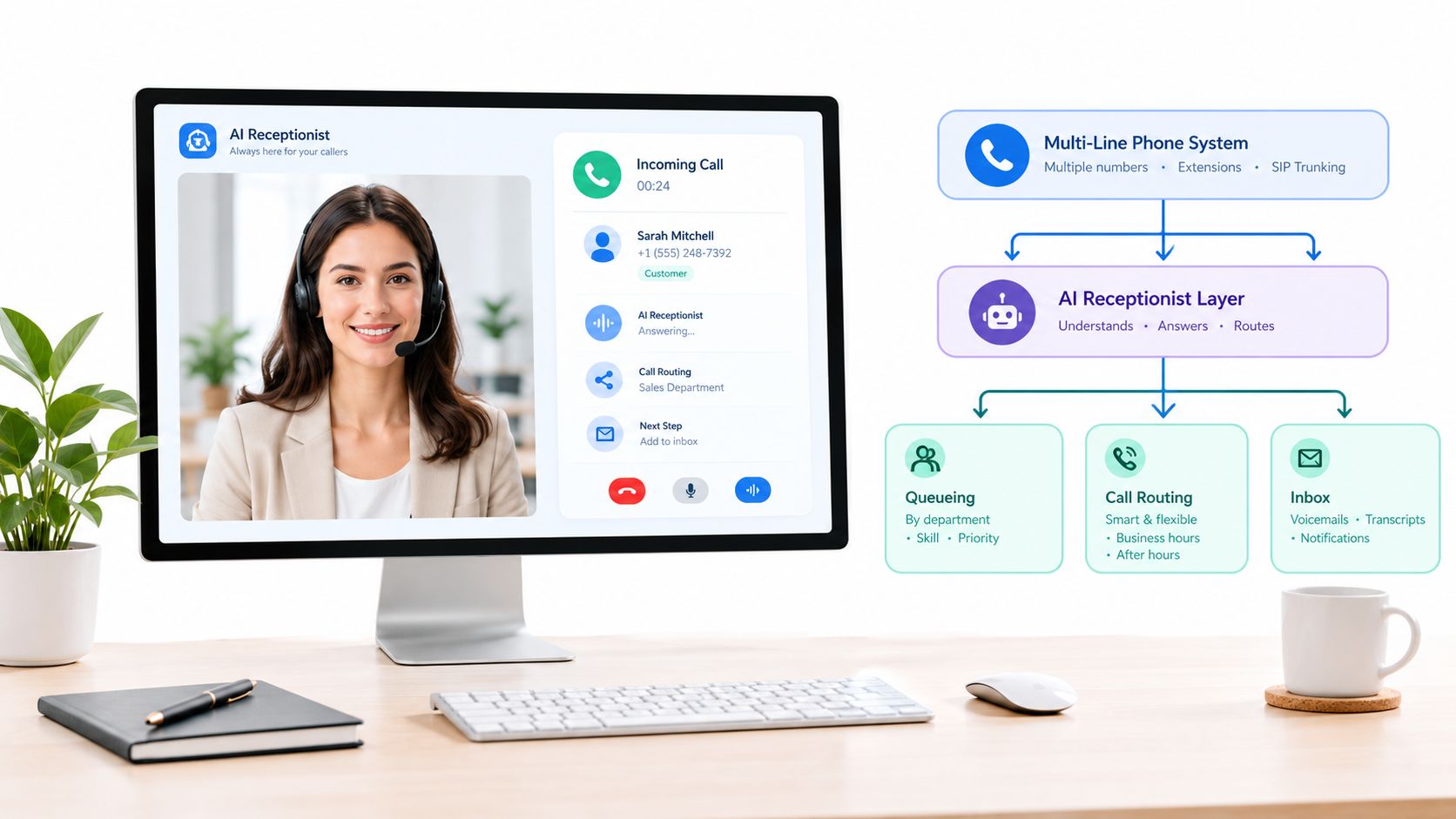
Put the AI first, not last. Most owners treat automated answering as the thing callers reach after everyone fails to pick up. Flip it. An AI receptionist for missed calls answers on every published number, captures the caller's name, location, service need, urgency, and preferred callback time, and then decides whether to book, transfer, or send you a summary.
Speed is why this works. A 2011 Harvard Business Review study summarized in speed-to-lead research covering 2,241 U.S. companies found only 37% responded to an inbound lead within one hour, and companies that made contact within that hour were nearly seven times more likely to qualify the lead. An always-on first layer removes that delay entirely.
How It Works Day to Day
SkipCalls is built for exactly this position in the stack. It's simple to set up, handles voice and text, works for customer support, lead qualification, and appointment booking, and doesn't require you to change your phone number. You forward your existing lines into it, connect the calendar and CRM you already use through its integrations, and it books appointments, logs caller details, and alerts you on hot leads. Urgent calls get a warm transfer or an immediate notification. Routine calls arrive as clean summaries you can work through between jobs.
Text handling matters as much as voice. Benchmark data in Verse.ai's SMS response rate analysis reports an average SMS reply rate of 50% against a 25% answer rate for call-only outreach, with qualification-question response rates as high as 92%. That's why a missed call should trigger a text conversation that collects service need and timing before you ever call back.
The walkthrough below shows the answering and booking flow in action.
Take a salon owner doing a ninety-minute facial. Her phone's on silent, both her booking line and her Instagram number ring during that window, and the AI books three evening appointments she'd otherwise have lost to the salon down the street. She didn't hire anyone. She didn't port her number. She put one answering layer in front of the numbers she already had.
Concurrency Versus Call Initiation Rate
Vendors love selling you line count. Six lines, ten lines, unlimited lines. That number hides two separate limits, and confusing them is how a setup that looks fine on a Tuesday collapses during a Saturday callback rush.
Concurrent calls means how many conversations can be active at the same time. Calls per second, or CPS, means how fast new calls can be started. They're different dials, and you need both set correctly.
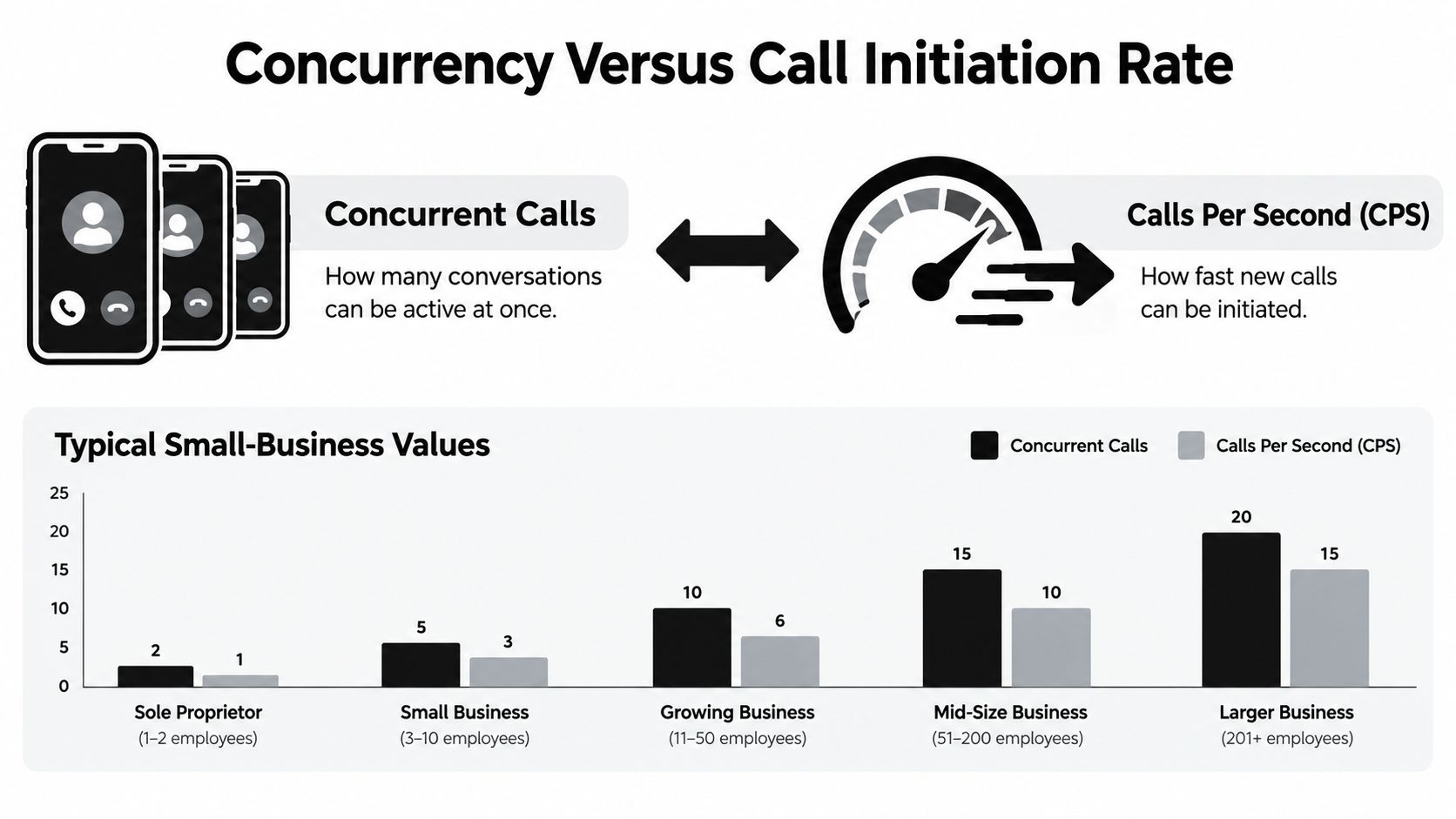
Sizing It in Plain English
Twilio's SIP trunking scale and limits documentation makes the split concrete. Default outbound initiation is 1 CPS, approved business profiles can support unlimited concurrent calls subject to infrastructure capacity, and exceeding a trunk's CPS limit can return a SIP 503 error. You can have plenty of room for simultaneous conversations and still fail because you're starting new calls too fast.
Size your setup in this order.
- Estimate peak simultaneous calls from your real busy-hour history, not your average day.
- Add headroom for campaigns, callbacks, and seasonal surges.
- Verify your concurrency entitlement with the provider before you publish new numbers.
- Configure CPS separately for outbound dialing and callback batches.
Here's the trap. Six lines look plenty when six calls are active. Then a storm knocks out power in your service area, twenty customers call at once, and your team tries to return all twenty calls in the same minute. Concurrent capacity is sitting there unused while the initiation rate chokes and calls start failing.
Don't buy numbers. Model active conversations, overflow behavior, and callback traffic, then test under load.
Run a deliberate test during a quiet hour. Place simultaneous calls to every number, trigger a batch of callbacks, and watch answer rate, setup latency, abandoned calls, and provider error codes. An AI answering layer also relieves both limits in practice, because it resolves and books many calls itself instead of ringing your cell and generating a callback for every single inquiry.
Inbound Answering and Outbound Compliance
Answering a call someone placed to you is one legal situation. Automatically calling or texting them back from one of your other numbers is a different one. Most multi-line guides skip this boundary entirely, and it's where small businesses get into trouble they never saw coming.
In the United States, the FCC's consumer guide on unwanted robocalls and texts states that autodialed, prerecorded, or artificial-voice calls and texts to wireless numbers generally require consent, that commercial texts require written consent, and that telemarketing calls using prerecorded or artificial voices require prior written consent. It's worth reading SkipCalls on automated calls alongside that guidance before you automate follow-up.
A customer consents to appointment reminders from your scheduling line. Your sales line then sends automated marketing texts. Same business, different number, real compliance risk.
Give Every Line a Purpose and a Consent Record
The governance rule is simple. Every published line gets a stated purpose, and every automated follow-up ties back to a consent record showing source and scope. When someone opts out or revokes consent, suppress them across all your related numbers, not just the one they replied to.
| Line purpose | Example use | Consent required | Identifier to record |
|---|---|---|---|
| Sales | Promotional offers and campaigns | Prior written consent for automated marketing | Consent source, date, and offer scope |
| Scheduling | Booking confirmations and reminders | Consent tied to the appointment relationship | Appointment record and reminder preference |
| Support | Service updates and status replies | Consent for informational messages | Ticket or job number |
| Collections | Payment and servicing communication | Treatment varies by message type | Account reference and communication category |
Debt collection shows why the categories matter. Informational, servicing, and promotional messages can carry different legal treatment, so a collections line and a marketing line should never be treated as interchangeable.
Two habits protect you across every line. Your automated system should identify your business at the start of the call, and it should handle opt-outs cleanly and immediately. Build those into the setup on day one rather than bolting them on after a complaint.
Troubleshooting the Most Common Multi-Line Setups
Most multi-line failures aren't exotic. They're the same five or six problems repeating across shops, agencies, and salons. Run through this checklist before you blame your provider or buy more capacity.
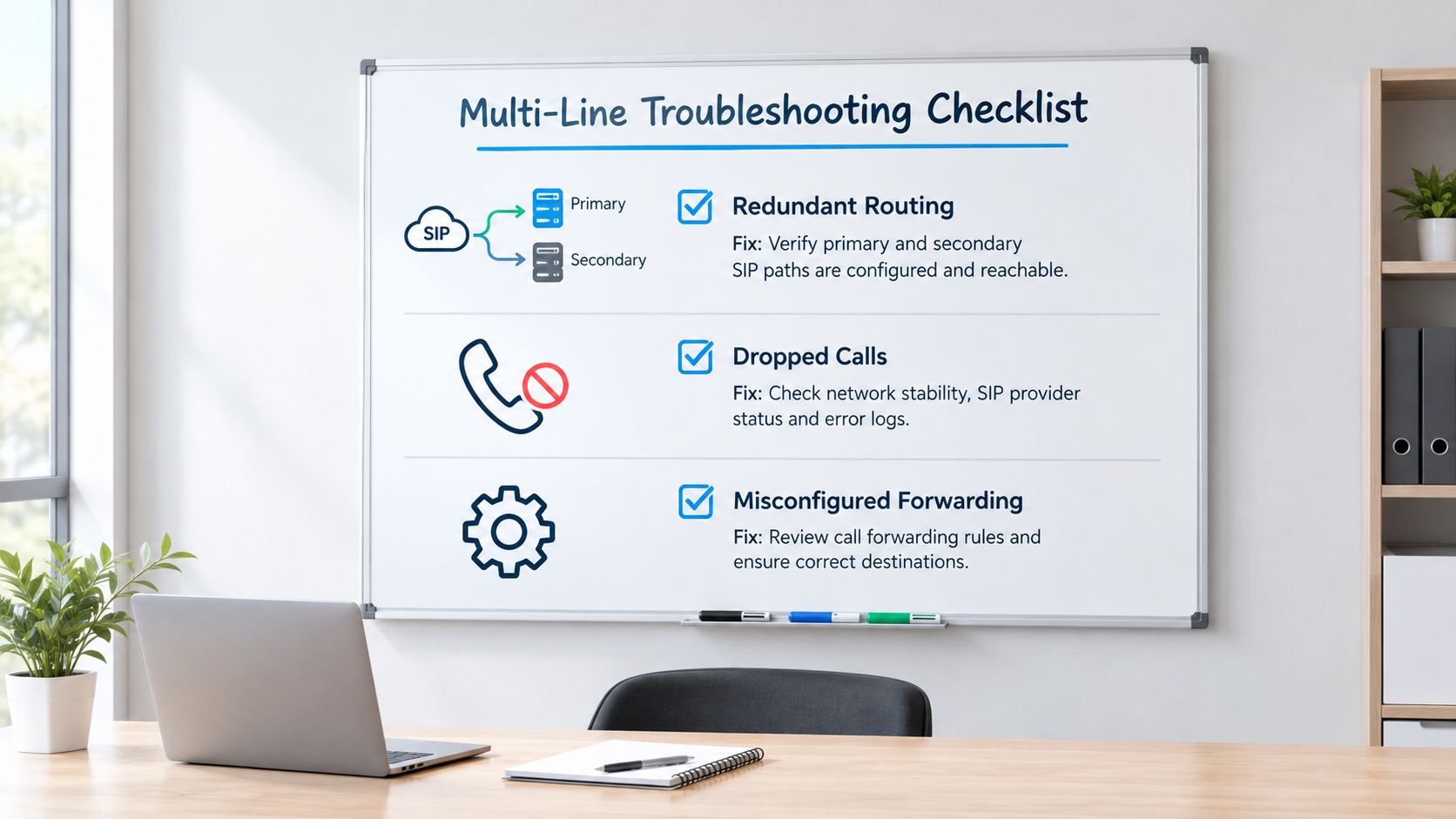
Redundant Routing and Number Formatting
If all your numbers point at one PBX, one SIP endpoint, or one internet connection, you don't have redundancy. You have a single point of failure wearing several phone numbers. Twilio's SIP trunking setup documentation via LiveKit describes the standard fix, where multiple origination URIs provide redundancy, the URI with the lowest priority is attempted first, and traffic fails over to a higher-priority URI if the first doesn't respond. Weight only distributes traffic among URIs sharing the same priority.
Set a primary and secondary destination, configure health checks or timeout-based failover, then deliberately make the primary unreachable and confirm calls land on the backup with caller ID intact. If you haven't tested the failure, you don't have failover. You have a hope.
Formatting breaks more outbound setups than owners expect. Send numbers in E.164 format, such as +14155550123. Skip the country code or include dashes and parentheses, and calls can fail with an invalid-number error that looks like a carrier problem but isn't.
Overflow, Text Continuity, and the Test Matrix
Check what callers hear when every path is busy. Dead air and generic carrier voicemail are the two most common findings, and both tell a ready-to-buy caller to hang up and dial your competitor. Every line needs defined overflow behavior that captures the caller's need. Reading up on how to route calls without missing leads helps you map those fallback paths before you test them.
Text continuity is the quiet killer. A customer calls your ad number, gets a text back, replies to it, and then you return the call from your cell. Now the conversation lives in two threads, the context is split, and neither of you can find the address she sent. Keep the conversation on the number the customer engaged with, inside one inbox.
Run this test matrix once at setup and again after every carrier, PBX, or routing change.
- Inbound call test: dial every published number and confirm it answers the way you designed.
- Outbound callback test: return a call from each line and check the caller ID customers see.
- Transfer test: move a live call to another team member without dropping it.
- Simultaneous call test: place concurrent calls to confirm capacity matches your entitlement.
- Outage test: take the primary endpoint down and verify failover to the backup.
- After-hours test: call outside business hours and confirm the right greeting, routing, and capture flow.
Record the SIP response codes and call-detail records from each test so you're comparing evidence, not memory, when something breaks later. Then go back to the one metric that tells you whether any of this worked. Count your answered-and-booked calls per week. Not lines owned, not numbers published, not voicemail boxes checked. If that count climbs, your multiple phone line setup is doing its job.
Stop letting good jobs die in voicemail while you're standing in front of a paying customer. SkipCalls puts an AI receptionist in front of every number you already publish, answers calls and texts around the clock, qualifies leads, books appointments into your calendar, and alerts you when a hot lead needs a human, all without changing your existing phone number. Set it up once, forward your lines, and start counting answered-and-booked calls instead of missed ones.