Virtual Receptionist Service for Small Business
Learn how a virtual receptionist service for small business answers calls, books appointments, and captures leads 24/7 without hiring extra staff.
You're halfway through a plumbing repair when your phone starts ringing. Your hands are wet, the customer is waiting, and stopping to answer means delaying the job. You let it go to voicemail, planning to call back after lunch. By then, the caller has contacted another contractor.
That same problem affects real estate agents between showings, lawyers in consultations, salons with clients in the chair, and solo operators doing every administrative task themselves. A virtual receptionist service for small business helps, but answering the call is only the beginning. The system needs to capture the right details, identify urgent opportunities, schedule the next step, and put the information where your team already works.
The Cost of a Ringing Phone You Cannot Answer
The plumber under the sink isn't failing at customer service. He's doing the billable work that keeps the business alive. The problem is that his phone keeps operating as if he has a front desk.

A widely cited observational study of 85 small businesses across 58 industries found that only 37.8% of inbound calls were answered by a live person, while 37.8% went to voicemail and 24.3% received no response at all, as summarized by Aira's missed business call statistics. In practical terms, about 62% of calls went unanswered. That isn't a minor service defect. It means the phone often becomes unavailable precisely when the owner is busiest.
Practical rule: If the owner is the only person who can answer, the business has limited phone coverage, even during advertised opening hours.
Voicemail doesn't solve the underlying issue. It asks a potential customer to repeat the effort later, while the customer may be comparing several providers at once. The caller might need an emergency repair, a property valuation, a consultation, or an appointment. A delayed callback gives competing businesses time to respond first.
For a home service company, the missed call may contain a high-intent request from someone with water damage or a failed heating system. For a real estate agent, it may be a buyer ready to schedule a viewing. The phone number itself doesn't tell you which opportunity matters most, and a voicemail inbox doesn't qualify the lead for you.
The economics can be material. One industry summary citing a study of more than 85 businesses estimated more than $62,000 in average annual lost revenue from missed calls, and reported that businesses lose an average of $500 monthly to unanswered phones. Those figures appear in Nextiva's overview of virtual receptionist services, but the operational lesson matters more than the exact estimate: unanswered demand has a cost, even when the owner never sees the opportunity.
A useful breakdown of that revenue leak appears in this guide to the cost of unanswered calls. The fix isn't just "answer more." It's building a reliable path from ringing phone to captured lead, correct priority, and completed next action.
What a Virtual Receptionist Actually Does for You
A basic answering service takes a message. A capable virtual receptionist manages an intake workflow.
That distinction matters because the largest failure isn't always the initial missed ring. A receptionist that answers but records only “John called” leaves the owner with almost the same problem. The useful system records who called, what they need, where the job is, how urgent it is, and what should happen next.
The previously cited study of 85 businesses found that roughly 62% of calls went unanswered, while a separate observational summary reports the same distribution of live answers, voicemail, and no response outcomes. ReadyTo's missed-call analysis connects the operational issue to lead capture: reducing voicemail and no-response outcomes gives service businesses a better chance to act while the inquiry is still active.
The workflow after the greeting
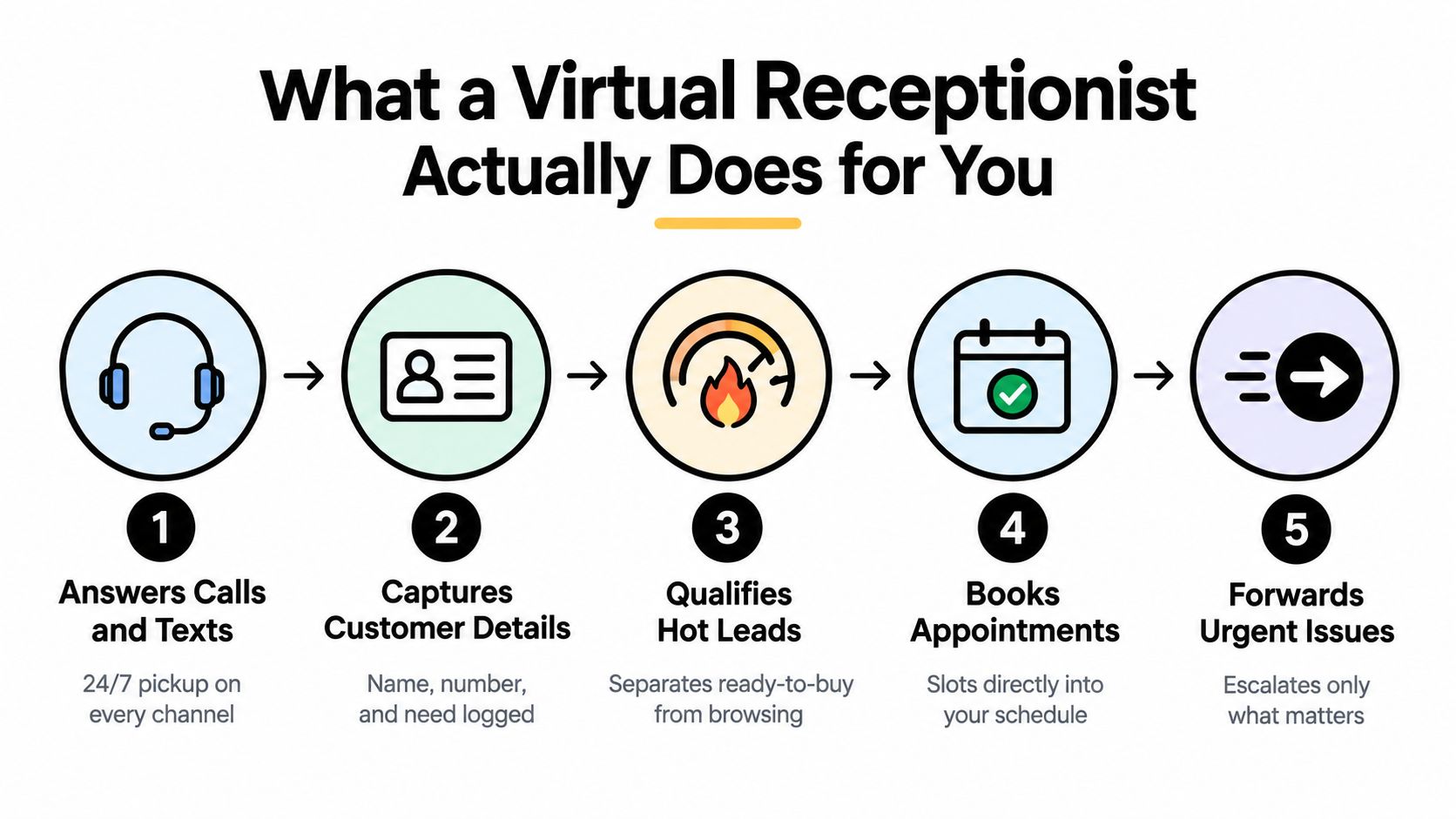
A well-configured system should handle five connected jobs:
- Answer calls and texts. It gives callers a live response across the channels your customers already use.
- Capture customer details. It records the name, callback number, location, service requested, and relevant context.
- Qualify the lead. It separates an urgent repair request from a general pricing question, or a ready-to-view buyer from a casual inquiry.
- Book the next action. It checks calendar availability and places an appointment directly into the correct schedule.
- Escalate what matters. It transfers emergencies, sensitive conversations, or high-value leads according to rules you define.
This is why a SnapDial telephone auto attendant can be a useful reference point when comparing basic call routing with a fuller receptionist workflow. An auto attendant may direct callers efficiently, but buyers should confirm whether a provider also captures structured intake, updates systems, and supports escalation with context.
Calendar integration changes the economics of the interaction. Platforms can connect with Google Calendar, Outlook, and Calendly, while some also connect with HubSpot, Salesforce, Pipedrive, and Zoho CRM, according to this overview of virtual receptionist appointment booking integrations. The point isn't the number of integrations. It's avoiding the gap between “the caller wants an appointment” and “someone on the team eventually enters it.”
Qualification is where the value compounds
Consider an HVAC company receiving two calls at once. One caller wants a routine quote next month. The other has no heat and needs help immediately. A useful receptionist asks different questions, applies the agreed priority rules, and routes the urgent request without forcing the owner to listen to both conversations from the beginning.
The same logic applies to real estate. The system can ask whether the caller is buying or selling, identify the preferred area, collect timing, and offer a showing slot. It shouldn't make promises outside its knowledge or improvise on legal, financial, or safety-sensitive questions. Its job is to collect accurate information and move the conversation to the right person.
The hidden post-call workflow is the true test. If the provider only sends a generic email, your team still has to reconstruct the lead, decide its urgency, and enter it into a calendar or CRM. If the system produces a structured record and triggers the right follow-up, the receptionist becomes operational infrastructure rather than an automated voicemail box.
How to Set Up a Virtual Receptionist Without Changing Your Number
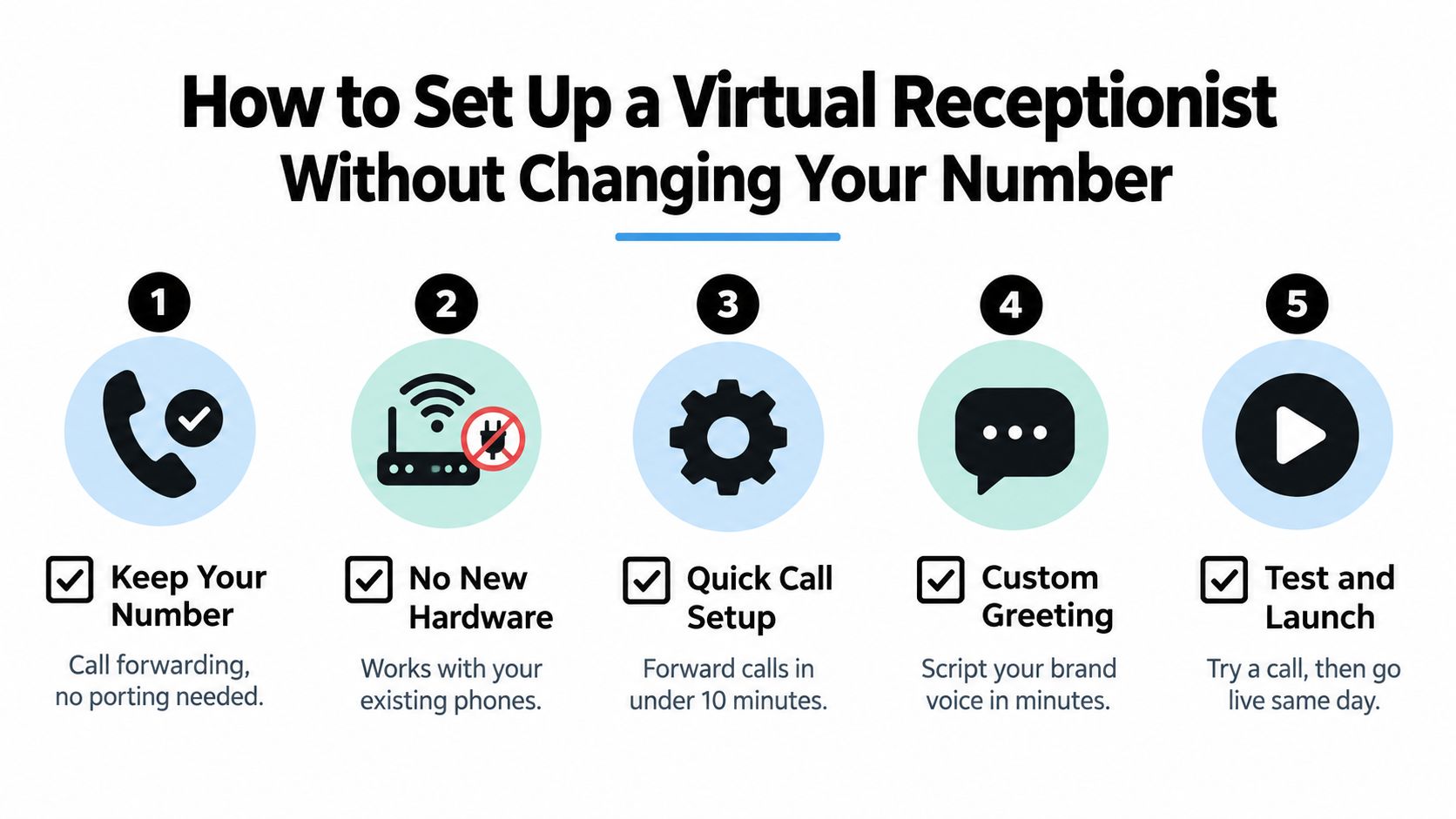
The easiest implementation is usually a backend change, not a new public identity. Number porting transfers control of a business number to a different carrier, while call forwarding redirects incoming calls from the number customers dial to another destination. That distinction is explained clearly in this guide to call forwarding.
Many small businesses don't need to replace their existing number. They can keep the number printed on vans, signs, listings, email signatures, and property brochures, then route calls to the receptionist according to the chosen rules. Vonage's explanation of number porting also highlights why keeping a familiar number protects continuity with existing customers and prospects.
Build the call path first
Start with the moments that currently create missed calls:
- During active jobs: Answer every call while technicians are under sinks, on roofs, or inside mechanical rooms.
- During appointments: Capture new inquiries while an agent is showing a property or a stylist is serving a client.
- After hours: Separate emergencies from routine requests and define who receives an escalation.
- During busy periods: Use overflow handling instead of sending every additional caller to voicemail.
Then write the receptionist's operating rules. Include business hours, service areas, appointment types, questions to ask, information it must never invent, and the conditions for transferring to a person. A short, accurate knowledge base is more useful than a long collection of outdated answers.
Connect the systems that hold the next step
Give the receptionist the minimum permissions needed to check availability, book appointments, and record customer details. Test cancellations and rescheduling, not just new bookings. A calendar connection that creates double bookings is worse than manual scheduling.
| Integration Type | Examples | Purpose |
|---|---|---|
| Phone routing | Existing business number, call forwarding | Preserve your public number and direct calls |
| Calendar | Google Calendar, Outlook, Calendly | Check availability and book the next action |
| CRM | HubSpot, Salesforce, Pipedrive, Zoho CRM | Store lead details and conversation context |
| Messaging | SMS and text workflows | Confirm details and support follow-up |
| Escalation | Staff phones, departments, emergency contacts | Transfer urgent or sensitive requests |
Use the practical guidance in SkipCalls' call-forwarding options guide when mapping your current number to the new workflow. Before launch, call from a personal phone, request a routine appointment, simulate an emergency, ask an unfamiliar question, cancel a booking, and request a human. Review the transcript or summary for missing details.
The setup works when customers experience continuity. They still call the familiar number, hear a greeting that sounds like the business, and reach a process that produces a clear next step.
Virtual Receptionist vs Hiring a Human Front Desk
A human front desk and a virtual receptionist solve different problems. The human offers judgment, relationship-building, and flexibility in unusual conversations. The virtual option offers consistent coverage without tying every incoming call to one employee's desk.
For a small plumbing company, hiring a receptionist may make sense if the role includes dispatch coordination, walk-in customers, invoicing, supplier calls, and daily office administration. If the core issue is that the owner misses calls while working in the field, a full-time front desk may be a disproportionate answer.
Compare the operating model
| Decision Factor | Human Front Desk | Virtual Receptionist |
|---|---|---|
| Coverage | Depends on scheduled staff and absences | Can provide continuous automated coverage |
| Capacity | Limited by the number of people available | Can handle concurrent intake, subject to provider design |
| Judgment | Strong for unusual or sensitive conversations | Depends on rules, knowledge, and escalation |
| Administration | Can complete broad office tasks | Best at defined, repeatable workflows |
| Onboarding | Requires hiring, training, and supervision | Requires configuration, testing, and ongoing review |
| Customer tone | Naturally personal and adaptive | Scripted or conversational, depending on the system |
| Cost structure | Employment and operating overhead | Provider fee and usage or service terms |
The virtual model isn't automatically cheaper in every situation. A business with heavy office administration may get more value from an employee who answers phones and manages the wider operation. A business with sporadic calls, after-hours demand, or a mobile owner may value coverage more than a permanent desk presence.
Missed-call economics make the comparison concrete. The industry estimate of $500 per month in losses from unanswered phones is cited in Nextiva's service comparison. Treat that figure as an external benchmark, not a guarantee for your business. Your own decision should use call logs, booking records, average job value, and the number of inquiries that currently disappear into voicemail.
A virtual receptionist is a poor substitute for an office manager. It can be an excellent substitute for an empty phone line.
Choose the right division of labor
Let automation handle predictable intake, FAQs, appointment requests, confirmations, and routine routing. Let people handle disputes, sensitive personal information, complex estimates, negotiations, and cases where the caller sounds confused or distressed.
A hybrid model often works well. The receptionist catches demand, asks the required questions, and sends the right context to a human. Your team then spends its time on conversations that require judgment instead of repeating opening questions to every caller.
You can use this comparison of AI receptionists and live answering services to examine where automated handling ends and human escalation begins. The useful question isn't whether software sounds exactly like an employee. It's whether the chosen division of labor protects response speed without creating new errors.
Industry Use Cases That Prove the Value
A virtual receptionist earns its place by fitting the workflow of the business, not by listing a long menu of features. The questions a plumber needs answered aren't the questions a real estate agent, lawyer, salon, or debt collector should ask.
Home services
A technician is inside a customer's property when a new call arrives. The receptionist can collect the address, service needed, timing, and whether the issue sounds urgent. It can offer a suitable appointment, send the details to the CRM, and escalate emergencies according to the contractor's rules.
That workflow protects the technician from constant interruptions while preserving the information needed for dispatch. It also prevents a vague message such as “call me about a leak” from becoming the entire record.
Real estate
An agent often misses calls while driving, showing a property, or meeting a seller. The receptionist can establish whether the caller is a buyer, seller, tenant, or existing client, then capture location preferences, timing, and the desired next step.
For a buyer, the next step might be a showing request. For a seller, it might be a valuation consultation. The system should never invent property availability or make promises about financing. It should gather intent and place a qualified request in the agent's workflow.
Law firms and insurance agencies
Legal and insurance intake requires restraint. A receptionist can collect contact information, matter type, incident timing, jurisdiction, policy or account context where appropriate, and the caller's preferred callback window. It should avoid offering legal advice, coverage conclusions, or assurances that the firm has accepted a matter.
Vendor documentation matters here. Ask how the provider handles recordings, transcripts, retention, access permissions, consent, and human escalation. Globe Market Research's coverage of AI receptionist adoption highlights the growing emphasis on appointment booking, intelligent routing, multilingual voice support, and always-on answering, but those capabilities don't remove the need for careful implementation in high-stakes industries.
Salons and spas
A salon receptionist can handle appointment requests while staff are working with clients. The workflow should recognize service duration, preferred staff member, cancellations, and rescheduling rather than treating every booking as an identical slot.
The system needs clear policies. It should know when to ask for a deposit, what counts as a cancellation, and when to send a request to a person. A calendar connection is valuable only if the receptionist respects the service rules behind the calendar.
Debt collection
Debt collection needs consistency and careful escalation. A receptionist can support structured follow-up, identify the account or contact context, record the reason for the call, and route questions that require a trained employee. It shouldn't improvise about balances, legal rights, repayment terms, or identity verification.
Across all these industries, the common requirement is context before handoff. A transfer that sends only a phone number forces the employee to restart the call. A transfer that includes the caller's need, urgency, and collected details lets the employee act.
Choosing the Right Provider and Measuring Success
Start with the workflow, not the vendor's feature page. Write down the calls you receive, the information required for each one, the actions that can be automated, and the situations that must reach a person.
A provider should demonstrate the complete path from greeting to record creation. Ask it to show how a caller's name, location, request, urgency, appointment, transcript, and escalation status appear in the systems your team uses.
Test these capabilities before buying
- Booking accuracy: Confirm that the system checks live availability, writes the appointment back to the calendar, and handles cancellations and rescheduling. Upfirst's appointment-setting overview describes this real-time scheduling model.
- Integration depth: Ask whether the CRM connection creates structured records or merely forwards an email summary.
- Escalation control: Define which callers reach a person immediately, which receive a callback task, and which can complete the interaction automatically.
- Context transfer: Require the receiving employee to see the reason for the call and the details already collected.
- Multichannel behavior: Test voice and text together so a customer can continue without repeating the entire request.
- Accuracy boundaries: Ask what the system does when it doesn't know an answer. It should admit uncertainty, collect essentials, or escalate, not guess.
- Sensitive-data handling: For law, insurance, healthcare, and finance-related workflows, review recording, retention, access, consent, security, and compliance documentation.
- Reporting clarity: Confirm how the provider defines an answered call, booking, transfer, resolution, and conversion.
Measure the handoff, not just the answer
Track answer rate, but don't stop there. A high answer rate can hide poor qualification, wrong routing, or appointments that never reach the calendar. Monitor response latency, completed intake records, booked appointments, rescheduling accuracy, escalation rates, and lead conversion.
Review a sample of transcripts regularly. Look for repeated customer questions, incorrect service descriptions, missing addresses, weak urgency detection, and transfers without context. Then update the knowledge base and call rules.
The provider's pricing model also affects your evaluation. Compare flat fees, per-minute charges, per-call pricing, conversation allowances, and human escalation costs against the value of a completed next step. This guide to AI receptionist pricing can help you frame those questions, but verify current terms directly because plans and definitions change.
SkipCalls is one option for a straightforward setup. It handles voice and text, supports customer support, lead qualification, appointment booking, and other workflows, doesn't require a phone-number change, and offers CRM and calendar integrations. The practical test remains the same as with any provider: give it real scenarios, verify the handoff, and measure whether more inquiries become properly recorded next actions.
Buyer's test: Don't ask only whether the receptionist answers. Ask what your team receives five minutes after the caller hangs up.
A virtual receptionist pays for itself only when it improves the full operating chain. If it answers quickly but loses the address, books the wrong slot, or fails to escalate an urgent request, it has moved the problem rather than solved it. If it captures reliable context, updates the right systems, and sends the right opportunities to the right person, it gives a small business phone coverage without requiring the owner to stop working every time the phone rings.
If missed calls are interrupting jobs or leaving leads in voicemail, SkipCalls can answer your calls and texts, capture customer details, qualify inquiries, and book appointments without changing your existing number. Set up the workflows you need for support, lead intake, or scheduling, then test the service against real customer scenarios before you send every call its way.