An Answering Service for Legal Office: The 2026 Guide
Discover how an answering service for legal offices protects client confidentiality, captures leads, and improves intake workflows for modern firms.
Only 40% of U.S. law firms answered a prospective client's phone call in 2024, down from 56% in 2019. An answering service for a legal office can close that gap, but only if it combines rapid intake with strict confidentiality controls and clear human escalation.
That distinction matters. A missed call isn't just an administrative annoyance when the caller has searched for counsel, found your firm, and needs help now. The right system should answer voice and text inquiries, capture only the information your team needs, book consultations, and recognize when automation must stop.
Why Law Firms Are Losing Clients on the Phone
The decline is stark. Clio's 2024 Legal Trends research found that only 40% of 500 U.S. law firms answered a prospective client's phone call, compared with 56% in 2019 (Clio's 2024 Legal Trends findings). Among the firms contacted, 48% neither answered nor called back, leaving nearly half of prospective callers effectively unreachable by phone.
A caller may have found your firm through a search result after an accident, arrest, custody dispute, or employment problem. If the line goes to voicemail while an attorney is in court, the caller often doesn't know whether anyone will respond. They call another firm instead. The Oklahoma Bar Journal reports that only 20% of firms that missed a call returned it, and cites an estimate of approximately 195 million missed incoming calls by U.S. law firms each year (Oklahoma Bar Journal).
Why voicemail isn't enough
The earlier benchmark was already concerning. In 2019, 39% of calls went to voicemail, and more than half of firms receiving voicemails failed to respond within 72 hours (Clio's 2019 research). The same research found that 82% of prospective clients considered timely communication important, while 79% expected a response within 24 hours.
A voicemail system records a message. It doesn't ask whether a court date is imminent, identify an adverse party, check whether the caller is an existing client, or route a domestic-violence safety concern. A basic remote receptionist can improve availability, but a legal workflow needs more than a friendly greeting and a callback promise.
Start by auditing your own after-hours exposure with this law-firm missed-call assessment. Count not only unanswered calls, but also how many receive a useful intake, a scheduled consultation, or an urgent handoff. Those outcomes reveal whether your current front desk protects new business or sends it elsewhere.
Confidentiality and Compliance Requirements
A legal answering service isn't merely a customer-support vendor. The workflow touches prospective-client communications, existing-client information, conflict details, and sometimes privileged material. ABA Model Rule 1.6 requires lawyers to protect information relating to a client's representation and make reasonable efforts to prevent inadvertent disclosure or unauthorized access (ABA Formal Opinion 477).
That obligation should shape the intake design from the first sentence. The receptionist or AI system should establish the purpose of the call, collect contact details and limited matter information, and trigger conflict screening before inviting a detailed narrative. It shouldn't ask a caller to describe every fact of a sensitive dispute while the system has no conflict boundary or authenticated identity check.
Practical safeguards for the intake layer
A defensible deployment should include controls such as:
- Limited initial collection: Ask for names of relevant parties, contact information, matter category, and urgency before gathering sensitive facts.
- Restricted messages: Keep case details out of voicemail and SMS. A neutral callback notice is safer than a detailed description of an allegation.
- Role-based access: Limit recordings, transcripts, and intake summaries to personnel who need them for a defined task.
- Authenticated handoffs: Existing clients should be verified before staff receive or discuss active-matter information.
- Documented data flows: Map information from the carrier to the answering platform, CRM, calendar, and firm staff.
- Retention controls: Define when recordings, transcripts, and intake records are deleted, and document exceptions.
- Human escalation: Route legal advice, settlement discussions, emergencies, and requests involving privileged information to qualified people.
Encryption for stored recordings and transmitted intake records, administrative access logs, and a written deletion process are not decorative features. They give the firm a way to understand who handled information and what happened to it. Firms handling especially sensitive environments may also review physical and technical privacy risks through resources such as TSCM bug sweeping, although that is separate from ordinary call-platform diligence.
Before deployment, ask vendors how their workflow supports the firm's confidentiality duties, then record the answers in your vendor review. The customer data security guidance provides a useful framework for examining access, retention, and transmission policies without assuming that an automated system is safe just because it is convenient.
Intake Script Design for Legal Offices
A good script doesn't try to turn an answering service into a lawyer. It creates a controlled path from greeting to scheduling, conflict screening, and escalation.
Begin with a neutral greeting and an explicit boundary. The caller should know that the person or system handling the call can gather information and arrange contact, but can't provide legal advice. Then collect the minimum facts needed to determine the next action.
A practical conversation flow
- Identify the caller. Record the caller's name, safe contact method, phone number, and whether the caller is a new or existing client.
- Classify the matter. Use broad categories such as personal injury, criminal defense, family law, immigration, estate planning, or business law.
- Screen for conflicts. Ask for the caller's name and the names of known opposing or involved parties before inviting a detailed account.
- Check urgency. Ask about a court date, arrest, deadline, immediate physical danger, child-safety issue, or other trigger defined by the firm.
- Set the boundary. Explain that the intake team can't advise on legal rights, deadlines, settlement value, or likely outcomes.
- Choose the next action. Transfer to an authorized human, schedule a consultation, create a callback task, or provide the firm's approved emergency direction.
A script might sound like this:
Receptionist: “Thank you for calling. I can collect basic information and help arrange a consultation, but I'm not an attorney and can't provide legal advice. May I have your name and a safe number for the firm to use?”
Receptionist: “Before you describe what happened, are there other people or organizations involved whose names you know? The firm may need that information for a conflict review.”
Receptionist: “Do you have a court date, arrest, filing deadline, immediate safety concern, or another urgent issue? I'll follow the firm's escalation process, but I can't advise you about what you should do.”
The firm should adapt the questions by practice area, while preserving the same boundaries. A personal-injury caller may need accident date and treatment status. An existing family-law client may need authenticated routing rather than new-lead screening. The law-firm client intake framework can help organize those paths.
Voice and text should work together, not compete. Voice can establish urgency and trust, while text can confirm an appointment or send a neutral scheduling reminder after the caller has consented to that channel.
Hybrid Automation versus Fully Automated Solutions
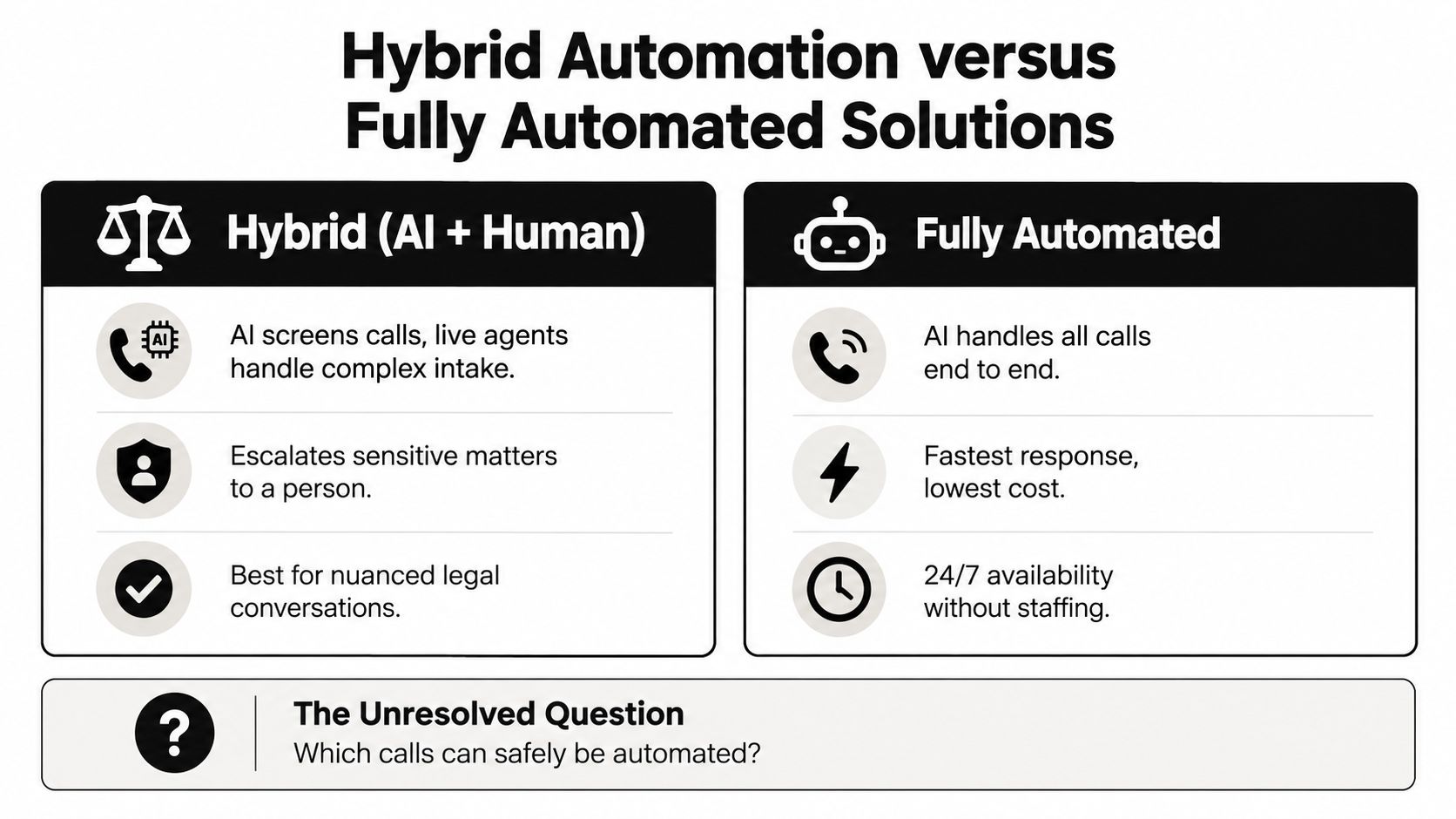
The important question isn't whether an AI receptionist can answer a call. It can. The important question is which calls can safely remain automated and which calls require a person immediately.
A 2025 survey of 3,750 people who had used legal services within the previous two years found that consumers preferred telephone and face-to-face communication in roughly equal proportions (Legal Services Consumer Panel survey). That preference makes a fully automated front door risky in high-stakes matters, especially when the caller is distressed, distrustful, or asking a question that sounds logistical but requires legal judgment.
Three models, three different compromises
| Model | What works | Where it fails |
|---|---|---|
| Fully automated | Fast response, consistent availability, and efficient handling of routine scheduling or basic qualification | It can miss emotional context, over-collect sensitive facts, or continue when legal judgment is required |
| Human-only service | Empathy, flexible conversation, and warm transfers for callers who need reassurance | Quality can vary by agent, shift, script, and call volume |
| Hybrid AI and human | Automation handles routine intake while trained people receive sensitive, urgent, or ambiguous matters | It requires carefully written rules, staff availability, and regular review |
A hybrid model treats the AI receptionist as an intelligent intake layer, not a call forwarder and not a substitute for counsel. It can identify the matter type, capture contact information, offer appointment times, and flag an emergency. A person should take over when the caller requests legal advice, raises a settlement issue, discloses privileged information, reports immediate danger, or gives an answer the system can't classify confidently.
SkipCalls is one example of this category. It is designed to handle voice and text, capture caller details, book appointments, and support escalation based on the firm's workflow. Its AI receptionist approach for lawyers is most useful when the firm defines the human boundary before switching automation on.
Operational rule: Automate the predictable path. Escalate the consequential path.
The cheapest fully automated option may produce the fastest pickup, but pickup isn't the same as trust, qualification, or competent communication. A hybrid system costs more operational attention to design, yet it better respects the fact that legal callers don't all arrive with the same urgency or emotional state.
Pricing Models and Technology Integration
Pricing deserves scrutiny because an attractive base rate can hide the cost of unusable intake. Providers commonly bill by the minute, by the call, or through a monthly subscription with usage limits. Each model shifts risk between the vendor and the firm.
Per-minute billing is easy to understand, but complex legal conversations consume more time precisely when the lead may be most valuable. Per-call pricing offers clearer forecasting, yet a shallow message may still require a second call from staff. Monthly plans can simplify budgeting, but only if the firm understands included usage, overages, transfer charges, recording fees, and appointment-booking limits.
Compare the proposal, not just the headline price
| Pricing structure | Useful for | Questions to ask |
|---|---|---|
| Per-minute | Variable overflow and short calls | How are transfers, pauses, after-hours calls, and long intakes billed? |
| Per-call | Firms seeking predictable call-level costs | Does a follow-up or failed transfer count as another call? |
| Monthly subscription | Teams that need a stable workflow | What happens when usage exceeds the plan, and which integrations are included? |
| Hybrid arrangement | Firms combining AI intake with human escalation | Which events trigger a human handoff, and is that handoff priced separately? |
Integration is part of the economics. A system that sends an email with a caller's name may still leave staff copying information into a CRM, checking calendars, and creating follow-up tasks manually. Research on legal intake workflows identifies manual bottlenecks, inconsistent follow-up, data-entry errors, and fragmented technology stacks as recurring failure points (legal client-intake workflow research).
Look for a connected path from call or text to structured intake record, appointment, notification, and follow-up task. SkipCalls is a simple-to-set-up solution that works for any case, from customer support, lead qualification, appointment booking, and many more. It handles voice and text and does not require you to change your phone number to integrate into your workflow. It has many integrations with CRM and calendars.
That combination matters for a small firm. The technology should fit the current phone number and existing operating habits rather than forcing a disruptive migration. During vendor review, test the exact handoff: call a test number, book an appointment, inspect the CRM record, and confirm what staff receive when a caller needs urgent human attention.
Implementation Steps and Success Metrics
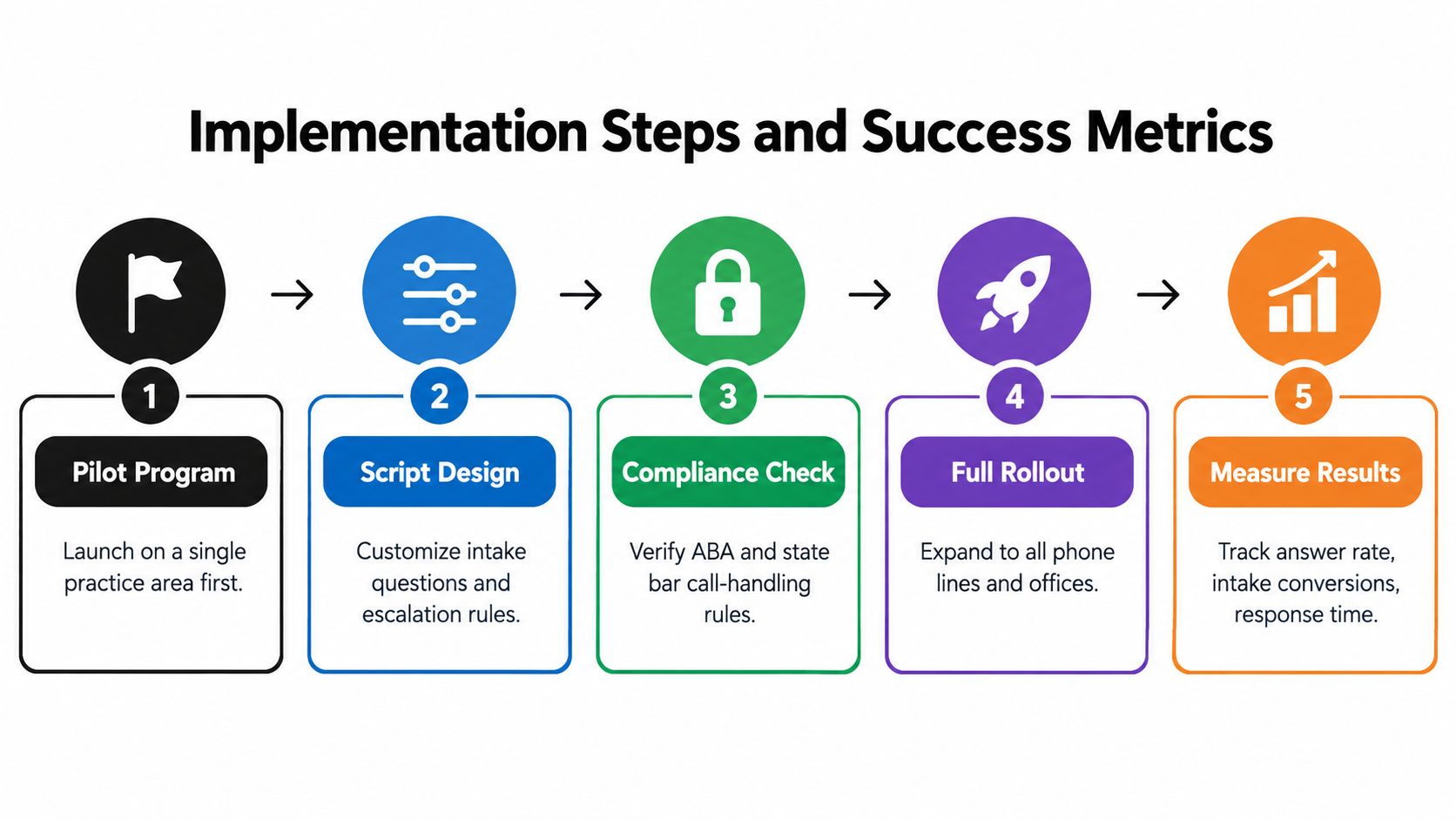
Implementation should start with a controlled pilot, not a practice-wide switch. Choose one practice area or one overflow line, write the escalation rules, and have staff review real interactions before expanding coverage.
A practical rollout sequence
- Pilot one workflow. Start with a defined call type, such as new personal-injury inquiries or consultation scheduling.
- Write the script with staff. Attorneys, paralegals, and reception staff should identify prohibited questions, conflict triggers, and urgent conditions.
- Test confidentiality controls. Confirm access permissions, recording settings, retention rules, notification content, and deletion procedures.
- Train the receiving team. Staff need to know where summaries appear, how quickly to respond, and how to document a handoff.
- Review outcomes. Expand only after the firm has examined answer quality, intake completeness, appointment handling, and escalation accuracy.
Response speed deserves a specific metric. Data attributed to the Clio Legal Trends Report indicates that firms responding within five minutes were approximately 21 times more likely to qualify a lead than firms responding after 30 minutes, while firms responding within one hour were about seven times more likely to qualify a lead than firms waiting 24 hours (law-firm intake response data). Use those figures as a reason to measure speed, not as permission to sacrifice careful screening.
Track the first response interval, qualified-intake rate, completed consultation bookings, callback resolution, escalation accuracy, and caller complaints. For text workflows, measure appointment confirmations and reminder delivery. A consumer texting study found that 75% of respondents considered appointment-reminder texts helpful, and reported strong preference for texting about appointments, reminders, and scheduling (consumer texting study).
Red flags include a vendor that won't explain data retention, a script that gives legal-sounding answers, an escalation process dependent on one person's memory, and a dashboard that reports answered calls without showing what happened next.
Choosing the Right Solution for Your Practice
The right answering service for a legal office should pass four tests. It must protect confidential information, follow a script that respects the limits of nonlawyer intake, connect captured details to the firm's workflow, and transfer sensitive or urgent matters to an appropriate human.

Use a decision sequence
Start with the firm's actual call patterns. Decide which matters can be scheduled without attorney involvement, which require conflict information, and which must be routed live. Then inspect the vendor's security documentation, integration behavior, escalation controls, and pricing terms against those requirements.
A small firm may need reliable after-hours coverage and calendar booking, while a larger practice may need role-based routing across several practice areas. Neither should accept a generic script that collects detailed facts before conflicts screening. Ask for a test conversation involving an existing client, a distressed new caller, an appointment request, and a question seeking legal advice.
Next, involve the people who receive the handoffs. A technically clean summary is worthless if staff can't find it, don't know who owns the follow-up, or can't tell whether the caller consented to text communication. The firm should assign responsibility for reviewing intake records and correcting scripts as recurring edge cases emerge.
Use a short pilot to compare the old workflow with the new one. Review not only answer rates, but also whether staff received usable information, whether appointments appeared on the correct calendar, whether urgent calls reached a human, and whether the system avoided unnecessary collection of sensitive details.
For a closer look at the operating model, this video can help teams evaluate how automated reception and human follow-up fit together.
The strongest choice usually isn't maximum automation. It's the solution that answers routine inquiries promptly, keeps the intake narrow and structured, and knows when a lawyer or trained staff member must take over. That design protects the firm's reputation while giving prospective clients a dependable first contact.
SkipCalls offers a simple-to-set-up answering workflow for legal offices that handles voice and text, captures caller details, books appointments, and fits into existing phone, CRM, and calendar processes without requiring a number change. Visit SkipCalls to evaluate whether its AI receptionist and human escalation approach can help your firm stop sending qualified callers to voicemail.