Call Answering Rules for Local Service Teams
Master call answering rules for local service teams. Learn routing logic, hold procedures, and AI automation to capture leads and stop missed calls.
A technician is under a kitchen sink when the company phone starts ringing. The roofer is halfway up a ladder. The owner sees the missed call later, calls back, and hears that the homeowner already booked the first company that answered. Nothing went wrong with the workmanship. The lead entered a phone system without a dependable rule for what happened next.
Local service businesses don't lose calls only because nobody cares. They lose them because answering depends on whoever happens to be free. Call answering rules turn that uncertainty into a repeatable operating process. They tell your team, or your AI receptionist, how quickly to answer, what to ask, which calls deserve immediate attention, and what to do when the intended person can't pick up.
The Real Cost of Missing the Phone
A missed call from an existing customer is inconvenient. A missed call from someone with a burst pipe, a failing furnace, or a large roofing project can represent a job that never enters your pipeline. The owner may see the number later, but the caller experiences silence at the exact moment they need reassurance and a next step.
Callers are less patient than many small businesses assume. 67% hang up when they reach voicemail, 60% abandon after more than one minute on hold, and more than 90% are gone by five minutes, according to coverage of live call answering expectations. Those figures make the first minute an operating window, not a courtesy period.
Practical rule: If the caller has to guess whether anyone is handling the request, your process has already created friction.
The phrase “answered call” can hide a serious gap. A system may register a call as answered because an automated message played, while the customer considers it unanswered because they couldn't explain the problem, reach a person, or receive a clear callback commitment. A technician who picks up but can't record the address and service need has technically answered, yet the business still may not have captured a usable lead.
What a dependable process captures
A structured process protects both sides of the conversation. The technician can stay focused on safe work, while the caller gives the same essential information to a trained agent, receptionist, or automated system.
At minimum, the intake should record:
- Caller identity: Name, phone number, and whether the person is the owner, tenant, property manager, or another contact.
- Service need: The specific problem, requested service, and whether the caller is asking for emergency help or a planned visit.
- Location: Full service address, access notes, and any detail that affects dispatch.
- Timing: When the problem started, whether conditions are worsening, and when the customer can be available.
- Next action: Immediate transfer, scheduled appointment, technician callback, text confirmation, or a documented escalation.
Historical business telephone guidance treated answering as an operational standard rather than casual manners. Trade publications such as Telephony were publishing etiquette guidance by 1926, including the rule to answer promptly with the business name instead of only saying “Hello,” as described in this history of telephone etiquette. The reason was practical: identify the business quickly and save time.
That principle still works. A phone rule isn't successful because it sounds polished. It works when a call moves from ringing to accurate intake, appropriate routing, and a clear commitment without forcing the owner to abandon the job in progress. For a fuller look at the financial and operational impact, review this guide to the true cost of missed business calls.
Core Call Answering Rules for Local Services
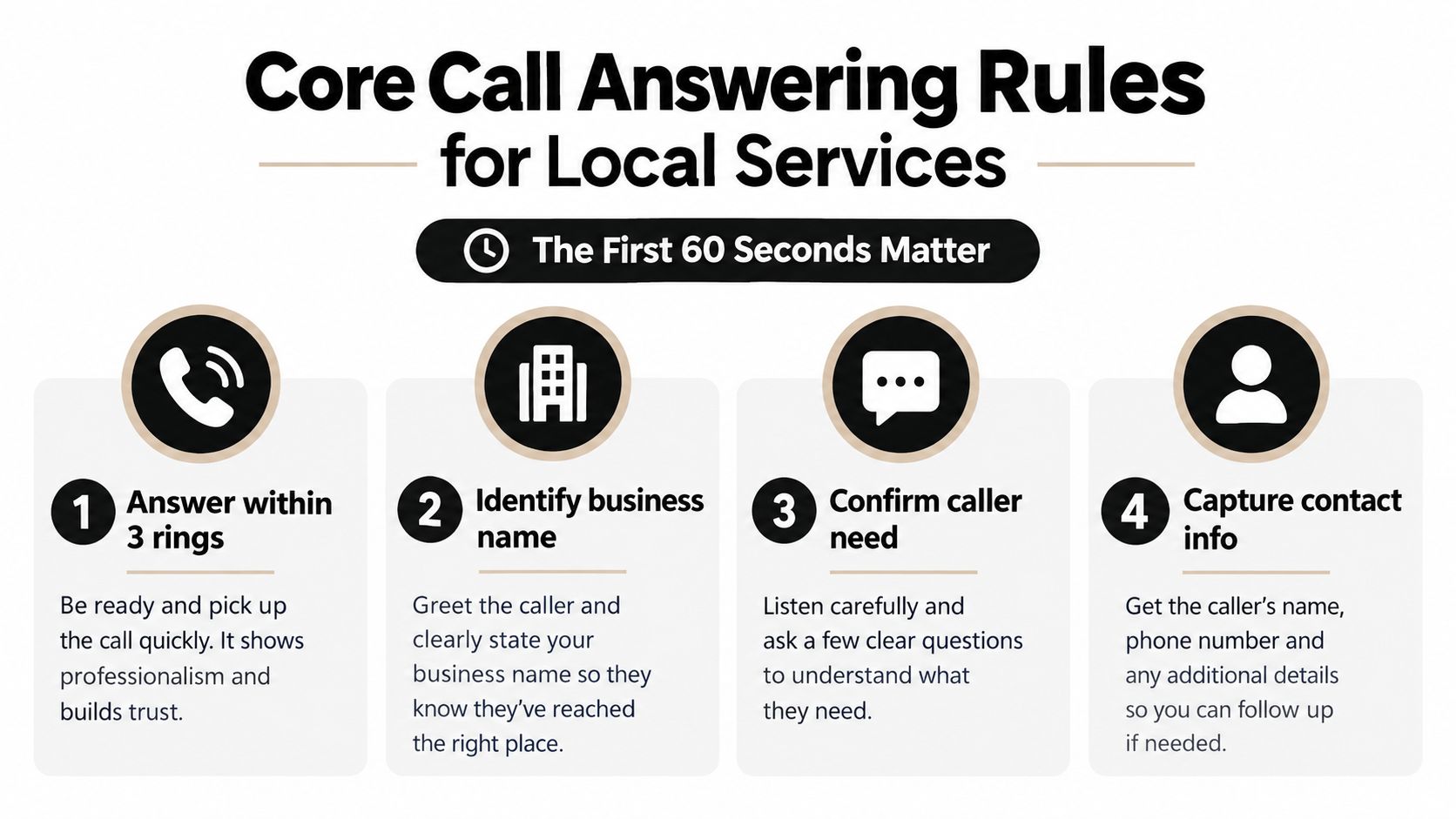
Start with a standard that a busy team can meet. A widely used business rule is to answer within three rings, roughly 10 seconds, as outlined in phone answering best practices. That target matters because a caller's confidence drops quickly when the phone rings without context.
Build the first 60 seconds
Use a fixed greeting formula instead of letting every employee improvise. The formula should identify the business, identify the person answering, and invite the caller to state the reason for the call.
A practical business-hours greeting sounds like this:
“Thanks for calling [Business Name], this is [Name]. How can we help you today?”
The wording can vary, but the components shouldn't. The caller immediately knows they reached the right company and can move directly to the problem. Avoid a long menu before the customer has had a chance to explain what they need, especially for urgent home service requests.
The next step is confirmation. The agent should briefly repeat the core need, then collect the contact and location details required for action. Don't make the caller repeat information because the first person recorded it in a personal notebook that nobody else can access.
Use one required intake template
Every agent and automated system should follow the same fields:
- Name and callback number. Repeat the number back when the request is urgent or the line quality is poor.
- Service address. Confirm the street, unit, city, and access instructions.
- Reason for calling. Record the customer's words first, then classify the request.
- Urgency indicators. Note active leaks, loss of heat, electrical danger, flooding, security concerns, or other emergency signals relevant to your trade.
- Requested timing. Capture availability and whether the customer needs an immediate response.
- Disposition. Mark the call as transferred, scheduled, queued, texted, or escalated.
The message template should also tell the next person what happened. “Needs plumber” is weak. “Tenant reports water leaking from ceiling in upstairs bathroom, shutoff location unknown, available now, owner notified” gives a dispatcher or technician something usable.
Commercial communication has long prioritized speed, clarity, and caller identification. Modern tools don't replace those foundations. They make the rules easier to apply consistently. For script wording and variations by trade, use this practical telephone answering script guide.
Routing Logic and Priority Lead Handling
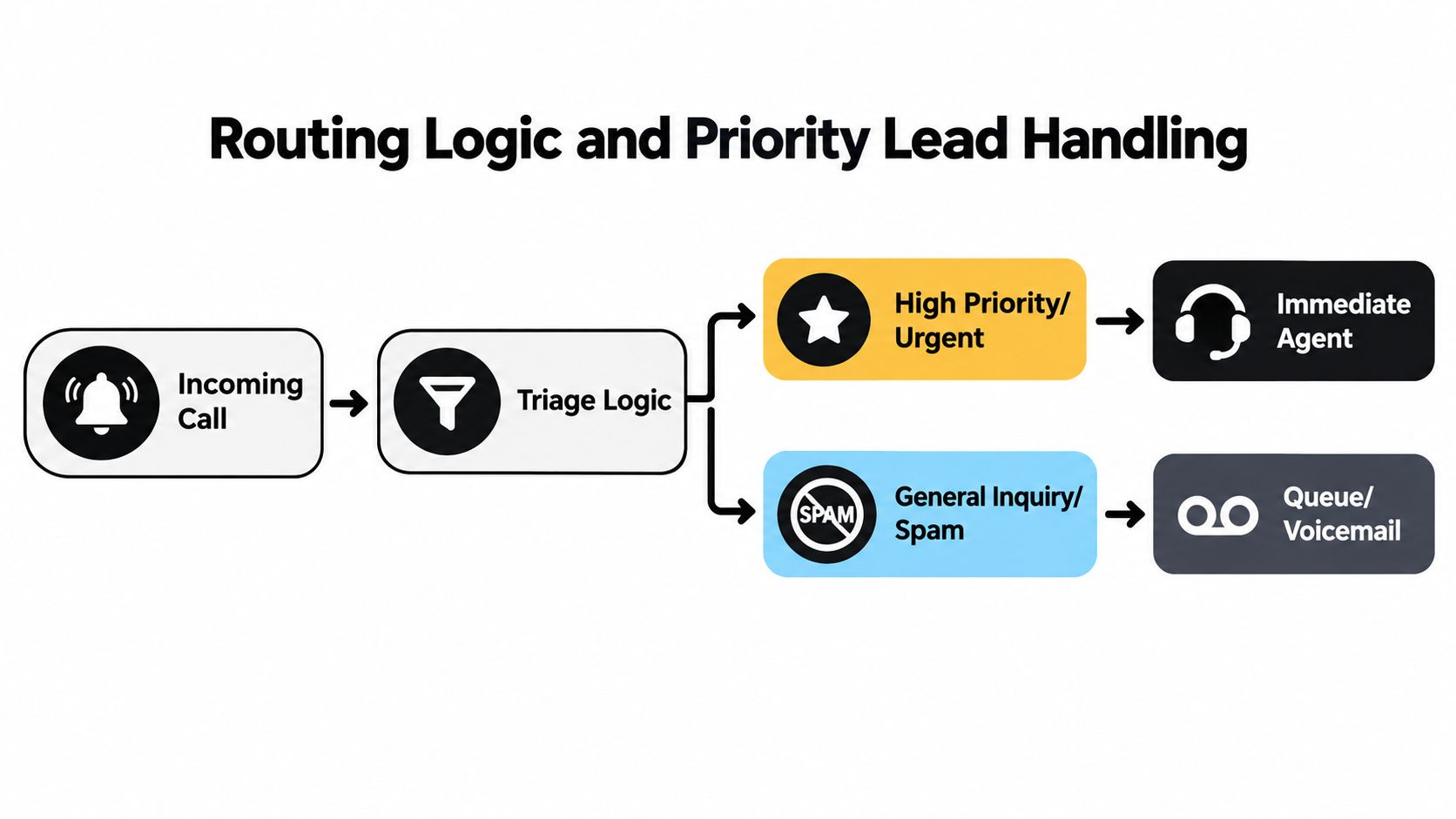
A ringing phone doesn't reveal whether the caller needs emergency service, a quote, a billing answer, or a sales callback. Your system needs to find that out early, then route the call according to business impact and urgency.
Start with three broad paths:
| Call category | Signals to identify | First route | Fallback |
|---|---|---|---|
| Emergency request | Active damage, safety risk, loss of essential service | On-call owner or lead technician | Immediate alert and emergency queue |
| New high-value opportunity | Replacement project, commercial work, large property, urgent quote | Sales lead or owner | Priority callback with complete intake |
| Routine or existing-customer request | Scheduling, invoice question, maintenance, status update | Service queue or office team | Recorded callback task |
This classification shouldn't depend on a caller using your preferred vocabulary. A homeowner may say “the ceiling is dripping” rather than “water emergency.” Build rules around plain-language indicators and teach the system which answers should trigger priority treatment.
Separate urgency from value
Urgency and commercial value aren't the same category. A small repair with active property damage may require an immediate response, while a large renovation inquiry may deserve priority sales handling without waking an on-call technician. Create separate branches so the system doesn't treat every important lead as an emergency.
A useful decision sequence is:
- Is there a safety or active-damage concern? Route to emergency handling.
- Is the caller a new prospect with a substantial or time-sensitive project? Route to the owner, estimator, or sales queue.
- Is the caller an existing customer with an active job? Route to the assigned team or service coordinator.
- Is the request routine? Capture the details and place it in the scheduling workflow.
- Does the call show spam or no actionable intent? Filter it without consuming priority capacity.
The fallback matters as much as the first route. If the lead technician doesn't answer, don't send the caller through an endless ring group. Leave a clear status, trigger the agreed notification, and give the caller a specific next step. A routing system should always answer the question, “What happens if the preferred person is unavailable?”
For teams evaluating phone systems, this overview of business telephony features to consider is useful when comparing transfer controls, queues, voicemail, analytics, and integrations. The exact feature list matters less than whether your chosen system can enforce the decision tree instead of merely displaying missed calls.
Review routing by call type, not just total call volume. If routine scheduling calls repeatedly reach the owner, the tree is wrong. If emergency calls land in a general voicemail box, the tree is unsafe. A call routing guide for small businesses can help translate common service scenarios into explicit paths.
Business Hours and After-Hours Automation
After-hours calls need their own policy. Extending the daytime greeting into the evening and sending every caller to generic voicemail is simple, but it creates no useful distinction between a dangerous emergency, a booking request, and a low-priority question.
A human answering service offers judgment and empathy. An internal on-call rotation offers trade knowledge and direct access to the person who can act. Both can work, but both require coverage rules, escalation boundaries, and a way to document the interaction. Without those controls, the business may wake someone for every minor request or fail to respond to a serious one.
An AI receptionist offers a different trade-off. It can collect structured details, answer common questions, offer available appointment times, and notify the team when a call meets defined emergency or lead criteria. It doesn't replace a technician's judgment in a dangerous or emotionally charged situation, so the handoff rules must be explicit.
Set the after-hours decision tree
Use a simple sequence:
- Identify the service and location. Don't escalate an unknown caller without basic context.
- Screen for emergency conditions. Ask trade-specific questions that identify active damage, safety risks, or loss of essential service.
- Route emergency calls immediately. Contact the on-call person through the approved channel and provide the captured details.
- Book routine appointments. Offer available calendar times without requiring the owner to wake up.
- Notify for high-value leads. Send the lead summary for review during the next operating window, or use a defined call escalation when timing is critical.
- Confirm the next step. Text or verbally repeat the appointment, callback expectation, and emergency instruction.
Automation should handle predictable intake. Humans should handle exceptions, negotiation, distress, safety questions, disputes, and situations where the system can't confidently understand the request. A handoff isn't a failure. A silent or unexplained handoff is.
The customer should also know what happens next. “Someone will get back to you” is vague. A stronger response states whether the request was booked, placed in an urgent queue, sent to the on-call technician, or scheduled for office follow-up.
Modern customer expectations span more than phone calls. 77% of customers expect immediate contact, while 53% of businesses rely mostly on email for support and 38% use text messaging, according to business phone statistics and communication research. Those figures support a practical conclusion: after-hours rules should capture the lead even when a live conversation isn't possible.
Hold, Transfer, and Escalation Procedures
A caller will tolerate a short hold when the reason is clear and the next step feels controlled. They won't tolerate being placed into a queue with no explanation, transferred without context, or sent back to the same person who couldn't help them.
Start by asking permission before placing the caller on hold. Use direct language such as, “I need to check the technician's schedule. May I place you on a brief hold while I confirm that?” The caller should know why the hold is necessary, not just hear silence.
Make hold behavior explicit
A practical hold procedure has four parts:
- Explain the reason. Tell the caller what you're checking or who you're trying to reach.
- Ask permission. Don't assume a caller agrees to wait.
- Return with an update. If the answer isn't ready, come back and explain what you've learned.
- Offer a choice. Let the caller remain on the line, receive a callback, or continue through a different route.
The first minute deserves special protection. Since 60% of callers abandon after more than one minute on hold, as reported in the previously cited live answering coverage, a long silent hold is a poor default. If the required source isn't available quickly, return to the caller and capture the details rather than making them listen to dead air.
Transfers need the same discipline. Before transferring, summarize the caller's need to the receiving person. The caller shouldn't have to retell the address, problem, and urgency after already providing them once.
Use a phrase like:
“I'm going to connect you with our service coordinator. I'll pass along that you're calling about a furnace that stopped working at your property, and you're available this afternoon.”
Define the failed-transfer path
Every transfer target needs a fallback. If the destination doesn't answer after the configured attempt, the system should return the call to the original agent or an overflow queue. It should never drop the caller into an unrelated voicemail box without a documented task.
The fallback can include:
- Callback capture: Record the caller's preferred time and the precise issue.
- Priority notification: Alert the owner or on-call person when the call meets emergency criteria.
- Queue placement: Send routine requests to the scheduling team with all intake fields attached.
- Text confirmation: Confirm that the request was received and state the next action.
Measure transfer outcomes, not just transfer counts. A high transfer rate may indicate poor routing, unclear employee roles, or inadequate training. The right target is a call that reaches someone capable of resolving or properly owning the request.
Compliance, Consent, and Recording Rules
Recording every call by default feels efficient until a caller crosses a state line, discusses sensitive information, or asks why the business is capturing the conversation. Call recording is governed by federal wiretapping laws, state consent laws, and sector-specific rules, so a universal recording switch isn't a universal compliance policy. The call recording best-practices guidance recommends consent controls before substantive discussion and a universal all-party consent approach across jurisdictions.
Put consent before intake
The recording disclosure needs to happen before the meaningful conversation begins. If the system announces recording only after the caller has already provided an address, medical detail, legal issue, financial information, or other sensitive content, the control came too late for a conservative policy.
A safer operating sequence is:
- Announce that recording may occur.
- Obtain the required consent under the business policy.
- If consent isn't given, continue without recording or route the call according to the documented alternative.
- Limit access to recordings and transcripts.
- Define retention, deletion, and sharing rules.
- Audit whether agents and automated systems follow the process.
Use legal counsel for the jurisdictions and verticals that apply to your business. Law firms, insurance agencies, debt collectors, and companies handling sensitive customer information shouldn't copy a generic script and assume the risk is solved. A universal all-party policy can reduce ambiguity, but it still needs to be implemented correctly.
The same care applies to text-backs. A customer may consent to receiving a scheduling message without consenting to marketing messages. Keep transactional confirmations, appointment reminders, and promotional outreach in separate policy categories. Identity verification also needs a rule. Don't disclose job details, account information, or payment-related information to an unverified caller merely because the phone number looks familiar.
Audit the process, not only the recording
Your runbook should define service-level targets for answer speed, abandonment limits, and quality-audit cadence, as recommended in the cited operational guidance. Review whether the greeting included the business identity, whether consent happened in time, whether the agent captured the required fields, and whether the final disposition matched the conversation.
For cross-jurisdiction work, choose the stricter operating path when the legal position is unclear. It may add a small amount of friction at the start of the call, but it gives the team a consistent procedure instead of forcing each employee to interpret a complex rule while speaking with a customer.
Integrating AI and Text-Back Workflows
A phone number is no longer only a voice channel. Customers may call, miss a call, reply by text, send a photo, or expect an appointment confirmation without opening email. Business phone systems that support messaging commonly combine voice, SMS, and MMS and connect with CRMs, help desks, payment tools, and calendars, as described in this overview of business text messaging tools.
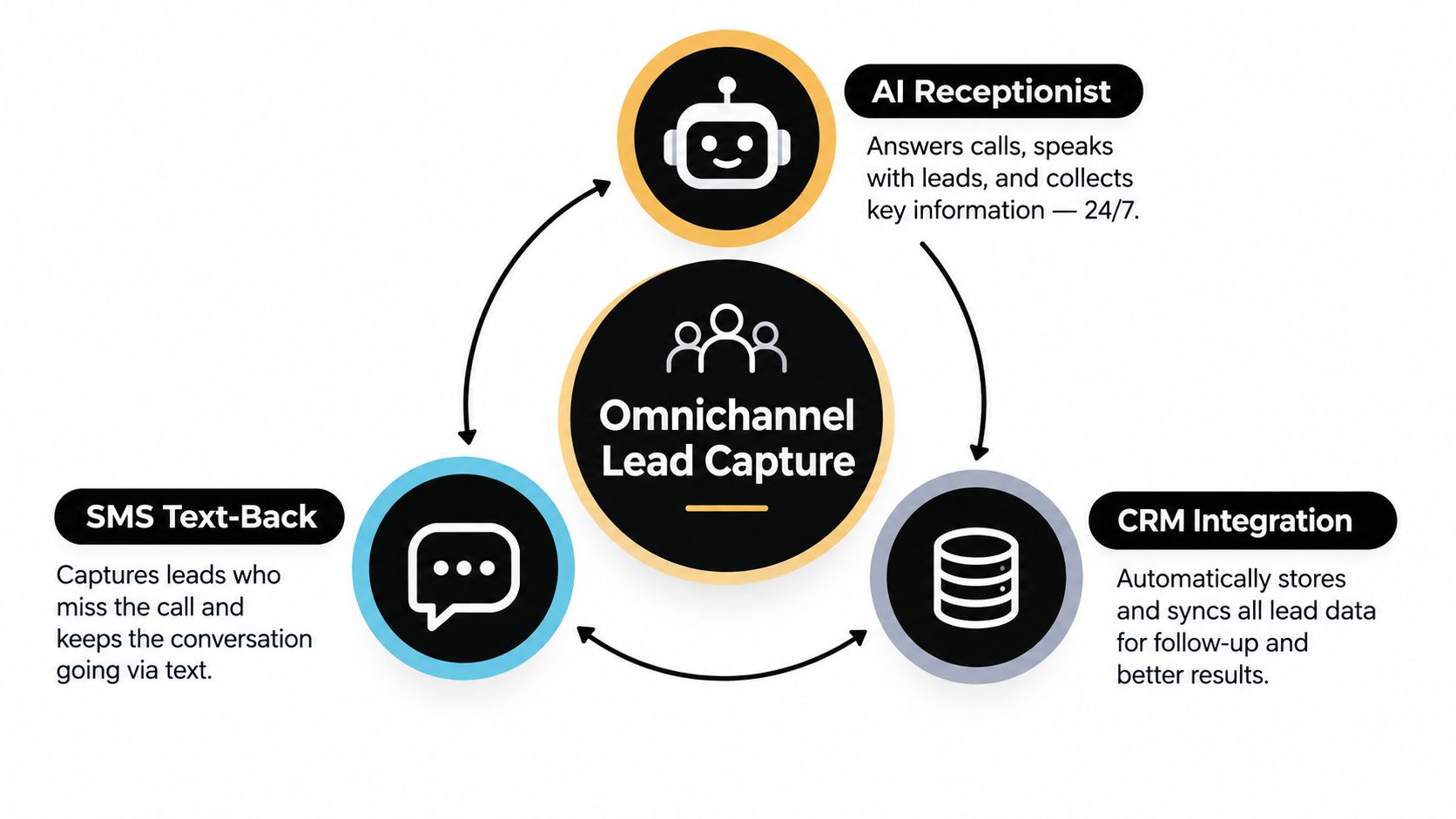
The operating model should therefore treat every inbound interaction as one lead record with multiple possible channels. Voice intake creates the initial context. SMS preserves contact when a conversation ends or a call is missed. CRM and calendar integrations turn the conversation into an assigned task or confirmed booking.
Design the missed-call workflow
A useful text-back rule isn't just “send a message after every missed call.” It should distinguish between a known customer, a new lead, a suspected spam call, and a person who has already received a response.
For a new missed call, the workflow can:
- Acknowledge the contact: State the business name and confirm that the team received the call.
- Invite the next detail: Ask for the service address and a short description of the need.
- Offer a response path: Provide a booking option or request a preferred callback time.
- Flag urgency: Tell the customer to identify active damage or safety concerns clearly.
- Create ownership: Attach the conversation to the correct CRM contact and assign a follow-up task.
Business texting platforms can log messages against the correct CRM contact and support two-way SMS and MMS inside customer records, which gives the team a concrete way to continue lead capture without switching tools. For a detailed implementation pattern, see this guide to missed-call text-back workflows.
Calendar automation closes the loop. Scheduling tools can update calendars when an appointment is booked, notify the team and customer, and connect with operational systems such as CRMs, according to this overview of scheduling software for small businesses. That prevents an AI or agent from promising a time that the field team can't support.
Keep the record connected
Established communication platforms commonly integrate with Salesforce, HubSpot, Google Calendar, Outlook, Office 365, iCal, and automation layers such as Zapier, as outlined in this comparison of appointment scheduling software. The goal isn't to collect integrations for their own sake. The goal is to keep the name, number, conversation, appointment, and assignment in one traceable workflow.
A home service business may use different software for dispatch, CRM, and scheduling. That can still work if the system has a clear source of truth and a defined handoff. Teams that serve lawn care customers can also compare their workflow with this guide to software for mowing businesses, particularly when recurring visits and customer messages need to stay linked.
For local operators, SkipCalls is a simple-to-set-up option for customer support, lead qualification, appointment booking, and other call workflows. It handles voice and text, doesn't require a phone-number change to integrate into the workflow, and offers CRM and calendar integrations. Use any tool only after defining the routing, consent, escalation, and ownership rules it must enforce.
Quick Reference Checklist for Call Handling
Print this checklist and give it to a new hire, dispatcher, or person configuring an AI receptionist. The purpose isn't to create a long policy document. It's to make the expected behavior visible when the phone is busy and the owner is out on a job.
Before calls arrive
- Set the answer target: Configure the team or system to answer within three rings, roughly 10 seconds.
- Write the greeting: Include the business name, the responder's identity, and an invitation to explain the need.
- Define required fields: Name, callback number, service address, service need, urgency, availability, and next action.
- List emergency signals: Use plain-language examples for active damage, safety risks, loss of essential service, and other trade-specific conditions.
- Assign owners: Name the person or queue responsible for emergencies, new sales leads, existing jobs, scheduling, and billing.
- Create the fallback: Decide what happens when the preferred person doesn't answer.
- Set recording controls: Place disclosure and consent before substantive discussion, and define the non-recorded alternative.
- Connect the systems: Test CRM contact creation, calendar availability, appointment confirmation, text messaging, and notifications.
During every call
- Identify the business: Don't rely on a bare “Hello.”
- Confirm the reason: Repeat the request in plain language before routing it.
- Capture the address: A service request without a usable location isn't dispatch-ready.
- Classify the call: Mark it as emergency, high-value opportunity, existing customer, routine request, or spam.
- Transfer with context: Tell the receiving person what the caller needs instead of passing along a silent connection.
- Control the hold: Explain the reason, ask permission, return with an update, and offer a callback when the wait becomes unreasonable.
- Protect sensitive details: Verify identity before discussing account, job, payment, legal, or insurance information.
- Close with a commitment: State who will act, what happens next, and when the customer should expect contact.
After the conversation
- Record the disposition: Use a consistent status such as booked, transferred, urgent escalation, callback, texted, or closed.
- Assign ownership: A note without a responsible person is an unresolved lead.
- Send confirmation: Include appointment details, callback expectations, or the requested next step.
- Review exceptions: Look at missed calls, failed transfers, repeat contacts, abandoned holds, and incorrect routing.
- Coach from real interactions: Use quality reviews to improve scripts and decision rules, while respecting recording and consent requirements.
- Test after-hours behavior: Call the number outside business hours and verify that the emergency, booking, notification, and text paths work.
- Audit the customer journey: A structured support review, such as this resource on how to audit tour operator support in an hour, can help identify gaps that call logs alone may miss.
The final test is simple. Can a new employee follow the process without asking the owner what to do with each category of caller? Can the system capture a usable lead when the team is under a sink, on a roof, or driving between jobs? If the answer is no, the business doesn't yet have call answering rules. It has a collection of preferences.
SkipCalls answers business calls and texts, captures customer details, books appointments, and notifies you about hot leads by calling you, so your team can apply these rules without hiring a full-time front desk. Visit SkipCalls to set up a more dependable intake, routing, and follow-up workflow for your local service business.