The Solo Contractor’s Guide to a 24/7 Virtual Front Desk (No Hiring Required)
Stop losing jobs to big franchises. Learn how to build a 24/7 virtual front desk that answers calls, books jobs, and sounds just like you—for under $5/week.

You know the feeling. You’re under a sink, on a roof, or wiring a breaker box when your phone buzzes. It’s an unknown number.
Do you stop what you’re doing, wipe your hands, and answer—risking your focus and safety? Or do you let it go to voicemail, knowing there’s a 90% chance that potential customer will hang up and call the next guy on Google?
This is the Solo Contractor’s Dilemma. You need to do the work to get paid, but you need to answer the phone to get the work.
Big franchises don’t have this problem. They have a front desk. They have dispatchers. They have a team of people whose only job is to ensure the phone is answered on the first ring, 24/7. That professional "front of house" experience builds trust instantly.
But you? You’re the CEO, the technician, and the receptionist all rolled into one.
The good news? You don’t need a $45,000-a-year office manager to compete with the big guys anymore. You can build a Virtual Front Desk that operates 24/7, sounds exactly like you, and books jobs while you sleep—all for less than the price of a coffee per week.
Here is your blueprint to looking like a national brand on a solo budget.
The "Man in a Van" Stigma (And How to Beat It)
Homeowners are anxious. When they call a plumber, electrician, or HVAC tech, they are often inviting a stranger into their home to fix an expensive problem. They are looking for signals of trust and reliability.
A voicemail box that says, "Hey, it's Mike, leave a message," screams "I am one guy, I am busy, and I might not get back to you for days."
A crisp, professional answer on the first ring—even at 7:00 PM—screams "We are a professional operation that takes your problem seriously."
For years, the only way to get that second reaction was to hire staff or pay expensive call centers that sounded generic and impersonal. Today, AI technology has leveled the playing field. You can now automate the entire "front desk" experience without sacrificing the personal connection that makes local businesses special.
Component 1: The Gatekeeper (Spam Protection)
Your time is your inventory. Every minute you spend listening to a robocall about "your car's extended warranty" is a minute you aren't billing for.
A human receptionist filters these out. Your Virtual Front Desk should too.
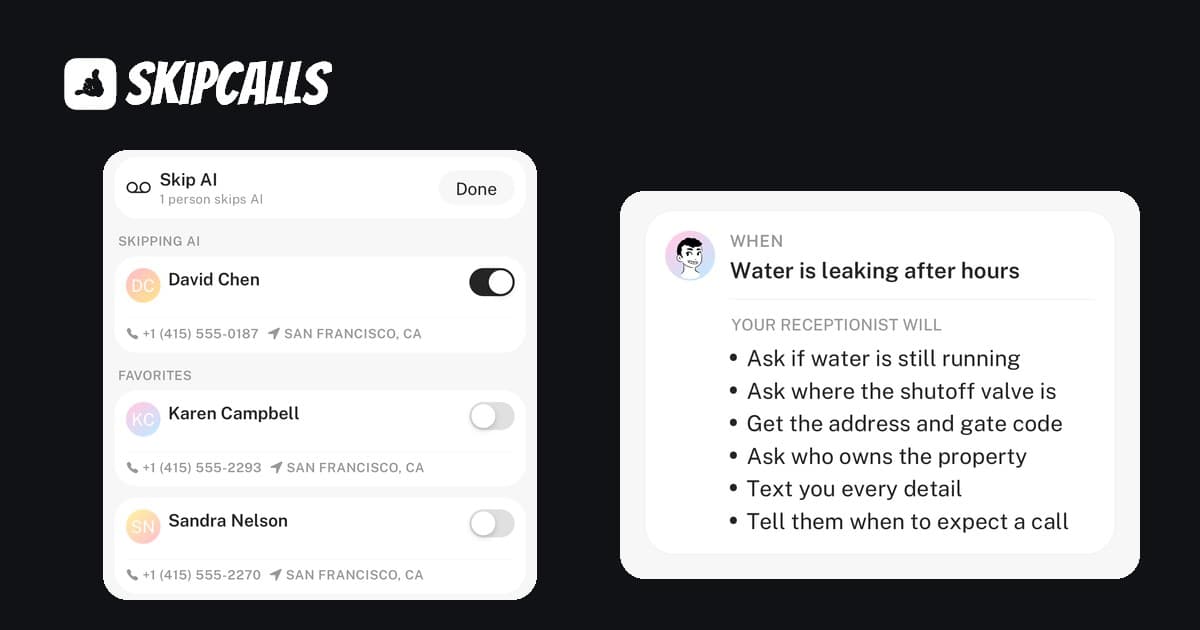
Modern AI phone agents don't just answer calls; they screen them. By using intelligent filtering, a system like SkipCalls can identify known spam numbers and block them before your phone even rings. For the tricky ones that get through, the AI answers first. If it's a robot, the call ends. If it's a customer, the AI engages.
The Result: You only get notified for actual business opportunities, saving you an average of 3-5 hours of distraction per week.
Component 2: The Dispatcher (Intelligent Routing)
Not all calls are created equal. A "my basement is flooding" call needs a different response than a "how much for a quote?" call.
Big companies have dispatchers to triage these. Your Virtual Front Desk uses AI intent recognition to do the same.
When you set up your AI agent, you can train it to handle different scenarios:
- Emergency Calls: The AI can be trained to recognize urgent keywords (leak, spark, smoke, emergency) and send you a priority notification instantly.
- Routine Inquiries: For standard pricing questions or service area checks, the AI provides the answers you've pre-loaded, satisfying the customer immediately without interrupting you.
- Vendor Calls: If a supplier calls about a part, the AI can take a detailed message and send you a text summary.
This isn't a "press 1 for sales" robot menu. It's a conversational agent that understands what the caller means, not just what they say.
Component 3: The Booking Agent (Calendar Sync)
The ultimate goal of a front desk isn't just to answer the phone—it's to book the job.
Phone tag is the enemy of revenue. If you call a lead back three hours later, they've often already hired someone else. Your Virtual Front Desk needs to be able to check your availability and secure the appointment right then and there.
By integrating your AI with your digital calendar (like Google Calendar), the AI can say: "I see Mike has an opening tomorrow between 2 PM and 4 PM. Would you like me to lock that in for you?"
When the customer says yes, the job appears on your schedule, and you get a notification with the customer's name, address, and issue. You didn't lift a finger, and you just made money.
Component 4: The Personal Touch (Voice Cloning)
Here is where most contractors get stuck. They worry that AI will sound like a sci-fi robot and scare off their loyal, older customers.
This is a valid concern with older technology, but Voice Cloning has changed the game.
SkipCalls allows you to record a short sample of your own voice. The AI then uses that sample to generate responses. To the caller, it sounds like you (or a very professional version of you) is answering the phone.
This maintains your personal brand—which is your biggest advantage over the national chains—while giving you the scalability of a machine. You get the credit for being responsive, but you keep your freedom.
The Financials: Human vs. Virtual
Let's look at the hard numbers. Why are so many contractors switching to this model?
The Cost of a Professional Image
The ROI is clear: One booked job—just one—often pays for an entire year of a Virtual Front Desk service like SkipCalls.
If your average ticket is $300, and your Virtual Front Desk captures just two "after-hours" emergency calls a month that you would have otherwise missed, you are looking at $7,200 in extra annual revenue for a cost of roughly $99.
How to Build Your Virtual Front Desk Today
You don't need an IT degree to set this up. In fact, you can do it in the truck between jobs.
- Download SkipCalls: It works as an app on your existing phone. You don't need a new device.
- Train Your Agent: Upload your service list, your pricing (if you want), and your service area. This takes about 5 minutes.
- Clone Your Voice: Read a 30-second script so the AI learns your tone and cadence.
- Connect Your Calendar: Link your Google or Outlook calendar so the AI knows when you are free.
- Enable Call Forwarding: Set your phone to forward calls to SkipCalls whenever you are busy, unanswered, or unreachable.
That’s it. You now have a 24/7 front desk.
Level the Playing Field
The difference between a "struggling solo operator" and a "growing local business" is often just perception and responsiveness.
When you stop missing calls, you stop losing money. But more importantly, you stop being a slave to your phone. You can finish that install, eat dinner with your family, or actually take a weekend off, knowing that your Virtual Front Desk is handling your customers with the professionalism they expect.
Don't let the big franchises win just because they have more staff. Outsmart them with better tech.
Ready to build your Virtual Front Desk? Try SkipCalls free for 7 days and see how many jobs you’re currently missing.