Front Desk Automation: A 2026 Guide for Small Firms
Discover how front desk automation streamlines operations, saves time, and reduces costs for your small business in 2026.
At 9:47 p.m., a homeowner calls a plumbing company about a burst pipe. The owner is already asleep after a full day of jobs, the office line goes to voicemail, and the caller moves on to another plumber before breakfast. Nothing was wrong with the company's workmanship or demand. The failure happened at intake.
That's the problem front desk automation solves. It gives a small firm a reliable first layer for answering calls and texts, collecting the right details, booking work, and making sure the information reaches a person or system that can act on it. For a local company competing through service business PPC optimization, a paid lead that receives no response is especially painful.
The broader virtual receptionist market reached $3.85 billion in 2024 and is projected to reach $9 billion by 2033, a 9.8% compound annual growth rate, according to Market.us research on the AI receptionist market. That growth reflects a practical shift. Businesses aren't buying automation merely to sound modern. They're trying to stop good inquiries from disappearing between the phone ringing and the next available human.
This guide explains what an automated front desk handles, how calls become records and follow-up tasks, how to connect calendars and CRMs, and how to roll out the system without creating a second administrative mess. If missed calls are already costing you opportunities, learn more about small-business phone answering services before choosing a setup.
The Phone Call You Cannot Afford to Miss
A one-person HVAC owner is under a kitchen sink, tightening the last fitting on a repair. His phone rings twice. He cannot reach it, the call goes to voicemail, and the caller leaves without a message.
The caller does not know the owner is busy or that the work would have been handled well. They only know nobody answered. A competitor answers, offers an appointment, and gets the job.
The same gap appears across service businesses. A salon stylist is with a client, a dentist is treating a patient, and a two-truck plumbing company is driving between jobs. In each case, billable work blocks the next inquiry. The problem continues after the call, too, if nobody routes the lead, updates the CRM, or starts follow-up.
The intake gap
One industry summary reports that 62% of small-business calls go unanswered, while 85% of callers who receive no answer never call back. It also estimates that the average small business loses $126,000 per year from unanswered calls, figures presented in Bluehost's overview of front desk automation.
Those figures point to an operational handoff problem. A caller asking for a quote, appointment, or emergency visit needs a clear path while the request is still fresh. Capturing the details is only the first step. The information must then reach the right person or system without creating a duplicate customer record.
A lightweight automated front desk can answer when staff cannot, ask basic questions, and save the conversation for follow-up. It can also handle texts, which helps customers who prefer messaging to waiting on hold. A useful setup labels urgent inquiries, sends hot leads to a human, records qualified prospects in the CRM, and triggers the next message or task.
For owners comparing small-business phone answering services, the handoff rules deserve as much attention as the greeting. An answer that produces no usable record still leaves work unfinished. For companies investing in service business PPC optimization, that gap can waste a paid inquiry before anyone measures its outcome.
Practical rule: Treat every unanswered call as an intake failure first, not a staffing failure. Check routing, record creation, and follow-up before deciding that another full-time employee is required.
The useful test is simple: can automation protect the first few minutes of the relationship and give the owner one clean next action? That action might be a booked appointment, a CRM task, or a direct escalation. Avoiding duplicate records and forgotten leads is what turns answered calls into workable opportunities.
What Front Desk Automation Actually Does
A caller reaches your service business while you are under a sink, driving between jobs, or helping another customer. The automated front desk gives that person a clear next step, then makes sure the useful information reaches the right system and person after the conversation ends.
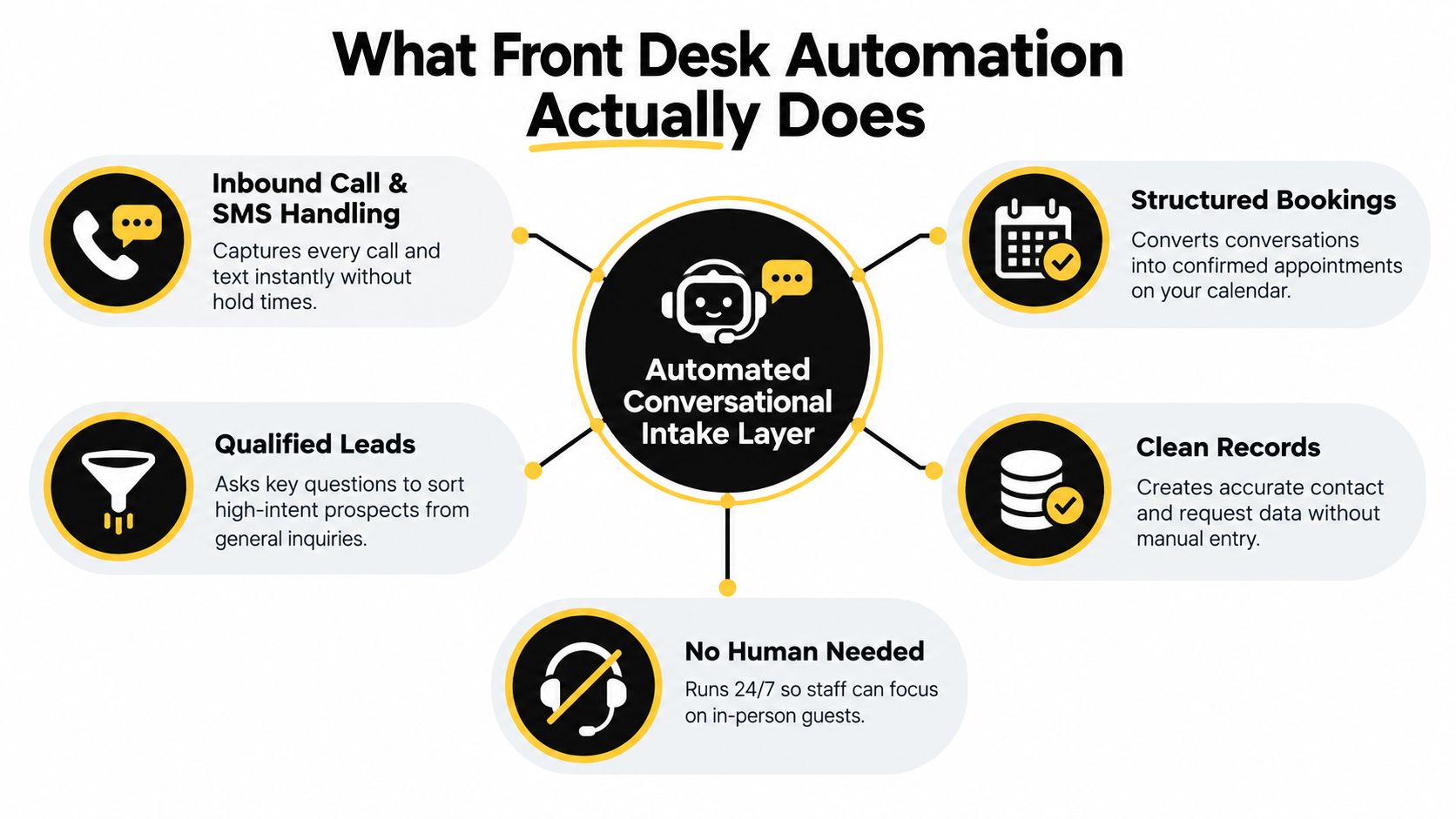
Front desk automation is a conversational intake layer. It receives calls and SMS messages, identifies the request, collects relevant details, checks available options, and turns the exchange into a booking, qualified lead, customer record, or human handoff. The handoff matters because an answered call still creates work if nobody knows what happened next.
A restaurant host offers a practical comparison. The host greets a party, asks how many people need a table, checks availability, confirms the reservation, and guides them to the right place. An automated front desk follows a similar path, then can write the result to a CRM, assign an owner, and trigger follow-up without asking staff to copy notes between systems.
Four jobs happen during intake
Answering comes first. The system receives the call or text and offers an immediate path instead of an empty voicemail box.
Intent capture gives the conversation a purpose. A boiler repair, service-area question, and invoice query need different handling. The system can collect a name, contact details, requested service, urgency, and preferred time.
Availability checks prevent imaginary appointments. With a live calendar connection, it compares the request with real openings rather than promising a time staff already filled.
Routing determines what happens next. A routine appointment can move toward booking. A complex commercial job, sensitive legal question, or high-value lead can go to a person with a concise summary. The system can also create one CRM record, mark its status, and start the appropriate message or task.
Basic voicemail stores audio and leaves someone to remember a callback. A rigid chatbot may offer menu choices without producing a usable record. Conversational automation can follow branching dialogue, read and write to calendars and CRMs, and preserve the handoff details.
For a solo operator, this reduces interruptions while work continues. For a two-truck service company, it creates consistent intake across office and field staff. For a clinic, it separates appointment requests from questions that require human judgment. The result is not merely a answered call, but a clear next action.
How the Automated Front Desk Works Behind the Scenes
A customer hears a helpful voice. Behind that conversation, the system is coordinating several handoffs: understanding the request, checking availability, recording the details, and deciding who owns the next step. A missed handoff can leave a hot lead sitting in a voicemail inbox, even when the call itself went well.
From conversation to structured record
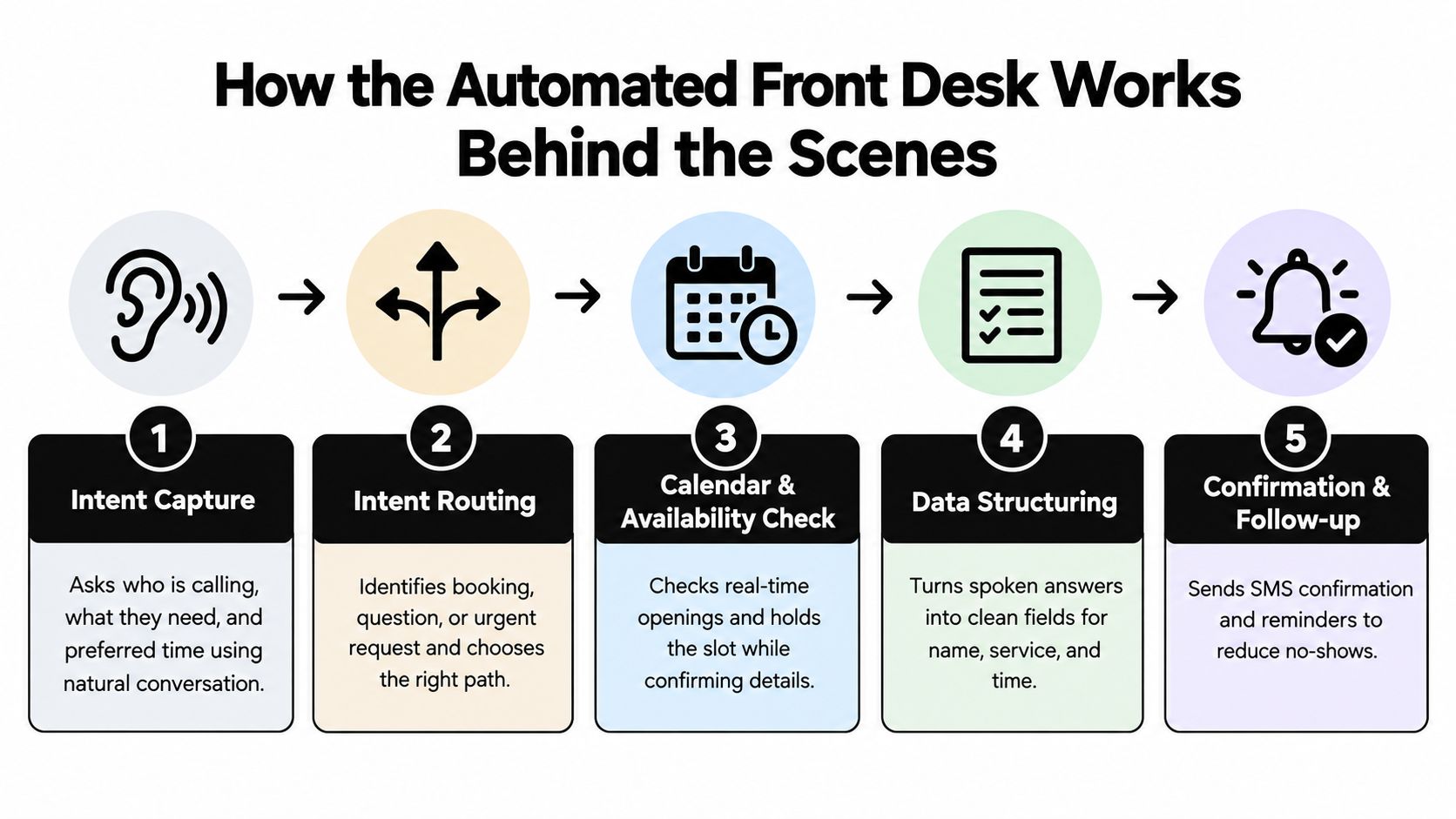
The process begins with intent capture. The system asks who is calling, what they need, and when they want help. Natural dialogue matters because customers do not speak in CRM fields. Someone might say, “The upstairs unit is making a strange noise,” instead of choosing a predefined service code.
The system then applies intent routing. A booking request can move toward the calendar, while a general question can receive an approved answer. An urgent, unusual, or high-value request can be sent to a person with a short summary.
The calendar check compares the request with live availability. The scheduling engine confirms an opening or offers alternatives. When phone, web, and staff workflows use the same availability rules, the shared calendar remains the source of truth, as shown in AI voice booking orchestration.
The important work starts after goodbye
After the caller confirms the details, data structuring turns the conversation into a usable record. The system writes the name, service, contact information, appointment time, and notes into the CRM, scheduler, or shared system. It should also check for an existing contact before creating anything new. That is how you avoid two records for one customer.
The downstream handoff often carries more operational weight than the greeting itself. In one dataset, captured leads represented 29.9%, notifications 19.2%, record creation 17.6%, and record updates 14.4% of automated patterns. Together, those categories accounted for 81.1% of automated work, according to Stacker's summary of 20 million live workflows.
A practical flow looks like this:
- A caller requests an estimate.
- The system records the service and location.
- The CRM searches for an existing contact.
- A new inquiry is created only when no match exists.
- The owner receives a summary when escalation rules apply.
- The customer receives confirmation or a follow-up text.
That sequence connects the call to the work that follows. For a customer-facing overview, see this guide to an AI phone receptionist.
Setting Up Automation for a Small Service Business
A missed handoff can undo a good call. The caller may receive a friendly answer, yet the request still gets lost if the calendar, customer record, and follow-up task remain separate. Set up the automated front desk as a chain: capture the request, send it to the right system, and trigger the next action without creating duplicate work.
Connect the front door
Start by deciding how calls reach the automated receptionist. Call forwarding keeps the existing business number familiar, while number porting may suit a different telecommunications setup. An independent vendor describes connections with Google Calendar, Outlook, Cal.com, and Calendly, and explains that some call-forwarding configurations work without changing or porting the business number, as described in IONOS Momentum's AI receptionist guide.
Define the services the system may book. A salon could separate cuts, color appointments, and consultations. A plumber may need the service type, address, and urgency. A dental clinic might distinguish cleanings, new-patient visits, and emergencies.
Make availability trustworthy
Connect the calendar staff use. Add appointment length, travel time, preparation requirements, and buffers. A field technician should not receive back-to-back jobs across town because the calendar shows two open times.
Keep the first version narrow. Start with common requests that have clear rules. Review real conversations before adding unusual cases, exceptions, or more complicated routing.
Decide where records belong
A solo operator might start with a structured spreadsheet. A growing company may need two-way synchronization with HubSpot, ServiceTitan, Jobber, or another CRM. Choose one reliable destination for each completed interaction, then define what happens after the record is updated. A hot lead might notify the owner, assign a callback, or start a follow-up message.
Set duplicate rules before launch. Match an existing contact through stable details such as the phone number, then update that record instead of creating another one. St. Petersburg automation from Netco Design LLC provides broader context on prioritizing small-business workflows.
Write the greeting and intake questions in the owner's natural voice. Route complex jobs, upset customers, VIP clients, emergencies, and out-of-area requests to a person. The AI receptionist setup guide can help turn those decisions into a working configuration. Test the full handoff, not just the greeting, before sending live calls through it.
Real Workflows You Can Hand Off Today
A call becomes valuable only when the information reaches the right person and system afterward. Front desk automation works like a relay: it collects the request, passes along the useful details, updates the customer record, and starts the next action without leaving someone to remember each step.
The late-night inquiry
A homeowner calls a roofing company after business hours. The system answers, asks what happened, records the property details, and separates a routine estimate from an urgent problem. If the caller wants an appointment, it can offer an available option or send a booking link by text.
The handoff should create one lead record in the company's chosen system. The owner sees the summary, urgency, contact details, and requested service in the morning instead of replaying a voicemail. A notification or callback task can be created at the same time, so the lead does not sit in an inbox without an owner.
The text-first customer
Some customers start with SMS. They may ask whether a salon has an opening or whether an electrician serves their neighborhood. The automated front desk replies, gathers the necessary details, and uses the connected calendar to move toward a confirmed appointment.
Vendor materials describe systems that handle voice and SMS in one workflow, including inbound answering, caller-detail capture, follow-up texts, and appointment booking or rescheduling, as outlined by Retell AI's receptionist use case. The operational test is whether the conversation remains attached to the same customer record when the channel changes. The customer should not have to repeat the request, and the staff should not receive two separate records.
The hot-lead callback
A commercial cleaning prospect calls with a large, time-sensitive request. The system captures the location, service need, timing, and contact details, then applies the company's routing rules. A high-priority inquiry can alert the owner, assign a callback, and include a short summary, while routine questions stay in the automated flow.
Routing matters more than a friendly automated voice. The owner does not need every call transferred. They need the right calls escalated with enough context to respond intelligently and quickly.
The recovered missed call
A missed call can become a contact record instead of a blank space. The system sends a follow-up message, checks for an existing contact through stable details such as the phone number, and updates that record rather than creating a duplicate. It can also create a task or notification for the appropriate person.
If the customer books, the calendar and CRM should reflect the same outcome. If they do not, the follow-up process can prompt another review without relying on memory. Confirmation messages, rescheduling options, and recurring reminders continue the workflow after the appointment. Every automated action needs a clear owner, a destination record, and an exception path for cases that require a person.
Why the Numbers Make Automation Worth It
The financial case starts after the call ends. A lead has value only if the business can identify it, route it to the right person, and follow up without losing the record. As noted earlier, missed-call leakage can be expensive, but your own inquiry volume gives you a more useful starting point than a general industry estimate.
Use a simple calculation. Count the inquiries that went unanswered or received a weak follow-up. Estimate how many could become jobs based on your normal close rate, then multiply that result by the average gross profit per job. Compare the recoverable value with the system cost and the staff time it saves or protects. An AI receptionist ROI calculator can organize these inputs without assuming every service business has the same economics.
Where recovery comes from
Automation creates value through the work that follows the conversation:
- After-hours coverage: Calls and texts enter the intake process when staff are unavailable.
- Faster response: The customer receives a clear next step while the request is still active.
- Qualified records: The owner sees the service need, timing, and contact details instead of an unexplained missed-call alert.
- Booking recovery: Customers can receive available appointment options without waiting for a callback.
- Follow-up consistency: Tasks, reminders, and notifications reduce reliance on memory.
As the workflow data discussed earlier shows, lead capture and record updates account for much of the practical automation value. That points to a better measure than call duration: did the system create one accurate record, send the right alert, and produce a defined next action?
| Metric | Without Automation | With Automation |
|---|---|---|
| Missed inquiry | Voicemail or no record | Captured contact and request |
| Booking process | Manual callback and calendar entry | Availability check and structured booking |
| Lead follow-up | Depends on staff memory | Notification and defined next action |
| Customer history | Notes may remain in personal inboxes | Shared CRM or operational record |
| Exception handling | Owner discovers the issue later | Preset escalation to a person |
The handoff determines whether the investment pays off. A hot lead should reach the person who can act, with enough context to avoid another discovery call. A routine request can remain automated, while the CRM stores the outcome once, rather than creating separate records for the call, text, and booking.
Review the estimate against actual outcomes after launch. Track captured inquiries, qualified leads, completed bookings, and follow-up tasks that received an owner. Those operational results show whether automation is recovering work or merely answering the phone.
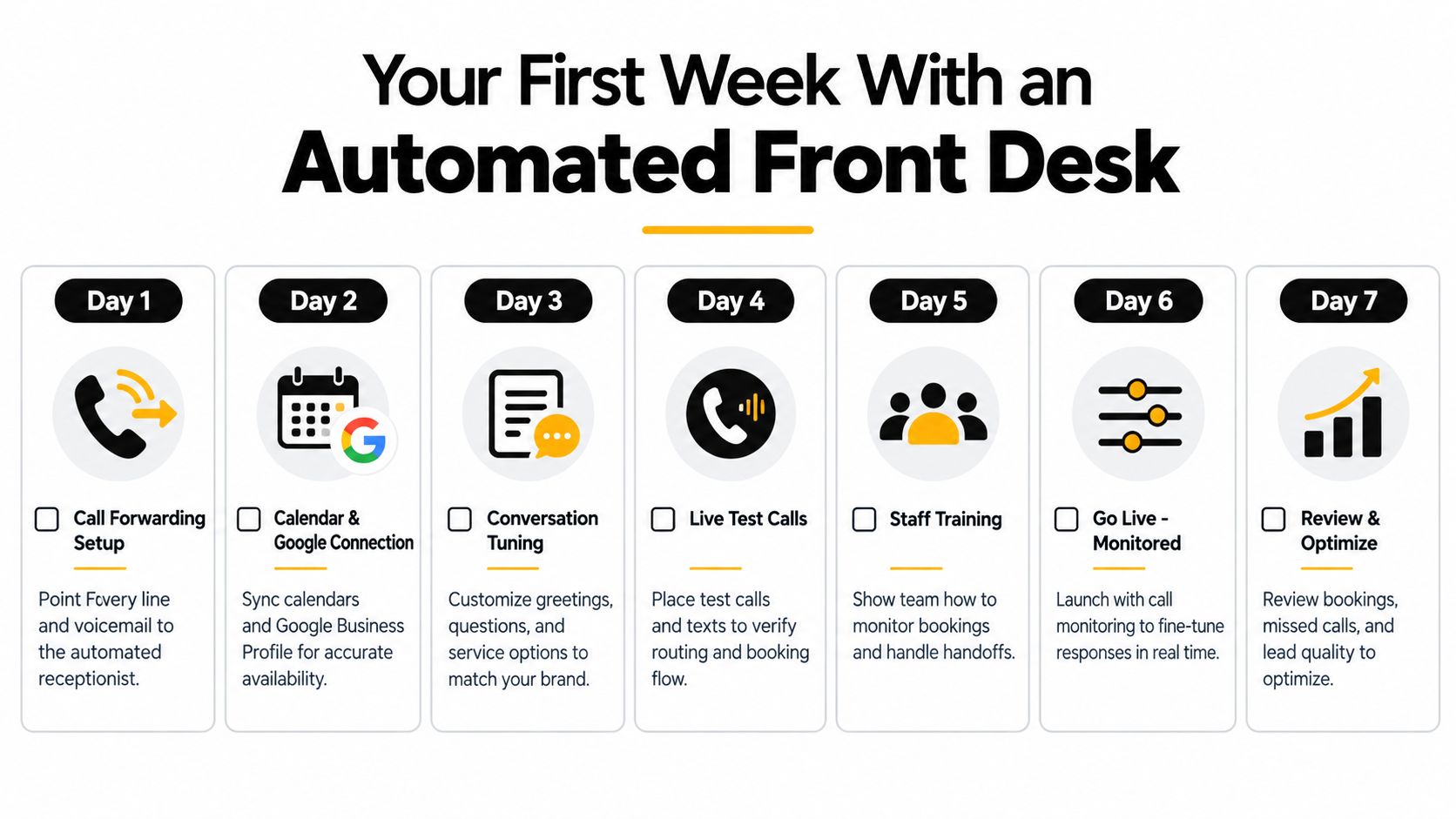
Your First Week With an Automated Front Desk
A controlled first week helps you catch routing mistakes, duplicate records, and confusing questions before they affect customers. Treat the rollout like a relay race: the call is only the first handoff. The system must pass accurate information to your calendar, CRM, and staff member.
Days one through three
Day 1, route the calls. Set up forwarding and revise voicemail instructions so each relevant line reaches the intended automated receptionist.
Day 2, connect calendars. Link Google Calendar or Outlook. Test availability, time zones, booking buffers, conflicts, and cancellations. Confirm that appointments appear where staff expect them.
Day 3, define the record. Choose required contact fields and tags. Set the matching rules that identify an existing customer, so a new call updates the correct record instead of creating another one.
Days four through seven
Day 4, write handoff rules. List the requests that need a person, name the recipient, and choose whether escalation arrives by transfer, text, notification, or task.
Day 5, create follow-up paths. Give a missed call, qualified lead, confirmed appointment, and rescheduling request its own action, destination, and owner. A hot lead should reach someone who can act while the details are still useful.
Day 6, test edge cases. Call from different numbers, send texts, request unavailable times, ask an unusual question, and trigger a handoff. Check that summaries and alerts arrive quickly, contain accurate details, and do not create duplicate CRM records.
Day 7, review the signals. Check captured leads, completed bookings, unresolved conversations, duplicate records, and average handle time. Adjust the greeting, questions, calendar rules, or escalation thresholds before expanding coverage.
The launch standard: A successful system directs human attention to the calls and follow-up tasks that need it.
SkipCalls handles voice and text, captures customer details, books appointments, sends follow-up messages, and notifies you about hot leads by calling you. It can support customer service, lead qualification, appointment booking, and other front desk tasks without requiring a phone-number change. It also integrates with CRM and calendar tools.
Visit SkipCalls to see how an automated front desk can protect incoming inquiries and keep the handoff organized.