The Contractor’s Guide to AI Phone Scripts: How to Train Your Virtual Receptionist to Close Jobs
Don't let your AI sound like a robot. Learn how to script your AI receptionist to handle price shoppers, book emergencies, and close more jobs.

You wouldn’t hire a new apprentice, hand them the keys to the van, and say, “Good luck, figure it out.” You’d teach them how to handle the tools, how to talk to customers, and what to do when things go wrong.
Yet, this is exactly what many business owners do when they sign up for an AI receptionist. They turn it on, expect magic, and get frustrated when it sounds… well, like a robot.
Here is the reality: An AI is only as good as its instructions.
If you want your virtual receptionist to sound like a seasoned pro—someone who can calm down a frantic homeowner with a burst pipe or firmly but politely deflect a spam caller—you need to give it the right script. But scripting for AI isn't like writing lines for a play. It's about setting rules, tone, and guardrails.
In this guide, we’ll break down exactly how to "train" your AI to sound like your best employee, including copy-paste scripts you can use today.
Why Traditional "Scripts" Don't Work for AI
For decades, call centers have used rigid flowcharts. "If customer says X, say Y."
That works for humans who can improvise when things go off-track. But if you give a rigid script to an old-school bot, it breaks the moment a customer asks a weird question.
Modern Voice AI, like SkipCalls, doesn't read from a piece of paper. It understands context. Instead of writing every single word, you give it instructions and knowledge.
Think of it less like writing a script and more like giving a character description to an actor. You tell it: "You are a helpful, calm dispatcher for a plumbing company. You never give exact prices over the phone, but you always try to book the diagnostic visit."
The 3 Core Elements of a Converting AI Script
To get your AI to perform, you need to define three things.
1. The Persona (Your Brand Voice)
Is your brand high-end and polished? Or are you the friendly neighborhood fix-it guy?
- The Professional: "Thank you for calling Elite HVAC. How may I direct your call?"
- The Friendly Local: "Thanks for calling Bob's Plumbing! How can we help you smile today?"
If you don't define this, the AI defaults to "Generic Robot Assistant," which kills trust immediately.
2. The Knowledge Base (The Facts)
Your AI needs to know the answers before the test.
- Service Area: "We cover all of Deltona and Orange City."
- Hours: "We book appointments M-F, 8am-6pm."
- Pricing: "Our diagnostic fee is $89, which is waived if you do the work."
3. The Guardrails (What NOT to Do)
This is where you save money. You must tell the AI what not to do.
- "Do NOT promise specific arrival times (e.g., '2:00 PM'), only windows (e.g., '12-4 PM')."
- "Do NOT give quotes for whole-house repipes over the phone."
Is Your Current Script Losing You Money?
Question 1 of 1
Does your answering service give price ranges over the phone?
Is Your Current Script Losing You Money?
- Does your answering service give price ranges over the phone?
Steal These Scripts: Templates for Trades
You can input these instructions directly into your SkipCalls settings.
Scenario A: The Price Shopper
The Goal: Pivot from price to value/availability.
The Instruction:
"If a customer asks 'How much for a water heater?', do not give a price. Instead, say: 'Prices vary depending on the model and your home's setup. The best way to give you an accurate price is to have a technician take a look. Our diagnostic fee is just $49. Would you like to schedule that for tomorrow?'"
Why it works: It acknowledges the question but firmly guides them to the appointment scheduling step, which is your real goal.
Scenario B: The Emergency (Panic Mode)
The Goal: Calm them down and book immediately.
The Instruction:
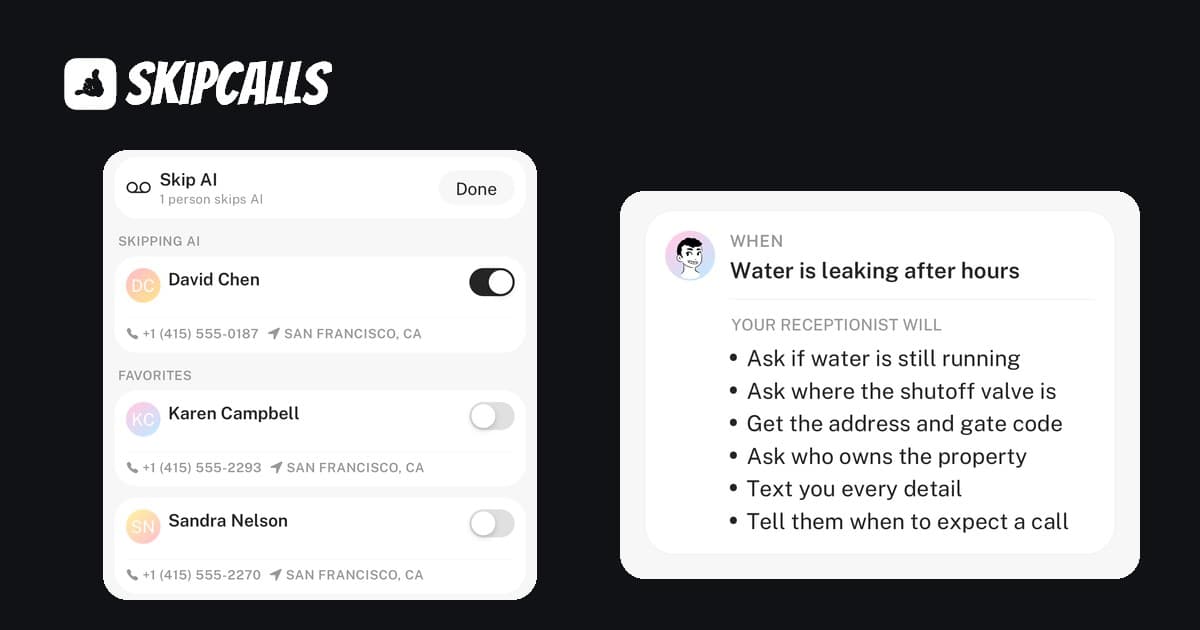
"If the caller sounds distressed or mentions 'flooding', 'leak', or 'no heat', switch to a calm, urgent tone. Immediately ask: 'Are you safe right now?' then 'I can get a technician out there as soon as possible. Can I get your address to check our emergency availability?'"
Why it works: Empathy first. This builds the trust required to charge emergency rates.
Scenario C: The Spam Caller
The Goal: Hang up fast.
The Instruction:
"If the caller is asking for the business owner by name but won't say why, or if they are selling insurance/SEO/marketing, politely say 'We are not interested, please remove us from your list' and end the call."
Why it works: Our spam blocking features handle most of this automatically, but having a script for the ones that slip through saves you from listening to 3-minute voicemail pitches.
How to Set This Up in SkipCalls
We’ve made this incredibly easy. You don't need to be a coder.
- Log into your Dashboard.
- Go to 'AI Instructions'.
- Paste your rules.
- Example: "My name is Sarah. I am the office manager for Sparky Electric. We are closed on Sundays. If someone asks for a quote, tell them we offer free estimates."
- Test it. Call your own number and pretend to be a difficult customer. See how it reacts.
The "Turing Test" for Contractors
How do you know if your script is working?
The Voicemail Test: If customers start leaving voicemails talking to the AI as if it's a person ("Hi Sarah, thanks for picking up..."), you've won.
The Calendar Test: Check your Google Calendar integration. Are the appointments landing in the right blocks? If you see a non-emergency booked at 2 AM on a Saturday, you need to tighten your script's "Business Hours" instructions.
Advanced Tip: Bilingual Support
If you work in an area with a high Spanish-speaking population, your script needs to adapt. With SkipCalls, you can simply add: "If the caller speaks Spanish, switch to Spanish immediately."
Our bilingual support handles the translation instantly, meaning you never lose a job because of a language barrier.
Key Takeaways
- Don't write lines, write rules. Tell the AI how to act, not just what to say.
- Protect your pricing. Train the AI to sell the appointment, not the repair.
- Update often. If you change your diagnostic fee or holiday hours, update the AI immediately.
- Review the tapes. Check your call summaries to see where the AI stumbled and tweak the instructions.
Ready to build your perfect phone answering system? You can tweak, test, and perfect your AI receptionist with our ROI calculator to see how much revenue you're currently missing.
Ready to Stop Missing Calls?
Your phone is ringing right now. Is your script ready to turn that ring into revenue?
Try SkipCalls free for 7 days and see how a well-trained AI can transform your business.